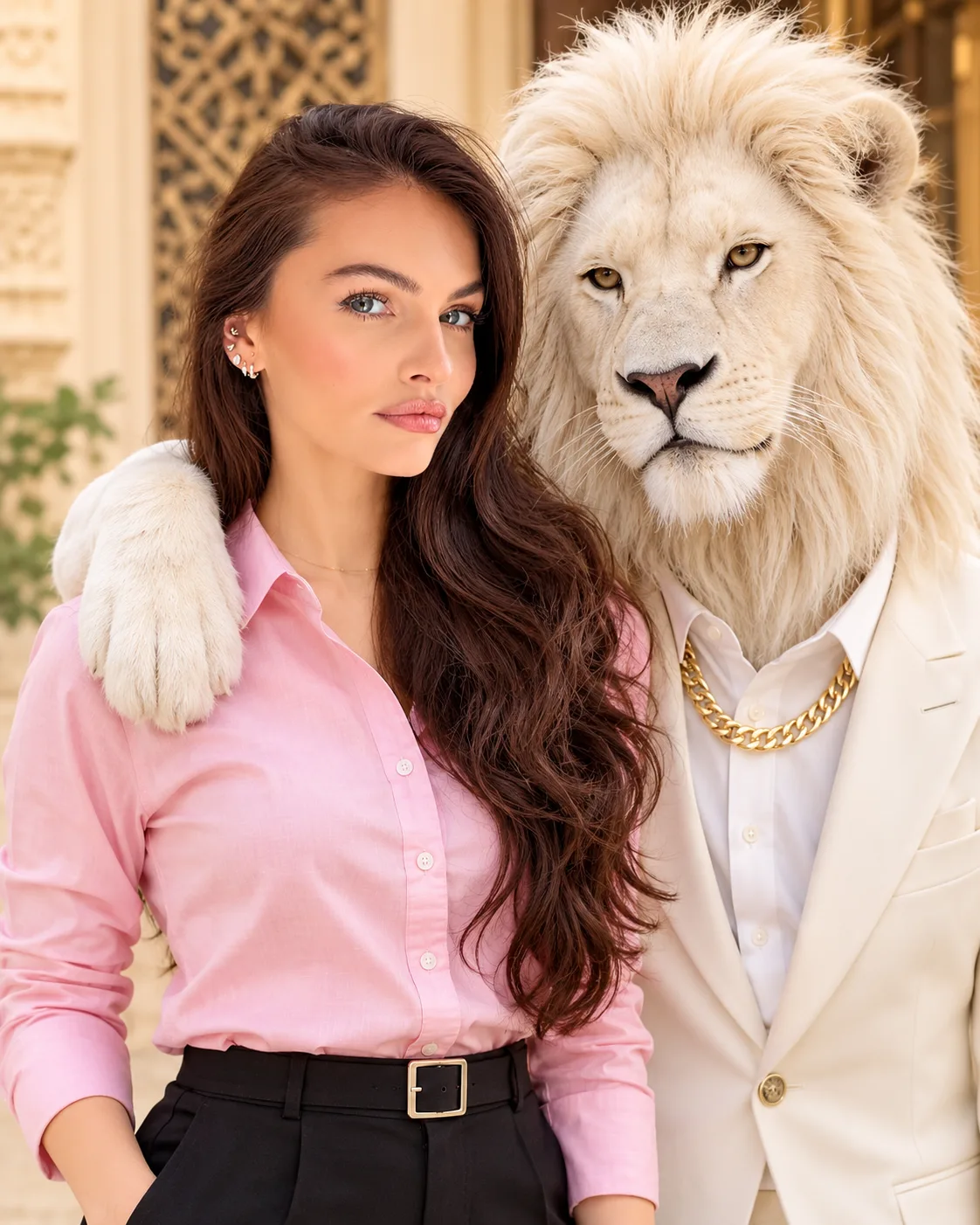
White Lion Luxury Portrait with Indian Woman
Create a cinematic luxury portrait beside a white lion in a tailored white suit while preserving your original face, hairstyle, smile and red tilak.
Using the uploaded photo, create an ultra-realistic luxury cinematic portrait of the same recognizable woman standing beside a majestic adult white lion, with a vertical 4:5 composition. The scene should look like a professionally photographed luxury editorial portrait, with believable physical contact between the woman and lion. KEEP — Preserve the woman's exact recognizable facial identity and original facial geometry from the uploaded photograph. Retain her original forehead height, facial width, eyebrow shape and placement, eye shape and natural eye colour, nose bridge and tip, lip contours, cheek volume, cheekbones, jawline, chin, ears and natural facial asymmetry. Maintain her original skin tone, pores, texture, marks and age without retouching. Preserve her exact hairstyle, hairline, hair density, texture and colour. Keep her original smile, expression, head position, eye direction and distinctive red tilak unchanged. Maintain her natural neck, shoulders, body proportions and overall appearance. Do not substitute a generic model or reconstruct her face. CHANGE — Dress her in a light pink full-sleeve shirt with natural cotton fabric texture, a neatly defined collar and realistic sleeve folds, paired with tailored black trousers. Position a majestic white lion standing closely beside her. Dress the lion in a premium white tailored luxury suit, crisp white shirt and a thick polished gold chain around its neck. Place one large anatomically accurate white lion paw gently across the woman's shoulder, with realistic fur detail and natural contact. SCENE — Position them outside an elegant beige luxury building featuring decorative wooden lattice doors, carved architectural details and a refined neutral-toned exterior. Keep the building softly blurred while both subjects remain sharply focused. Set the scene during clear daytime, with a natural outdoor atmosphere. LIGHT — Use soft natural daylight entering from the upper front-left, creating consistent illumination across both faces, subtle highlights on the lion's white fur and believable shadows beneath the paw. Avoid artificial studio reflections. CAMERA — Simulate professional full-frame DSLR photography using an 85mm portrait lens at f/2.8, positioned at chest height. Maintain realistic perspective, accurate anatomy and moderate background compression. GRADE — Apply warm beige and champagne colour grading, controlled highlights, balanced contrast and natural whites. Preserve realistic skin colour without excessive saturation. OUTPUT — Vertical 4:5 portrait, ultra-detailed 8K-quality rendering, sharp facial features, individual fur strands, realistic fabric textures and professional photographic finish. DO NOT — Change facial identity, expression, smile, red tilak, eye colour or hairstyle. No face slimming, skin whitening, plastic smoothing, invented jewellery, tattoos, extra people, extra limbs, distorted paws, floating contact, cartoon effects or watermarks.
Photo Guide
- Use a clear, high-resolution photo with visible facial details.
- Choose a front-facing or slightly angled portrait with natural proportions.
- Keep the original hairstyle, forehead, eyes and red tilak unobstructed.
- A daylight reference photo blends better with the outdoor beige building.
- Avoid harsh shadows or coloured lighting across the original face.
- A hidden shoulder or heavily cropped face can weaken the lion-paw placement.
How to Build
- 1Open Gemini AI or ChatGPT and select its image generation feature.
- 2Upload your original photograph as the identity reference.
- 3Paste the complete prompt without removing the KEEP section.
- 4Choose portrait orientation and a 4:5 aspect ratio.
- 5Use the highest available image quality setting.
- 6If the first result changes the face, regenerate using the same photo.
Pro Tips
- Choose a photo with a clearly visible shoulder so the lion's paw fits naturally.
- Keep the red tilak unobstructed so this defining detail remains recognizable.
- Use a light pink shirt reference to improve accurate fabric and colour rendering.
- Avoid pure-white overexposure so the lion's fur retains visible texture.
- Keep the lion slightly beside the woman to maintain realistic body proportions.
Share This Prompt
About the Author
Naziya
Creative AI writer at MFDA, sharing trendy photo-editing prompts and fresh ideas for beautiful, stylish AI images.