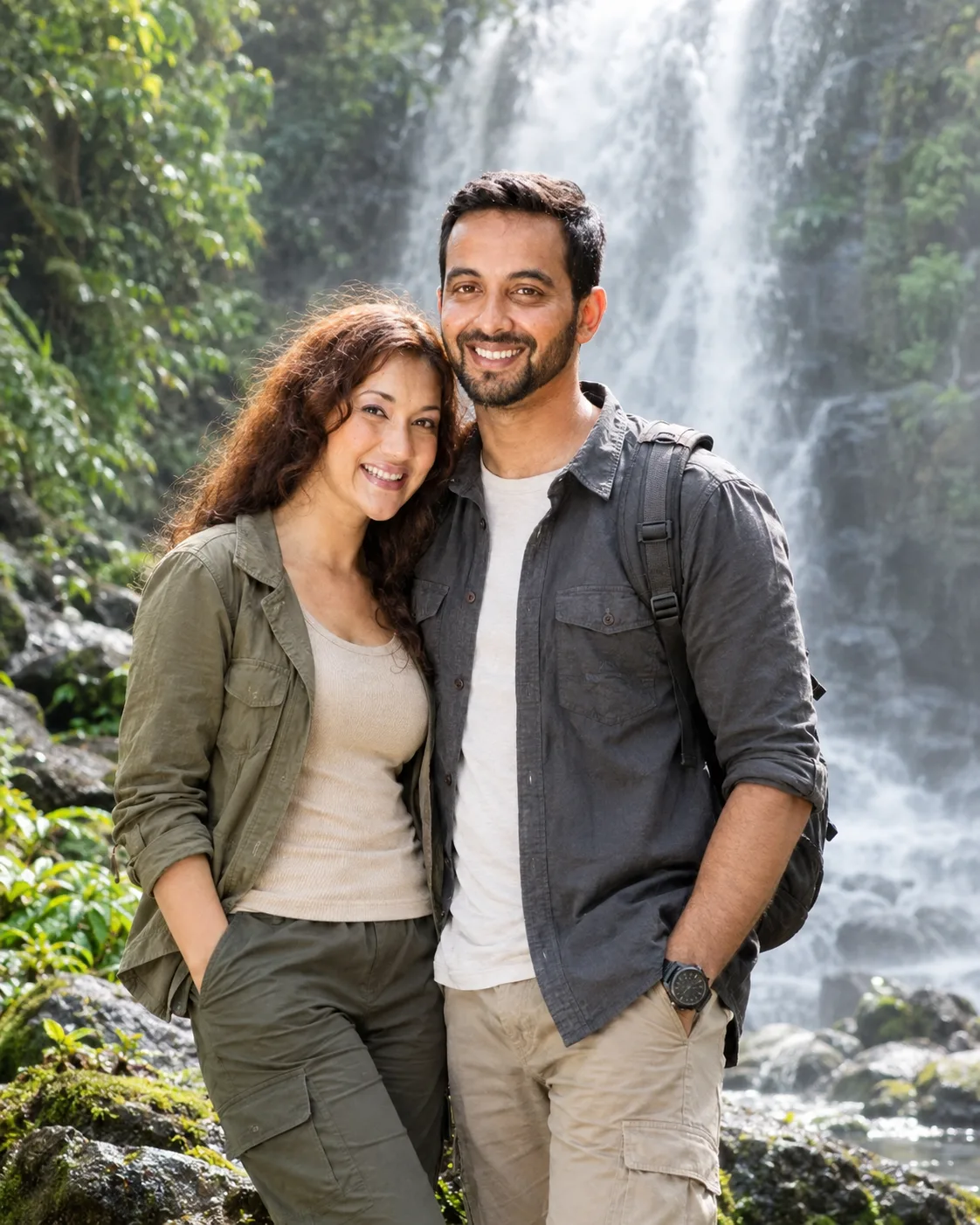
Waterfall Adventure Couple Portrait Prompts
Create a realistic couple portrait beside a misty waterfall, keeping both identities intact while adding tropical greenery, outdoor style, and cinematic light.
Using the uploaded photo, create a highly realistic cinematic portrait of the same couple standing together beside a powerful natural waterfall in a dense tropical setting. KEEP — Preserve both people’s exact identities from the uploaded photo. Keep each person’s original face structure, facial proportions, forehead, eyebrows, eye shape and natural eye colour, nose, lips, cheeks, jawline, chin, and natural facial asymmetry. Keep their original skin tone, visible pores, fine texture, natural marks, hairline, hair density, hairstyle, and facial hair exactly as shown. Preserve both people’s natural body proportions, height relationship, shoulder width, torso shape, arms, hands, legs, and overall build. Keep their recognizable identity separate; do not blend their faces or replace either person with generic model features. CHANGE — Place the couple standing close together on dark moss-covered rocks beside a tall waterfall. Give them relaxed, adventurous body language, with the woman slightly angled toward the man and the man naturally turned toward her. Dress them in practical casual outdoor clothing using realistic cotton, linen, and lightweight technical fabrics in muted earthy colours such as olive, beige, charcoal, and off-white. Keep clothing naturally fitted without changing body proportions. SCENE — Set the portrait beside a powerful waterfall surrounded by dense tropical greenery, wet leaves, dark rocks, and patches of moss. Fine water mist hangs around the falls. Shoot during late afternoon so the background remains naturally luminous while the waterfall stays clearly visible through soft atmospheric haze. LIGHT — Use soft daylight coming from the upper front-left, creating gentle highlights across both faces while maintaining shadow detail. Keep the waterfall mist slightly brighter than the surrounding foliage. CAMERA — Use an 85mm lens at f/2.8, camera positioned at chest height, with both faces on the same focus plane and the waterfall gradually blurred behind them. GRADE — Apply a natural cinematic grade with deep forest greens, cool water tones, warm skin tones, restrained contrast, and subtle highlight roll-off. OUTPUT — Create a vertical 4:5 composition at 1600×2000 pixels, keeping both people and the waterfall fully readable. DO-NOT — No face slimming, skin whitening, changed eye colour, plastic smoothing, invented jewellery or tattoos, altered body proportions, face blending, extra fingers, distorted hands, or artificial-looking waterfall mist.
Photo Guide
- Use a sharp photo of both people at least 1200px on the long edge.
- A chest-level or eye-level photo helps preserve natural facial proportions.
- Keep both faces, hairlines, and shoulders clearly visible in the source.
- Natural outdoor daylight blends better with the waterfall's soft mist.
- Avoid heavy beauty filters because they can erase pores and facial marks.
How to Build
- 1Open Gemini and upload one clear photo containing both people.
- 2Choose image generation and keep the output ratio at 4:5.
- 3Paste the prompt without removing the KEEP section.
- 4Generate the first version with both faces clearly visible.
- 5Check the jawlines, eye colour, height and body proportions first.
- 6If wrong, regenerate using the same photo and reinforce the KEEP section.
Pro Tips
- Use a photo with similar head angles so facial structure stays stable.
- Keep both people separated in the source so identities do not blend.
- Choose daylight source photos so waterfall mist feels naturally integrated.
- Avoid sunglasses because they hide the eye shape and natural eye colour.
- Use a full or three-quarter source photo so body proportions remain accurate.
Share This Prompt
About the Author
Naziya
Creative AI writer at MFDA, sharing trendy photo-editing prompts and fresh ideas for beautiful, stylish AI images.