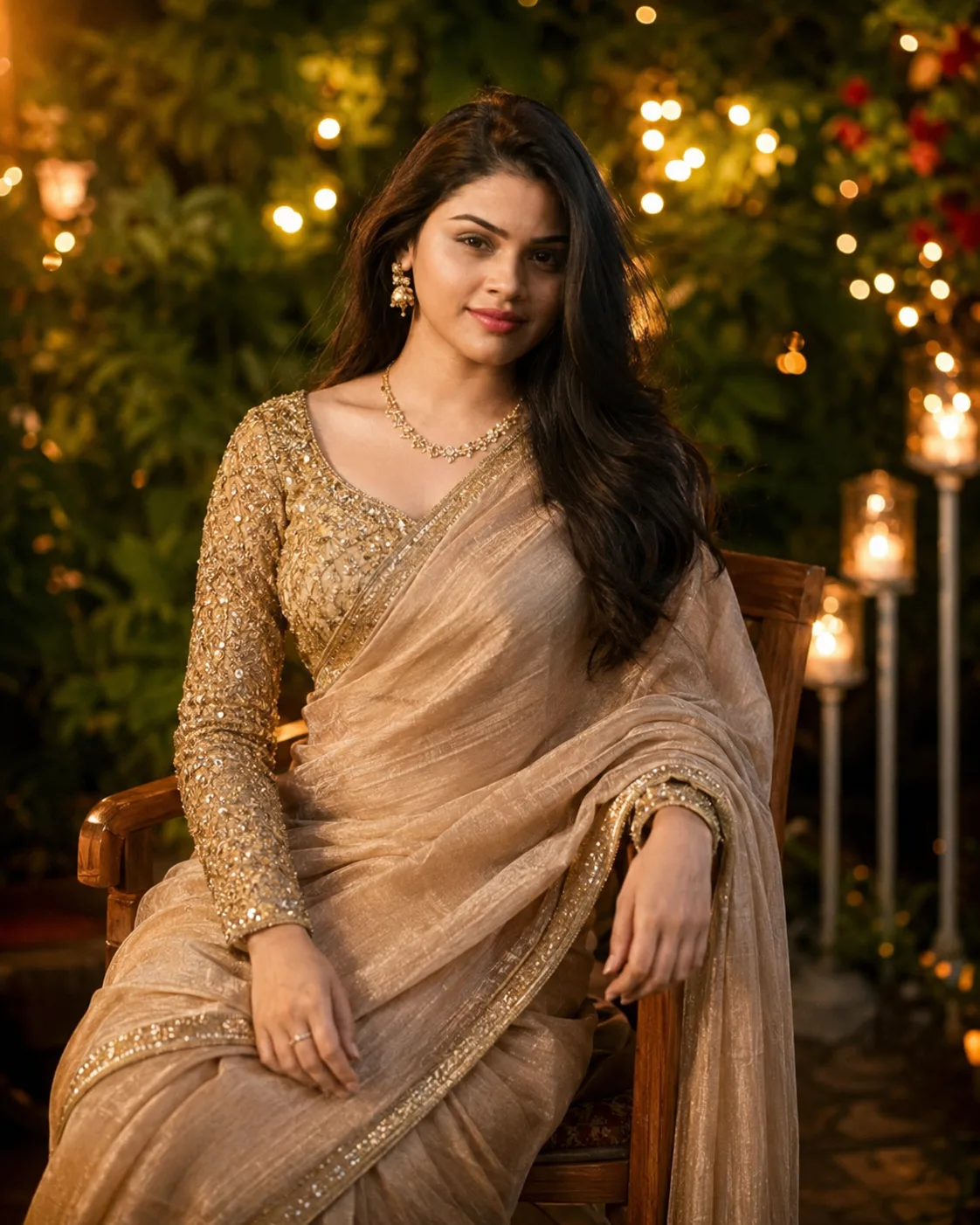
Warm Golden-Beige Saree Garden Portrait
Create a photorealistic golden-beige saree portrait with warm garden lights, natural skin texture, soft bokeh, and preserved facial identity.
Using the uploaded photo, create a photorealistic elegant Indian traditional portrait of the same person seated outdoors during a warm evening celebration, styled as a refined garden portrait rather than a heavily staged wedding photograph. KEEP - Preserve the uploaded person's exact facial identity and visible facial structure: forehead shape, eyebrow placement and natural shape, eye shape and natural eye colour, nose bridge and tip, lips, cheeks, cheekbones, jawline, chin, ears, facial width, facial proportions, and natural asymmetry. Keep the original skin tone, visible pores, fine skin texture, natural age, and authentic expression without beautifying or reshaping the face. Keep the original hairline, hair density, natural hair colour, and recognizable hairstyle characteristics. Preserve natural body proportions, shoulder width, neck length, and overall build. If facial hair is visible in the uploaded photo, keep its density, placement, and texture unchanged. CHANGE - Dress the person in a golden-beige saree with a subtle champagne-pink and taupe cast, using realistic lightweight woven fabric with natural folds and soft reflective highlights. Add a gold blouse with dense but refined sequin and embroidery detailing. Use small traditional gold earrings and a fine delicate necklace only. Place the person on a simple wooden chair with the body turned slightly toward the camera and shoulders naturally relaxed. Change the setting to a lush evening garden with deep green foliage, warm decorative string lights, and distant glowing lamps. Use a warm cinematic colour treatment while keeping skin tones neutral and believable. SCENE - Set the portrait outdoors during early evening after sunset, with dense leafy greenery directly behind the subject. Keep the string lights several metres behind the chair so they form soft circular bokeh rather than sharp points. The person remains the visual focus, framed from approximately the waist upward. LIGHT - Use soft warm light coming from the front-left at roughly face height, with gentle fill from the surrounding environment. Keep the key light around 3200-3800K so the face receives warm illumination while retaining natural skin colour. Add only a subtle warm edge light along the hair and shoulder to separate them from the dark foliage. CAMERA - Use an 85mm full-frame portrait lens at f/1.8, camera positioned at chest height and approximately eye-level with the seated subject. Use shallow depth of field, natural portrait compression, sharp focus on the nearer eye, and smooth background separation. GRADE - Apply a restrained warm cinematic grade with golden highlights, controlled contrast, slightly muted greens, natural skin tones, and gentle highlight roll-off. Avoid excessive orange tones, heavy HDR, artificial glow, or beauty retouching. OUTPUT - Create a vertical 4:5 portrait at the highest available resolution, with realistic fabric texture, natural facial detail, clean edges around hair, and photographic depth. DO-NOT - No face slimming, no facial reshaping, no skin whitening, no changed eye colour, no age change, no plastic smoothing, no generic model replacement, no invented jewellery, no tattoos, no distorted hands, and no artificial facial features.
Photo Guide
- Use a sharp, high-resolution photo where the full face is clearly visible.
- Choose a front or slight three-quarter angle so both eyes and the jawline remain clear.
- Soft outdoor daylight blends better with this warm garden evening treatment.
- Keep the hairline, forehead, ears, and facial edges visible.
- Avoid filters or beauty mode; they can weaken natural skin texture.
How to Build
- 1Use Gemini image editing with the uploaded photo as the reference.
- 2Choose a 4:5 portrait aspect ratio if the option is available.
- 3Paste the full Prompt Content after attaching the reference image.
- 4Use the highest available output resolution for finer saree texture.
- 5Generate several variations and compare the face with the source.
- 6If the first result is wrong, regenerate with stronger identity preservation.
Pro Tips
- Keep the reference face well lit so the jawline does not drift between runs.
- Use a simple source background so the new garden scene stays dominant.
- Avoid sunglasses or hair covering the eyes so eye shape remains consistent.
- Keep the original skin tone explicit so warm lights do not turn it orange.
- Check the saree folds and blouse embroidery for realistic fabric detail.
Share This Prompt
About the Author
Naziya
Creative AI writer at MFDA, sharing trendy photo-editing prompts and fresh ideas for beautiful, stylish AI images.