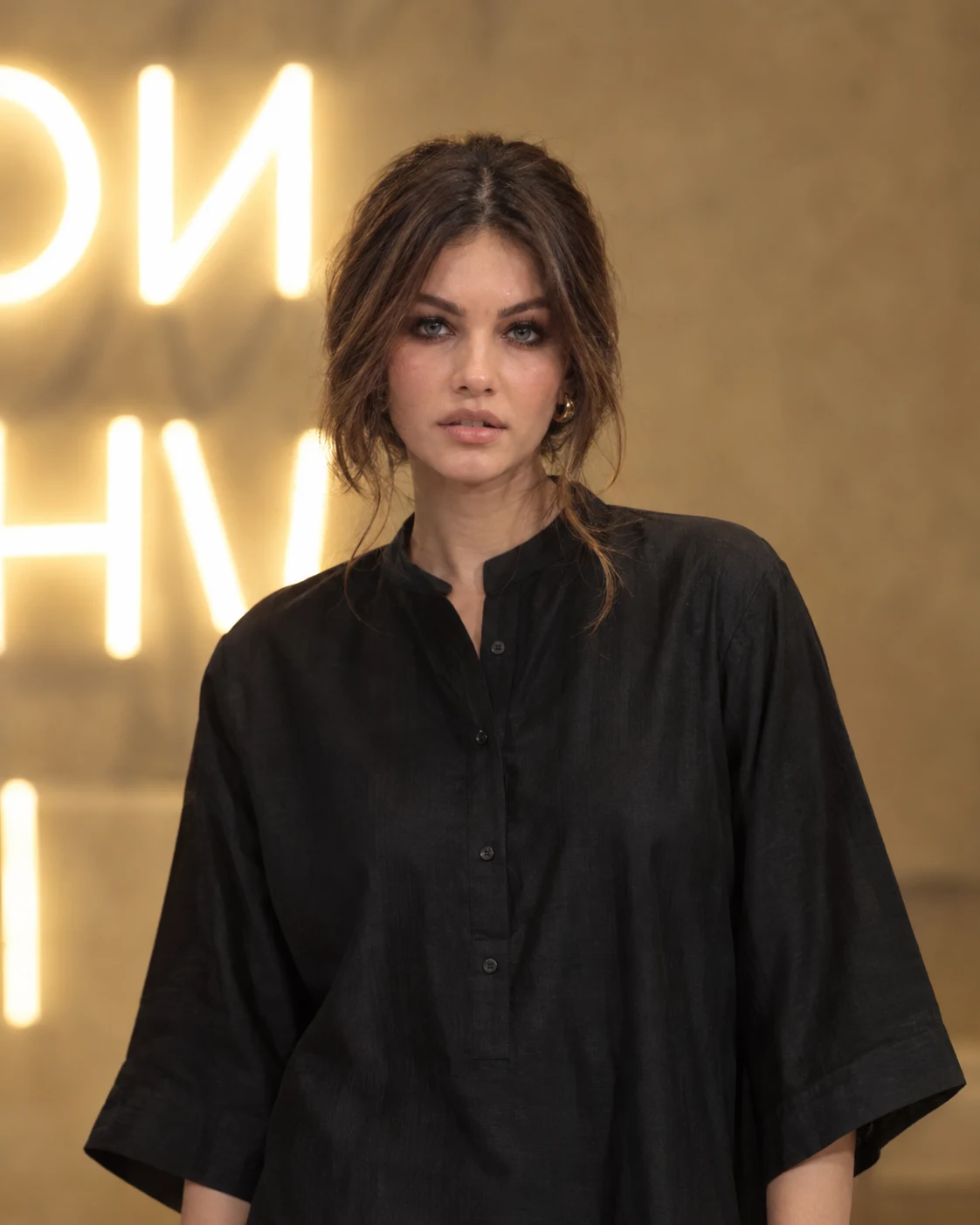
Warm Gallery Black Tunic Evening Portrait
Create a warm cinematic indoor portrait with a black tunic, glowing gallery lettering, natural skin texture, and identity-preserving facial detail.
Using the uploaded photo, create a photorealistic indoor evening portrait of the same woman in a minimalist gallery or event setting, preserving her identity exactly. KEEP - Preserve the exact facial identity from the uploaded photo. Keep the forehead shape, eyebrow placement and shape, eye shape and natural eye colour, nose structure and proportions, lips, cheeks, cheekbones, jawline, chin, ears, and natural facial asymmetry unchanged. Keep the real skin tone, visible pores, fine skin texture, natural under-eye details, and facial marks. Preserve the original hairline, natural dark hair colour, hair density, texture, and loose strands around the face. Keep the woman's natural body proportions, shoulder width, neck proportions, and overall recognizable appearance. Preserve the relaxed expression and natural facial character rather than replacing them with a generic model face. CHANGE - Dress her in a loose black tunic with a short rounded stand collar, narrow front button placket, wide three-quarter sleeves, and softly reflective lightweight fabric. Add small gold hoop earrings visible against the dark hair. Gather the hair into a relaxed low updo while retaining a few loose strands near the cheeks. Use a relaxed standing pose with the body slightly angled and the face turned gently toward the camera. Change the environment to a warm beige interior with softly glowing white lettering behind her. SCENE - Set the portrait inside an intimate contemporary gallery or evening event space. Use a warm beige textured wall as the main background, with oversized white illuminated lettering partially visible behind the subject. Keep the lettering heavily defocused so it reads as glowing abstract shapes rather than sharp text. LIGHT - Use warm overhead and slightly front-left ambient illumination, with soft light wrapping across the forehead, cheeks, nose, and chin. Keep gentle shadows beneath the jaw and along the opposite side of the face. Use approximately 3200–3800K warm-white light so the face naturally belongs inside the warm interior. CAMERA - Shoot at 85mm, f/1.8, camera positioned around chest height and aimed slightly upward toward the subject's face. Use medium portrait framing, natural perspective, shallow depth of field, and smooth background bokeh. GRADE - Apply a warm beige-and-black cinematic grade with restrained contrast, natural skin colour, slightly muted highlights, and subtle film-like tonal softness. Keep black clothing detailed rather than crushed. OUTPUT - Create a vertical 4:5 image at 2048 × 2560 pixels with crisp facial detail and realistic fabric texture. DO-NOT - No face slimming, no skin whitening, no changed eye colour, no plastic smoothing, no invented jewellery or tattoos, no altered facial proportions, no generic replacement face.
Photo Guide
- Use a sharp, front-facing or three-quarter photo where the full face is visible.
- Keep the forehead, hairline, jawline, and both eyes unobstructed.
- Natural indoor or neutral light helps preserve the warm gallery skin rendering.
- A visible hairline matters because loose strands frame this specific portrait.
- Avoid heavy filters or beauty edits; they can erase pores and facial asymmetry.
How to Build
- 1Open Gemini and choose Create Image with the uploaded photo as reference.
- 2Upload one clear face photo at its highest available resolution.
- 3Paste the full prompt without removing the KEEP section.
- 4Choose portrait output and set the canvas to 4:5 when available.
- 5Generate the image, then compare the eyes, nose, jawline, and skin texture.
- 6If the first result is wrong, regenerate using the same photo and prompt unchanged.
Pro Tips
- Use a photo with visible natural skin texture so the warm light stays believable.
- Keep the eyes unobstructed so the natural eye shape remains stable between runs.
- Avoid sunglasses because the reference depends on precise eye structure.
- Choose a photo with visible hairline so the low updo does not change identity.
- Use a neutral expression close to the target so the subtle smile stays natural.
Share This Prompt
About the Author
Naziya
Creative AI writer at MFDA, sharing trendy photo-editing prompts and fresh ideas for beautiful, stylish AI images.