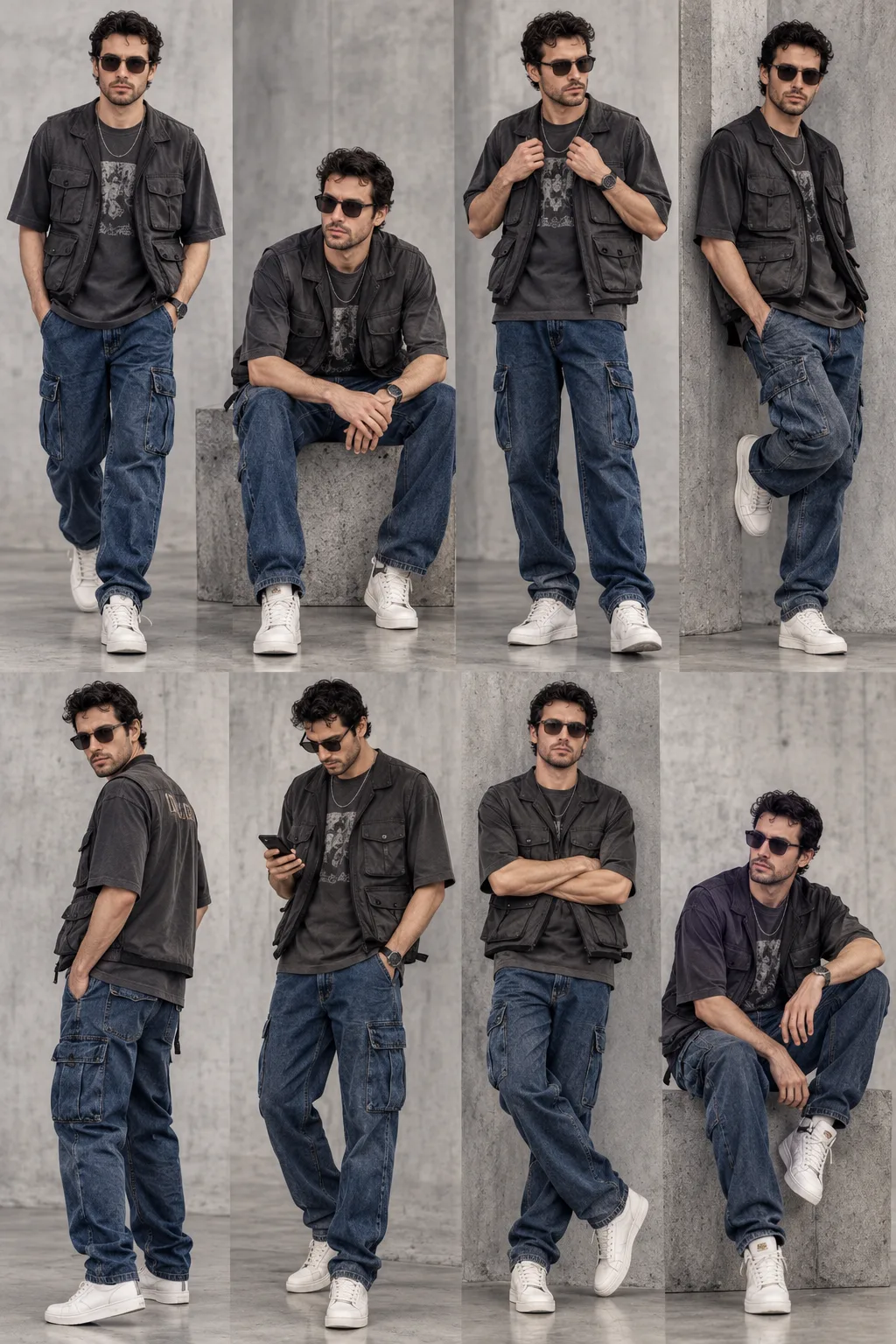
Urban Streetwear Multi-Pose Lookbook Photography
Turn your photo into an urban streetwear lookbook with eight full-body poses, blue cargo jeans, a charcoal graphic tee and a clean industrial studio setting.
Using the uploaded photo, create a photorealistic urban streetwear lookbook featuring the same person in eight distinct full-body poses, arranged naturally within one continuous fashion-campaign photograph in a vertical 2:3 composition. KEEP — Preserve the person's exact facial identity, original face shape, forehead proportions, eyebrow placement, eye shape and natural eye colour, nose bridge and tip, lips, cheeks, cheekbones, jawline, chin, ears, facial width, and natural facial asymmetry. Retain the original skin tone, visible pores, fine skin texture, natural marks, hairline, hairstyle, hair density, and facial hair wherever present. Maintain the person's original body proportions, shoulder width, neck length, and natural height-to-body relationship. Every appearance must clearly depict the same individual without blending facial features or generating alternative identities. CHANGE — Dress the person in an oversized charcoal-grey cotton graphic T-shirt, a dark-grey utility vest with functional pockets and matte technical fabric, loose-fit blue denim cargo jeans with visible stitching and side pockets, white leather high-top sneakers, a simple silver chain, and contemporary dark sunglasses. Keep the clothing, colours, accessories, and fit identical across all eight poses. Arrange the person walking with hands in pockets, sitting on a concrete bench, adjusting the utility vest, leaning against an industrial wall, looking over one shoulder, checking a smartphone, standing with crossed arms, and sitting casually with one knee raised. SCENE — Use a light-grey industrial studio with subtle concrete textures, clean architectural lines, and a softly blurred background. Place all eight full-body versions at natural distances, with enough space between them to distinguish each pose without overlap. Keep every head, hand, shoe, and body visible. LIGHT — Use a large diffused key light from the upper front-left, soft fill from the opposite side, and gentle overhead illumination. Maintain consistent neutral daylight at approximately 5500K, with realistic contact shadows beneath every pair of sneakers. CAMERA — Simulate professional full-frame fashion photography using a 50mm lens at f/5.6, with the camera positioned around waist-to-chest height. Use sufficient depth of field to keep all eight figures sharply defined. GRADE — Apply neutral charcoal and cool-grey tones, natural skin colours, controlled contrast, and restrained cinematic colour grading. Preserve denim texture and realistic fabric detail without artificial sharpening. OUTPUT — Vertical 2:3 aspect ratio, high-resolution 8K-style detail, accurate anatomy, and one continuous photograph without borders, frames, boxes, or grid lines. DO NOT slim the face, whiten the skin, change eye colour, smooth skin into plastic, invent jewellery or tattoos, alter facial identity, duplicate body parts, or distort hands and feet.
Photo Guide
- Use a sharp, high-resolution photo with the face clearly visible.
- Choose a front-facing or slight three-quarter angle with both eyes visible.
- Use even, neutral lighting to preserve natural skin tone and facial structure.
- Keep the hairline, shoulders, and as much of the body visible as possible.
- A charcoal T-shirt and blue jeans in your reference may confuse outfit replacement.
- Avoid blurry faces, heavy filters, and sunglasses that hide the eyes.
How to Build
- 1Open ChatGPT and select the image generation feature.
- 2Upload one clear reference photo using the attachment button.
- 3Copy the complete PROMPT CONTENT into the message field.
- 4Keep the vertical 2:3 composition and request all eight poses in one image.
- 5Generate the image and inspect each face, outfit, hand, and shoe.
- 6If the result is wrong, re-upload the original photo and correct the specific error.
Pro Tips
- Use a clear face reference so facial details remain consistent across poses.
- Choose a photo with visible shoulders to help preserve natural proportions.
- Keep the utility vest and cargo jeans descriptions unchanged for outfit consistency.
- Request soft contact shadows so every figure sits naturally in the studio.
- Ask for greater spacing if poses overlap or limbs merge between figures.
- Check the smartphone, sunglasses, and silver chain for unwanted shape changes.
Share This Prompt
About the Author
Naziya
Creative AI writer at MFDA, sharing trendy photo-editing prompts and fresh ideas for beautiful, stylish AI images.