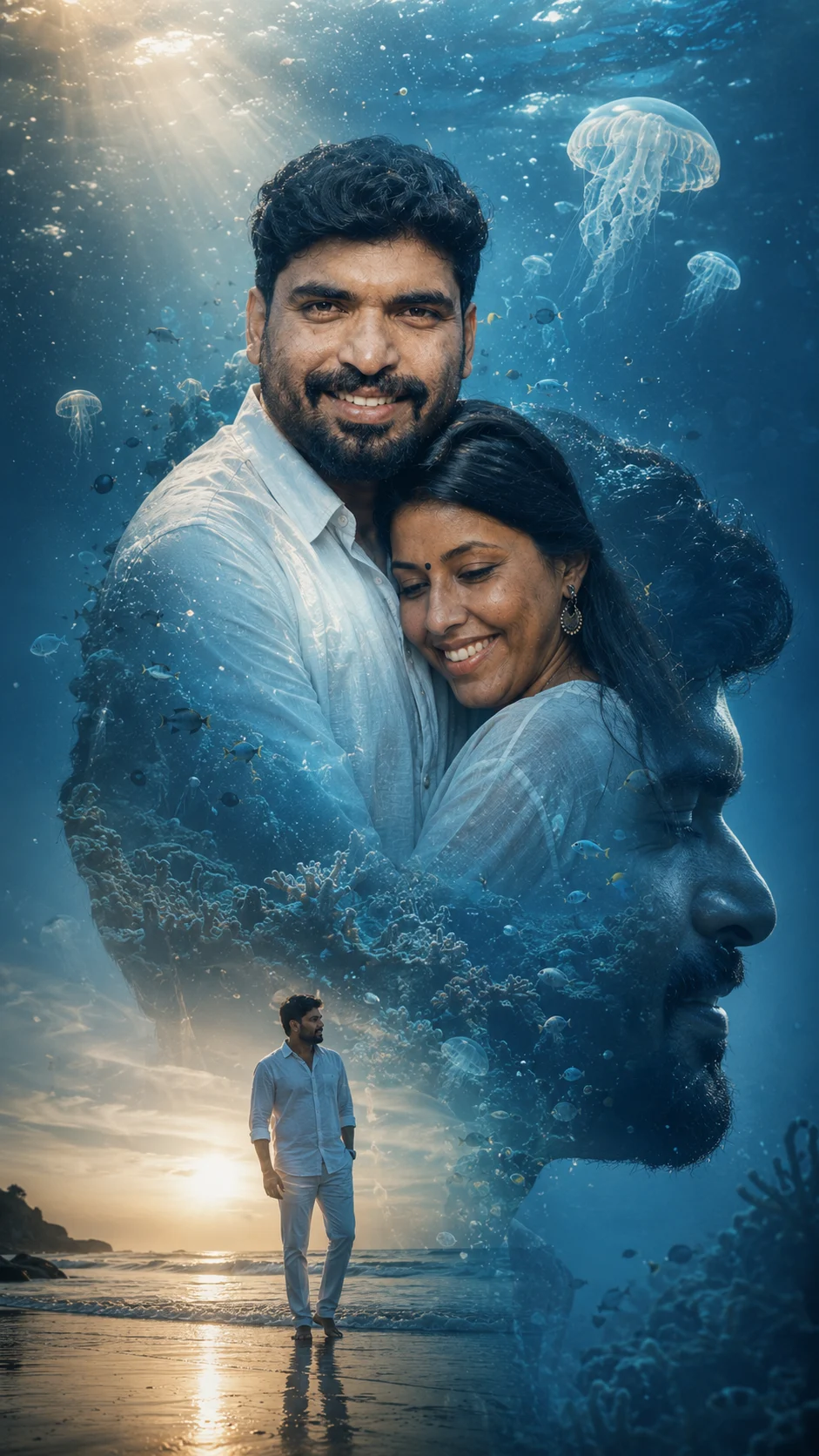
Underwater Dream Double Exposure Portrait
Create a cinematic underwater double-exposure portrait that preserves your identity while blending ocean depths, sunlight, jellyfish and reflections.
Using the uploaded photo, create a cinematic underwater dream double-exposure portrait of the same person. KEEP - Keep the uploaded person's exact face structure, eye shape and natural eye colour, skin tone and visible skin texture, hairline, hairstyle, facial hair, and body proportions. Preserve the original jawline, nose, lips, cheek structure, forehead, facial asymmetry, and recognizable features. Keep the person's natural expression and identity consistent with the uploaded photo. CHANGE - Change the wardrobe to a flowing white cotton-linen shirt with subtle water movement around the fabric. Change the background into a deep blue underwater environment filled with realistic suspended particles, soft jellyfish, distant coral shapes, and beams of sunlight. Change the composition into a large close-up portrait blended with a side-profile silhouette containing the underwater scene. Add a smaller full-body version of the person standing at the shoreline, visually connecting the ocean surface to the submerged double exposure. Change the lighting to cool blue ambient light with warm sunlight filtering from above. SCENE - Place the main double exposure between the ocean surface and deeper water, as if the person's silhouette contains an entire underwater world. Use clear turquoise-to-deep-blue water, slow-floating particles, translucent jellyfish, and narrow sun rays. Keep distant underwater elements softly blurred while the face remains sharply defined. Show the lower figure on wet shoreline sand during late afternoon. LIGHT - Illuminate the face primarily from the upper left with soft diffused sunlight passing through water. Use approximately 5200K highlights with cooler blue shadows, creating believable reflected light across the cheek, nose, hair, and shirt. CAMERA - Use an 85mm lens at f/2.0, camera at chest height, with controlled shallow depth of field and natural facial compression. GRADE - Use deep ocean blue, muted cyan, warm ivory highlights, medium contrast, gentle film grain, and a clean cinematic editorial finish. OUTPUT - Create a vertical 9:16 composition at 4K resolution with seamless double-exposure blending. DO-NOT - No face slimming, no skin whitening, no changed eye colour, no plastic smoothing, no invented jewellery or tattoos.
Photo Guide
- Use a sharp 2K+ photo with the complete face and hairline visible.
- A straight or slight three-quarter angle gives cleaner underwater blending.
- Use soft daylight so blue underwater light can be added naturally.
- Keep both eyes, facial hair, jawline and skin texture clearly visible.
- Avoid sunglasses because the eyes must remain unchanged.
- Avoid strong coloured indoor lighting; it can clash with the blue ocean grade.
How to Build
- 1Open Gemini and upload your clearest portrait photo.
- 2Paste the complete prompt, including KEEP and CHANGE sections.
- 3Select 9:16 portrait output and 4K if those options appear.
- 4Generate several versions and compare the face with the source photo.
- 5Choose the version with the closest eyes, jawline and hairline.
- 6If the first result is wrong, regenerate and name the drifting feature.
Pro Tips
- Use a calm expression so the underwater mood feels believable.
- Keep the forehead clear so water elements do not replace the hairline.
- Choose natural daylight so blue reflections do not overpower skin texture.
- Use a white shirt so underwater light remains visible through the fabric.
- Keep jellyfish behind the face so they do not distort facial features.
Share This Prompt
About the Author
Naziya
Creative AI writer at MFDA, sharing trendy photo-editing prompts and fresh ideas for beautiful, stylish AI images.