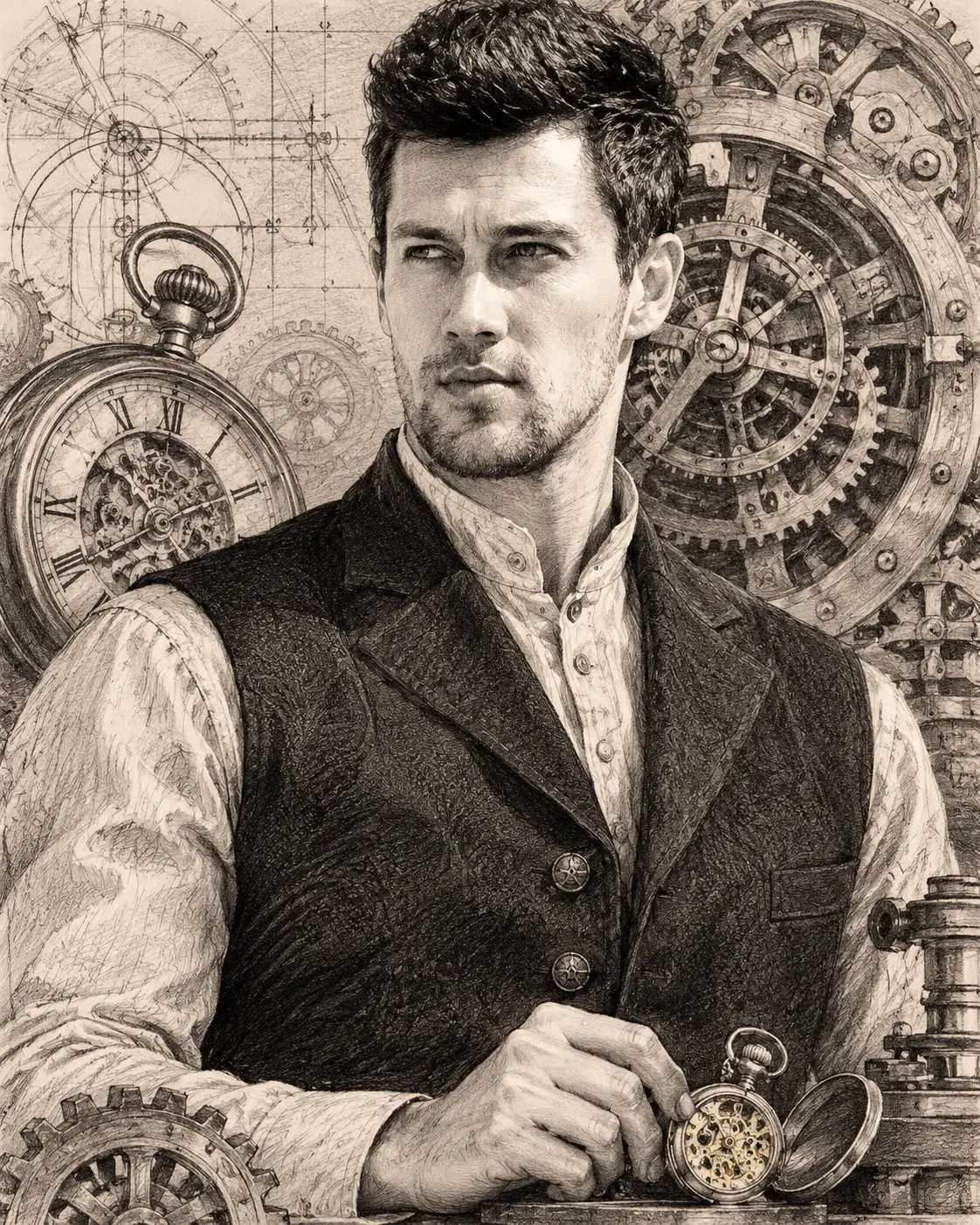
Timeless Mechanical Clockwork Graphite Portrait
Transform your uploaded photo into a detailed mechanical graphite portrait surrounded by antique clock gears, watch movements and vintage engineering details.
Using the uploaded photo, create an ultra-detailed, photorealistic graphite pencil portrait of the same recognizable person, integrated into an intricate antique clockwork composition. Use a vertical chest-up framing with traditional hand-rendered pencil techniques and realistic mechanical engineering details. KEEP — Preserve the exact facial identity and natural facial geometry from the uploaded photograph. Retain the original forehead width, eyebrow thickness and placement, eye shape and natural eye colour, nose bridge and tip, lip structure, cheek volume, cheekbones, jawline, chin, ears and natural facial asymmetry. Maintain the original skin tone, realistic pores, fine lines, natural marks and authentic age. Preserve the original hairline, hairstyle, hair density, individual hair texture and colour. Retain existing facial hair, including its natural density, outline and length. Keep the person's original neck, shoulders and body proportions. The face must remain immediately recognizable, not redesigned to match an illustrated character. CHANGE — Dress the subject in a tailored charcoal-black Victorian-inspired waistcoat over a textured ivory high-collar shirt. Add subtle antique-brass buttons and realistic woven fabric details. Position the subject facing slightly right in a composed three-quarter portrait pose, with one hand gently resting near an open antique pocket watch. Replace the original background with a detailed mechanical clock workshop rendered entirely in graphite. SCENE — Surround the subject with large antique brass-inspired clock gears, interlocking toothed wheels, exposed escapement mechanisms, delicate watch springs and engraved metal plates. Place a partially opened vintage pocket watch behind the left shoulder and a large circular clock mechanism behind the opposite side of the head. Include faint engineering diagrams, measurement markings and mechanical construction lines on warm ivory drawing paper. Keep the background mechanisms slightly softer than the face, while retaining recognizable gear structures. LIGHT — Use soft directional studio light from the upper left, creating delicate highlights across the forehead, nose bridge and cheekbones. Translate the illumination into controlled graphite highlights and deep mechanical shadows. CAMERA — Simulate an 85mm portrait lens at f/2.8, camera positioned at eye level, with chest-up framing and natural facial proportions. GRADE — Render the complete composition in monochrome graphite, with silver-grey highlights, deep charcoal shadows and subtle warm ivory paper undertones. Use fine cross-hatching, stippling, engraved metal textures and layered pencil shading. Avoid digital painting aesthetics. OUTPUT — Vertical 4:5 aspect ratio, 8K-quality detail, crisp facial features, finely rendered clockwork components and authentic textured drawing paper. DO NOT — Slim the face, change facial proportions, whiten skin, alter eye colour, modify the hairline, remove existing facial hair, apply plastic skin smoothing, invent jewellery or tattoos, replace the person's identity, distort hands or fingers, introduce random mechanical objects, or add text, signatures or watermarks.
Photo Guide
- Use a sharp original photo with visible facial details and minimal compression.
- A three-quarter face angle helps the clockwork composition feel natural.
- Choose soft, even lighting so graphite shadows match the original facial structure.
- Keep the hairline, ears, jawline and shoulders clearly visible.
- A visible hand helps if you want the pocket-watch interaction.
- Avoid heavily filtered selfies; they hide the facial texture needed for realism.
How to Build
- 1Open ChatGPT or Gemini and select an image-generation feature.
- 2Upload your original high-resolution portrait photograph.
- 3Paste the complete prompt into the image-generation input.
- 4Select portrait orientation with a 4:5 aspect ratio.
- 5Choose the highest available image-quality setting.
- 6if gears distort or the face changes, regenerate with KEEP unchanged.
Pro Tips
- Use a photo with visible shoulders so the Victorian waistcoat fits naturally.
- Choose a neutral expression so the graphite facial details remain accurate.
- Keep the forehead unobstructed so the clockwork framing does not hide identity.
- Use a visible pocket watch reference only if you want detailed hand interaction.
- Prioritize facial sharpness over background detail to prevent mechanical clutter.
Share This Prompt
About the Author
Naziya
Creative AI writer at MFDA, sharing trendy photo-editing prompts and fresh ideas for beautiful, stylish AI images.