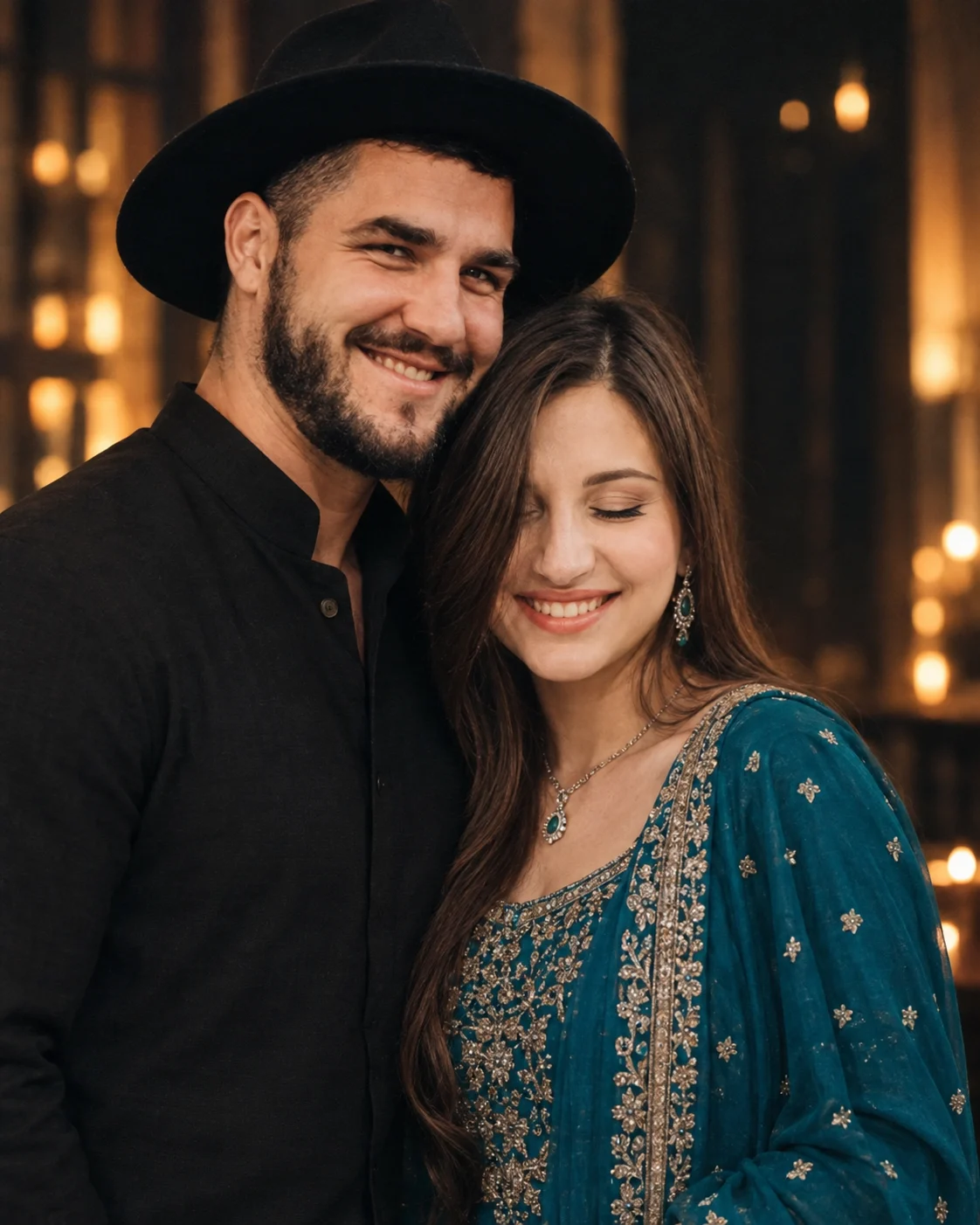
Teal Saree Couple Cinematic Portrait Prompt
Create a cinematic couple portrait with a teal embroidered outfit, black ethnic wear, warm bokeh, natural faces, and detailed Indian fashion styling.
Using the uploaded photo, create a photorealistic vertical couple portrait that keeps both people recognizable while recreating the elegant styling and composition. KEEP - Preserve each person's exact facial structure from the uploaded photo, including forehead shape, eyebrow structure, eye shape, natural eye colour, nose proportions, lips, cheeks, jawline, chin, facial proportions, and natural asymmetry. Keep both original skin tones and visible skin texture, including pores, fine lines, natural marks, and realistic facial detail. Keep the woman's original hairline, long dark hair, hair density, texture, and loose curled strand beside her face. Keep the man's original hairline, hairstyle, beard pattern, moustache, and facial-hair density. Keep both people's natural body proportions, shoulder width, neck shape, height relationship, and visible hands. Do not merge, blend, or reinterpret either face. CHANGE - Place the woman slightly forward on the left and the man slightly behind on the right, both facing the camera. Dress the woman in a deep teal-blue traditional outfit made from richly textured fabric with dense antique-gold and muted silver embroidery, paired with a matching teal dupatta. Add only the visible delicate necklace and dangling earrings shown in the reference look. Dress the man in a matte black ethnic-style outfit with a clean structured collar and understated texture. SCENE - Place them inside a dark, elegant interior during an evening-like setting. Keep the background softly out of focus, with warm vertical architectural light shapes and small rectangular amber bokeh points behind their shoulders. Keep the background darker than their faces so the subjects remain the visual focus. LIGHT - Use soft frontal illumination slightly from camera-left, matching the visible brightness across both faces. Mix warm ambient background light around 3200K with neutral soft key light around 4500K. Keep gentle shadow definition along the jaw and clothing so the faces do not look pasted onto the scene. CAMERA - Shoot at 85mm, f/1.8, with the camera at chest height. Use natural perspective compression, shallow depth of field, sharp facial detail, and smooth background separation. GRADE - Apply a restrained cinematic grade with deep blacks, controlled teal-blue clothing tones, warm amber highlights, moderate contrast, and natural skin colour without excessive orange tones. OUTPUT - Create a vertical 4:5 portrait at 2048 × 2560 resolution with realistic photographic detail. DO NOT change facial proportions, slim or reshape either face, whiten skin, change eye colour, smooth skin into plastic texture, alter facial hair, merge identities, invent jewellery or tattoos, create incorrect hands, distort embroidery, or turn the result into an illustration.
Photo Guide
- Use a clear photo where both faces and hairlines are fully visible.
- A front or slight three-quarter angle preserves the facial structure best.
- Use even face lighting so the warm interior light blends naturally.
- Keep both people visible from head through at least the upper torso.
- The teal embroidery and loose front hair strand should remain visible.
- Avoid heavy filters; artificial skin smoothing can cause face drift.
How to Build
- 1Gemini: upload the photo and paste the full prompt in one request.
- 2Choose a 4:5 portrait ratio if the tool offers aspect-ratio controls.
- 3Use the highest available image quality or resolution setting.
- 4Keep both people in the uploaded reference instead of separate crops.
- 5Generate once without adding extra beauty or fashion instructions.
- 6If faces drift, regenerate using the same photo and prompt unchanged.
Pro Tips
- Use a sharp original photo so eye shape survives the 85mm rendering.
- Keep the woman's loose curl visible so her hairline stays consistent.
- Avoid bright coloured backgrounds so the teal outfit remains distinct.
- Use natural skin texture in the source so the grade does not look plastic.
- Keep both faces similarly exposed so neither looks pasted into the scene.
Share This Prompt
About the Author
Naziya
Creative AI writer at MFDA, sharing trendy photo-editing prompts and fresh ideas for beautiful, stylish AI images.