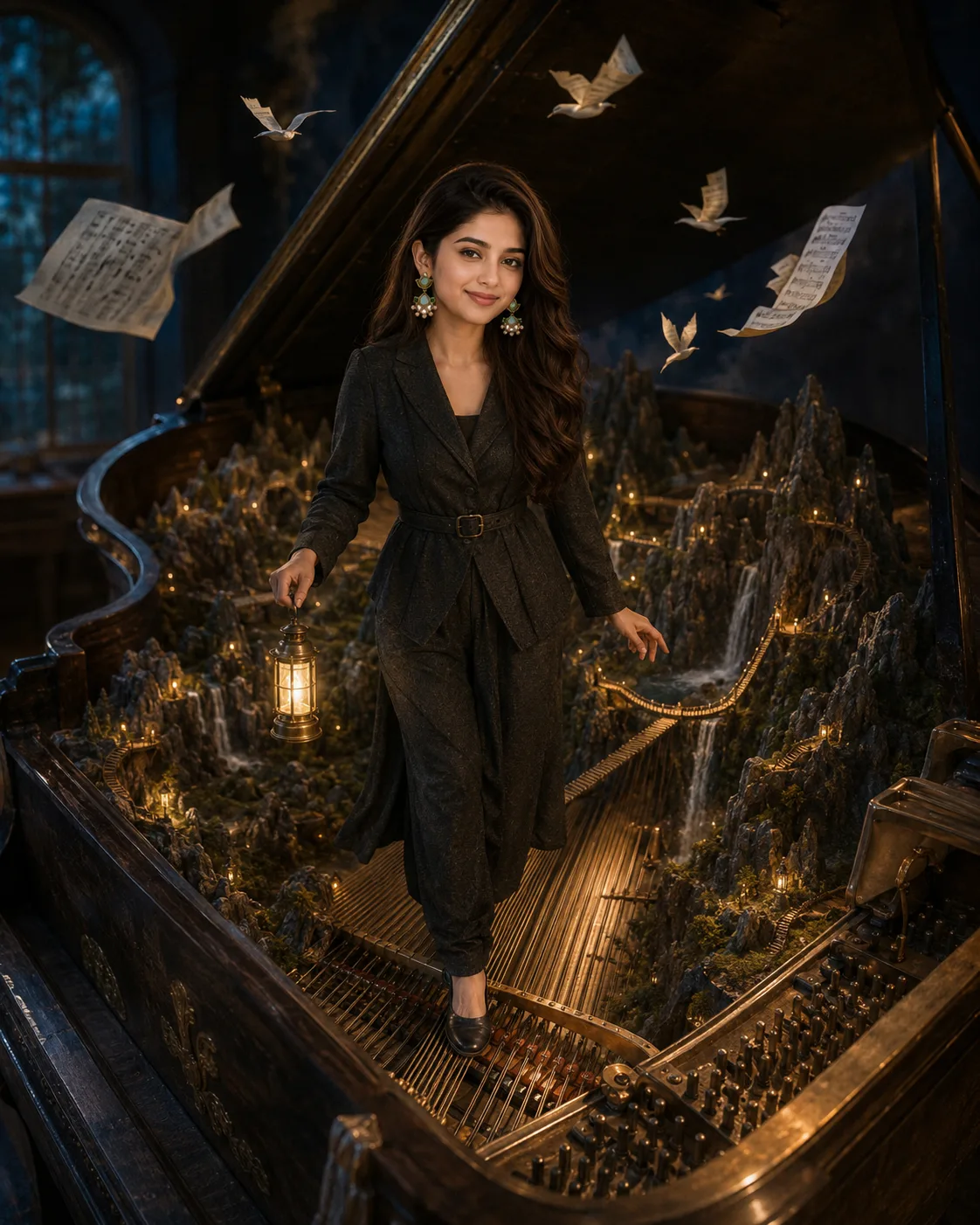
Surreal Piano Landscape Portrait Prompt
Turn your portrait into a surreal piano landscape where mountains, glowing bridges, waterfalls, and memories surround your likeness.
Using the uploaded photo, create a photorealistic surreal fantasy portrait of the same person walking through an enormous antique grand piano transformed into a miniature mountain landscape. KEEP — Preserve the exact facial identity and visible structure from the uploaded photo, including forehead shape, eyebrow placement, eye shape and natural eye colour, nose proportions, lips, cheeks, cheekbones, jawline, chin, ears, facial width, and natural facial asymmetry. Keep the original skin tone, pores, fine lines, natural skin texture, hairline, hair density, natural hairstyle and texture, facial hair pattern if present, body proportions, shoulder width, height impression, neck, arm and hand proportions. Keep the person clearly recognizable as the same individual. Do not replace, blend, or redesign the face. CHANGE — Place the person in [dark charcoal tailored clothing with subtle matte fabric texture], carrying a small warm-glowing brass lantern while walking carefully across one enormous piano string. Change the environment into a surreal mountain world contained inside an antique grand piano. Add weathered dark wood, exposed golden strings, distant rocky peaks, narrow glowing bridges, tiny waterfalls, and floating sheets of music. Keep the person's face naturally integrated with the scene. SCENE — The person stands inside the open body of the giant piano at twilight, surrounded by miniature mountains and deep atmospheric valleys. The piano's curved wooden interior fills the lower and side edges. Waterfalls descend from rocky cliffs, while sheet music drifts overhead and transforms into small white birds. Distant scenery remains softly blurred with atmospheric depth. LIGHT — Use warm golden light coming from inside the piano and from the lantern near the person's body. Add cool blue ambient light from the surrounding dark room so the face receives both warm key light and soft cool fill. CAMERA — Use an 85mm lens at f/2.0, camera at chest height, with shallow depth of field and natural perspective compression. GRADE — Use deep navy shadows, warm amber highlights, muted brown wood, soft bloom, restrained contrast, and a cinematic painterly film grade. OUTPUT — Vertical 4:5 aspect ratio, high resolution, detailed facial texture and realistic fabric rendering. DO-NOT — No face slimming, no skin whitening, no changed eye colour, no plastic smoothing, no invented jewellery or tattoos.
Photo Guide
- Use a sharp photo with the face and upper body clearly visible.
- Choose a front or three-quarter angle with the hairline unobstructed.
- Soft natural light helps preserve facial texture inside the warm piano scene.
- Keep facial hair, ears, jawline, and natural skin marks visible.
- A dark indoor photo can clash with the scene's warm lantern lighting.
- Avoid sunglasses or heavy shadows across the eyes.
How to Build
- 1ChatGPT: choose Image Generation and upload a clear identity photo.
- 2Paste the full prompt and keep the uploaded photo as the identity reference.
- 3Use vertical 4:5 framing and high-quality image output.
- 4Keep the face reference strength high if the tool provides that control.
- 5Check the face, hands, lantern, strings, and piano scale after generation.
- 6If the first result is wrong, regenerate while stressing KEEP and face identity.
Pro Tips
- Use a neutral expression so the face stays stable during the surreal change.
- Keep the original hairline visible so the head shape does not drift.
- Use a three-quarter source angle to blend naturally with the walking pose.
- Choose visible skin texture so warm lantern light looks physically believable.
- Avoid busy backgrounds in the source photo so facial features remain dominant.
Share This Prompt
About the Author
Naziya
Creative AI writer at MFDA, sharing trendy photo-editing prompts and fresh ideas for beautiful, stylish AI images.