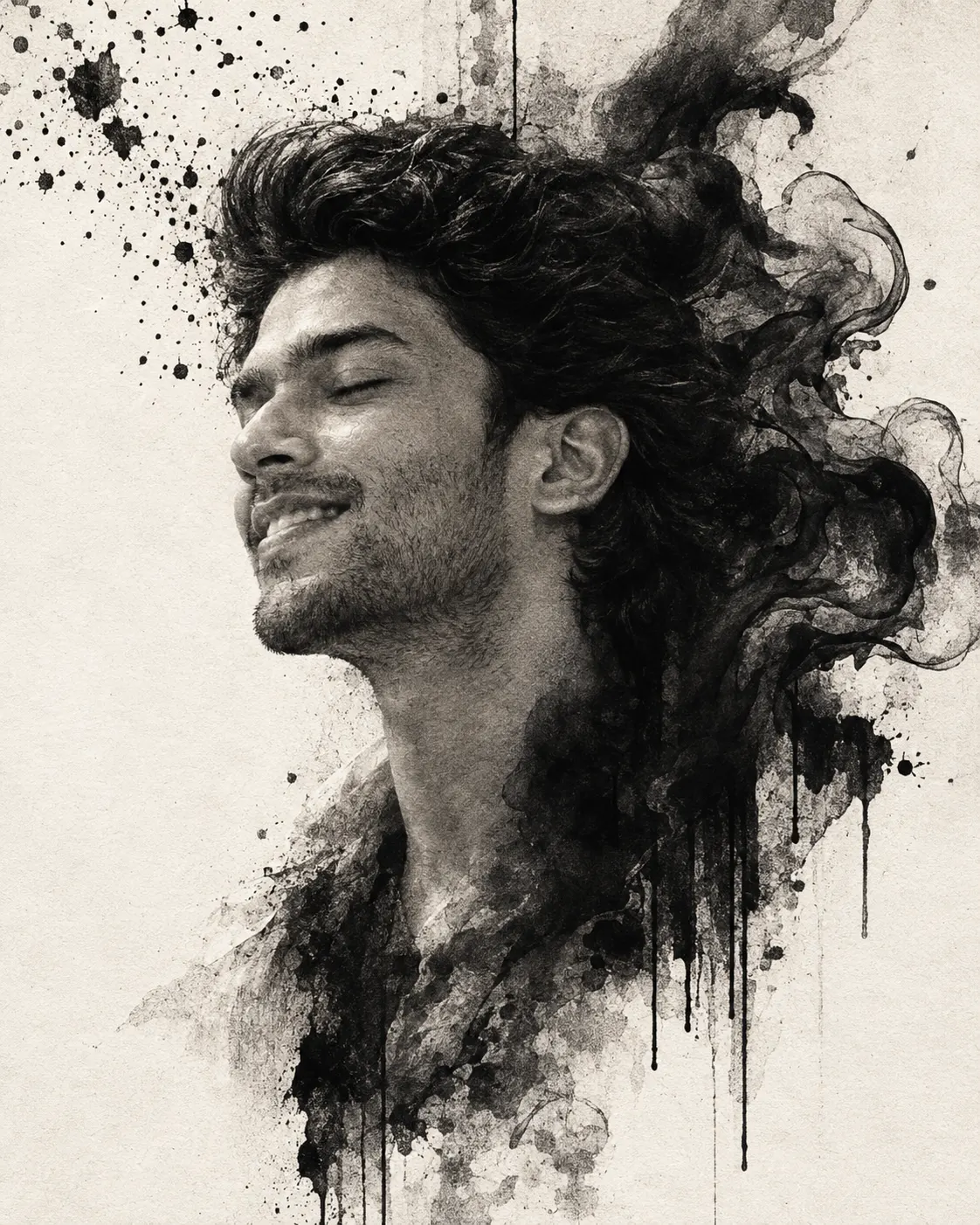
Surreal Charcoal Portrait with Flowing Black Ink
Turn your photo into a monochrome charcoal portrait with flowing black ink, smoky double exposure, dramatic shadows, and textured fine-art details.
Using the uploaded photo, create a photorealistic surreal charcoal-and-ink portrait of the same person in a vertical 4:5 composition. KEEP — Preserve the person's exact recognizable facial identity, including forehead shape, eyebrow placement, eye shape and natural eye colour, nose bridge and tip, lip shape, cheek contours, cheekbones, jawline, chin, ears, facial width, and natural asymmetry. Retain the original skin tone, pores, fine lines, marks, and realistic skin texture. Keep the natural hairline, hair density, texture, and visible hairstyle. Preserve visible facial hair, neck proportions, and body proportions wherever shown. Do not reconstruct, beautify, or replace facial features. CHANGE — Transform the surrounding portrait into a monochromatic charcoal drawing blended with expressive black liquid ink. Position the face in a close-up side profile, with the head tilted slightly backward, eyes closed, and chin gently elevated. Let the hair dissolve into thick black smoke and flowing ink ribbons that curl behind the head. Add fine ink particles near the forehead, scattered splashes in the upper-left corner, and long vertical drips descending from the abstract hair and neck. Use torn-paper edges, rough charcoal hatching, and layered ink washes. Keep the main facial profile intact and recognizable. SCENE — Place the portrait against a matte warm-white paper canvas with subtle grain. Leave generous negative space around the face. Concentrate the darkest ink forms behind the head, with scattered droplets fading into the upper-left background. Keep the face visually separate from the densest abstract textures. LIGHT — Use soft, diffused light from the upper front-left, creating gentle highlights on the forehead, nose bridge, cheek, and lips. Add deep charcoal shadows along the far side of the face. Maintain consistent facial shading so the portrait blends naturally into the drawn elements. CAMERA — Simulate an 85mm portrait lens at f/2.8, camera slightly below face level, focused on the visible facial profile. Use natural perspective without wide-angle distortion. GRADE — Apply a strictly black-and-white treatment, high contrast, rich charcoal blacks, soft white highlights, subtle graphite grain, and restrained paper texture. Avoid digital colour tinting. OUTPUT — Vertical 4:5 aspect ratio, 2048 × 2560 pixels, detailed facial texture, clean composition, no text or watermark. DO NOT slim the face, whiten the skin, change eye colour, smooth skin into plastic, invent jewellery or tattoos, alter facial hair, or distort the original identity.
Photo Guide
- Use a sharp, high-resolution photo where facial features are clearly defined.
- Choose a side-profile or three-quarter photo with the forehead, nose, and chin visible.
- Use soft directional lighting so the charcoal shadows follow the original face.
- Keep the hairline visible to help the ink dissolve naturally around the head.
- A plain background works best because dense scenery competes with the ink effects.
- Avoid motion blur or heavy face filters that obscure natural skin texture.
How to Build
- 1Open ChatGPT or Gemini and upload your original portrait photo.
- 2Choose image generation or image editing with the uploaded photo as the reference.
- 3Paste the complete prompt without removing the KEEP and CHANGE sections.
- 4Select a vertical 4:5 aspect ratio if the tool offers that setting.
- 5Choose the highest available image quality or resolution.
- 6Check that the face remains recognizable and the ink stays behind the features.
- 7If the result is wrong, regenerate with a specific correction to the face or ink placement.
Pro Tips
- Use a clear side-profile reference so the nose and chin retain their natural shape.
- Keep the eyes closed in the requested pose to match the contemplative artwork.
- Choose a photo with visible hair texture so the smoky ink transition looks natural.
- Keep the darkest ink behind the head so it does not swallow the facial outline.
- Request black-and-white output to prevent unwanted colour from entering the paper texture.
- If facial details drift, reinforce the KEEP section before changing artistic effects.
Share This Prompt
About the Author
Naziya
Creative AI writer at MFDA, sharing trendy photo-editing prompts and fresh ideas for beautiful, stylish AI images.