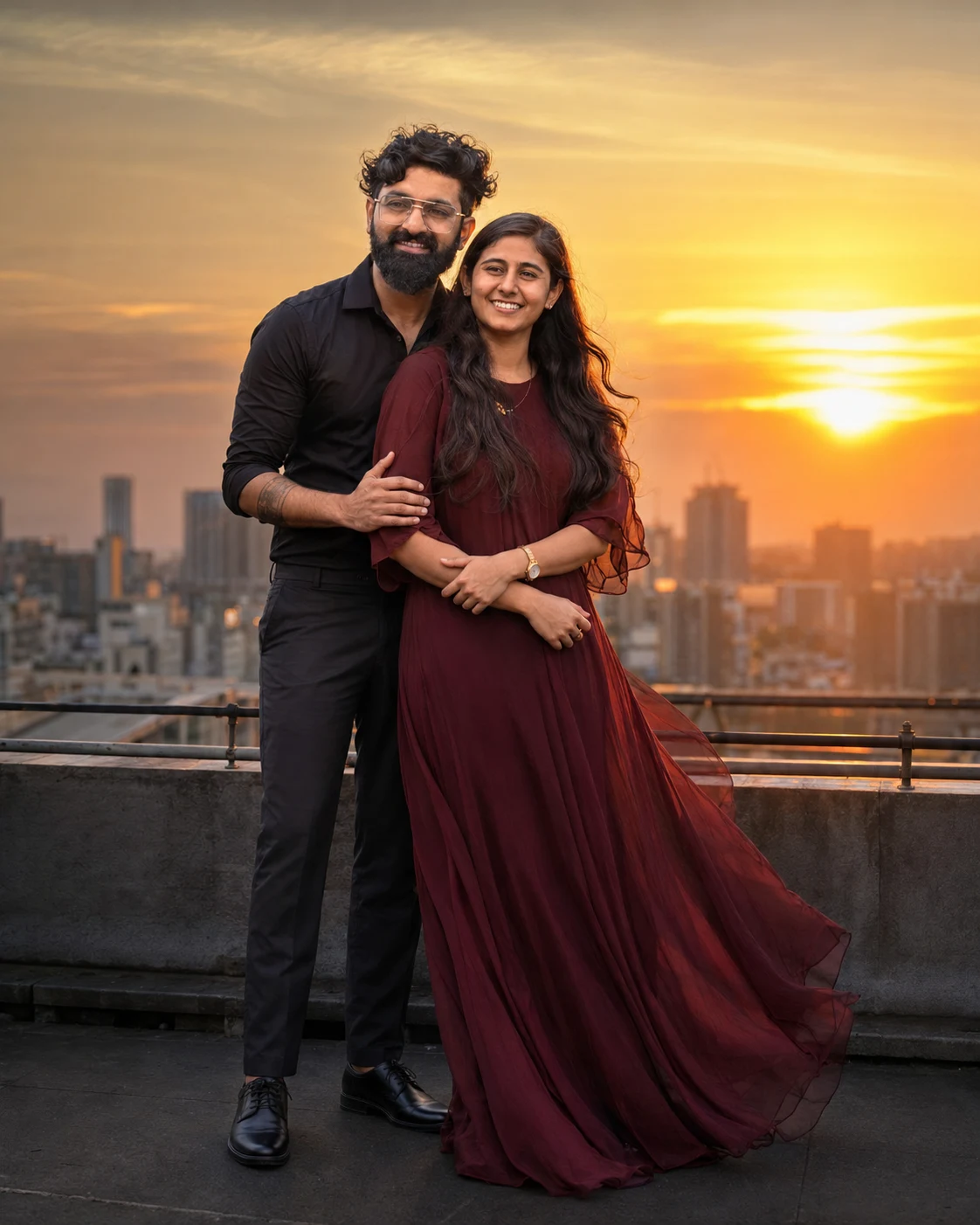
Sunset Rooftop Couple Cinematic Portrait
Create a realistic sunset rooftop couple portrait while preserving both faces, natural skin, body proportions, and recognizable identity from the uploaded photo.
Using the uploaded photo, create a photorealistic cinematic rooftop portrait of the same couple at sunset, preserving their recognizable identities exactly. KEEP - Keep both people’s facial structure, face shape, eye shape and natural eye colour unchanged. Keep each person’s natural skin tone, pores, texture, freckles, marks, facial asymmetry, hairline, hairstyle, and facial hair exactly as visible in the uploaded photo. Keep both people’s natural body proportions, height relationship, shoulder width, and overall physical build unchanged. Preserve their individual identity rather than generating new faces or beautifying them. CHANGE - Change the wardrobe to coordinated evening outfits: the man wears a clean black cotton shirt with tailored dark trousers, while the woman wears a flowing deep burgundy chiffon dress with subtle fabric movement. Change the pose so the man stands slightly behind the woman with one arm naturally around her waist, while she rests one hand gently on his forearm. Turn both bodies toward the sunset with relaxed, believable expressions. Change the background to a rooftop overlooking a distant city skyline. Change the lighting to warm late-sunset illumination with a soft golden rim around their hair. Apply a warm cinematic colour grade with controlled contrast. SCENE - Place the couple on an open urban rooftop during the final 20 minutes before sunset. The skyline should sit several metres behind them and remain softly blurred, with distant buildings visible as recognizable shapes rather than sharp details. Add only subtle natural wind movement to loose hair and dress fabric. LIGHT - Light both faces primarily from the front-left using the low warm sun, with gentle reflected rooftop light filling the opposite side. Keep the facial lighting soft enough to preserve skin texture, while the sunset creates a restrained golden edge light around hair and shoulders. Use approximately 4800K ambient fill with warmer direct sunlight. CAMERA - Photograph at 85mm, f/1.8, camera positioned at chest height, using full-body framing from head to shoes. Keep both faces sharp while allowing the skyline to fall into shallow depth-of-field blur. GRADE - Use warm amber highlights, natural skin tones, slightly lifted shadows, moderate contrast, and restrained cinematic grain. Keep the image realistic rather than heavily stylized. OUTPUT - Render in a vertical 4:5 aspect ratio at 2048 × 2560 resolution, with both people fully inside the frame and enough rooftop space around them. DO-NOT - No face slimming, no skin whitening, no changed eye colour, no plastic smoothing, no invented jewellery or tattoos, no altered facial structure, no duplicated limbs, no distorted hands, and no replacement faces.
Photo Guide
- Use a sharp photo at least 1500px wide with both faces clearly visible.
- Choose an eye-level or chest-height photo with both people facing the camera.
- Soft daylight on both faces helps preserve their real skin texture.
- Keep hairlines, facial hair, shoulders, and full body outlines visible.
- Avoid heavily filtered selfies; they can cause the sunset skin grade to drift.
How to Build
- 1Gemini: upload the couple photo and paste the full prompt.
- 2Choose image generation with the highest available quality setting.
- 3Set the canvas to portrait 4:5 before generating.
- 4Keep both people selected as identity references if the tool offers it.
- 5Generate once, then inspect faces, hands, pose, and sunset lighting.
- 6If faces drift, regenerate using the same photo and stress the KEEP list.
Pro Tips
- Use a front-facing source photo so facial proportions survive the pose change.
- Keep both faces similarly exposed so the sunset light does not flatten identity.
- Use a clear hairline photo so the golden rim light follows real hair placement.
- Avoid sunglasses because the eye shape and colour must remain unchanged.
- Choose a photo showing both bodies so the rooftop pose keeps proportions accurate.
Share This Prompt
About the Author
Naziya
Creative AI writer at MFDA, sharing trendy photo-editing prompts and fresh ideas for beautiful, stylish AI images.