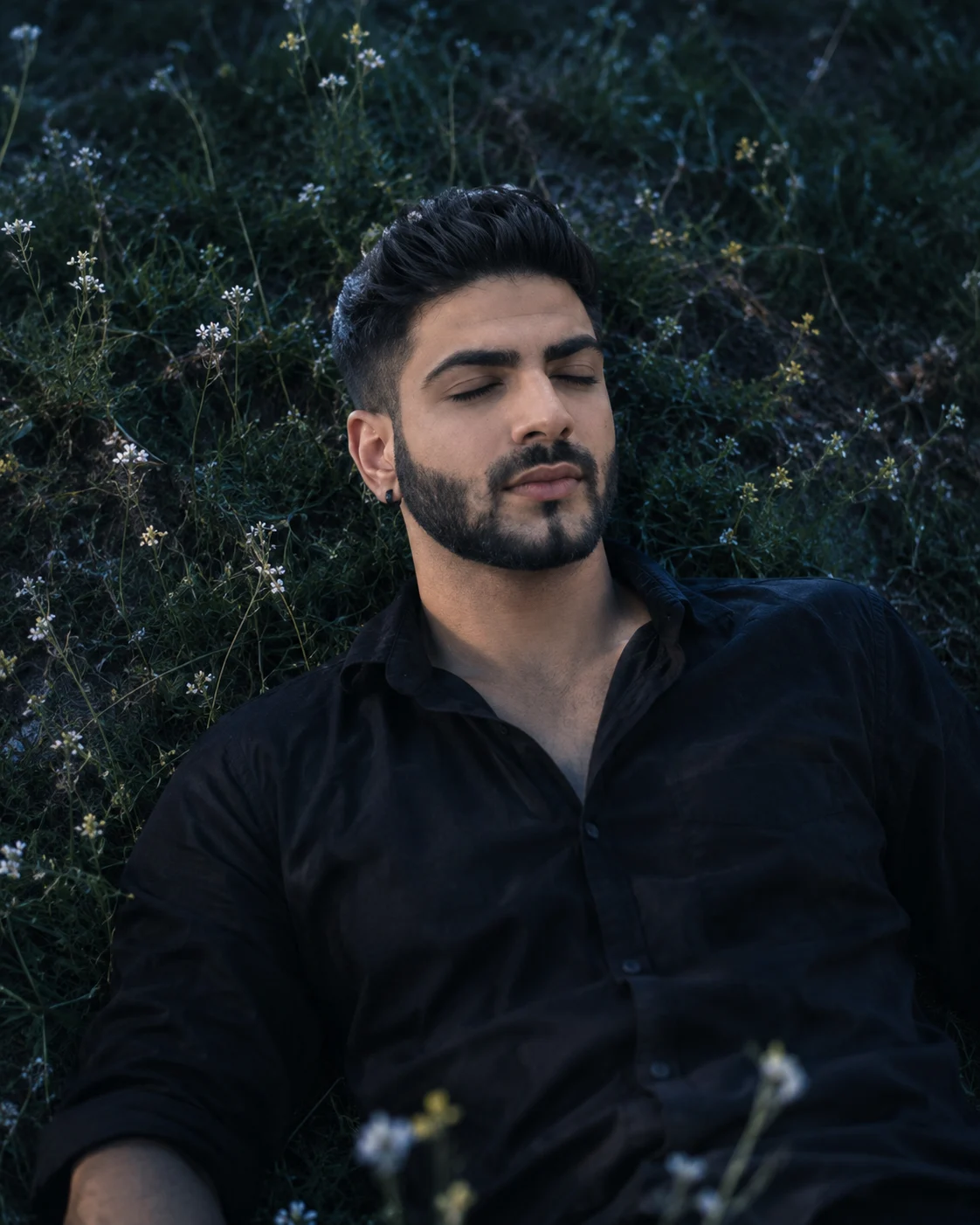
Starlit Meadow Night Sky Cinematic Male Portrait
Create a cinematic night portrait of yourself resting in a wildflower meadow beneath an indigo sky, with cool moonlight and natural facial detail.
Using the uploaded photo, create a photorealistic cinematic portrait of the same man resting peacefully on a grassy hillside beneath a deep indigo night sky, surrounded by tiny pale wildflowers. KEEP — Preserve the man's exact recognizable facial identity from the uploaded photo, including forehead shape, eyebrow placement, eye shape and natural eye colour, nose bridge and tip, lips, cheeks, cheekbones, jawline, chin, ears, facial width, and natural facial asymmetry. Keep his original skin tone, visible pores, fine lines, natural marks, and realistic skin texture. Preserve his hairline, hair density, individual hair strands, natural hairstyle, and visible facial hair pattern. Maintain his original neck, shoulder width, body proportions, and natural anatomy. His eyes must remain gently closed without altering their natural shape or colour. CHANGE — Dress him in a relaxed-fit black cotton shirt with a soft matte finish, natural creases, and an open collar. Position him reclining naturally on the hillside, with his head slightly turned, shoulders resting against the grass, and hands relaxed beside his body. Introduce cool moonlit highlights, deep blue shadows, muted vegetation, and a restrained celestial atmosphere. SCENE — Place him on a quiet grassy slope scattered with tiny ivory wildflowers, delicate stems, and uneven patches of dark foliage. A deep indigo sky and faint, softly blurred distant stars establish the nighttime setting. Keep the meadow visible around his head and shoulders, with foreground flowers gently out of focus. Do not add planets, glowing symbols, or fantasy objects. LIGHT — Use soft, cool moonlight from the upper left, creating believable highlights along his forehead, cheekbones, nose, and shirt folds. Add a subtle blue rim light along the hair and shoulder edges, while retaining natural facial shadows and realistic skin colour. CAMERA — Shoot from a slightly elevated overhead angle using an 85mm lens at f/2.0. Frame the head, shoulders, and upper torso with natural perspective, shallow depth of field, and realistic optical bokeh. GRADE — Apply an indigo-blue and charcoal colour palette with restrained silver highlights, rich blacks, soft contrast, gentle highlight roll-off, and subtle 35mm film grain. Keep skin tones natural rather than blue. OUTPUT — Vertical 4:5 aspect ratio, 2048 × 2560 pixels, photorealistic editorial quality, detailed skin, realistic fabric, and naturally rendered flowers. DO NOT slim the face, whiten the skin, change eye colour, smooth skin into plastic, invent jewellery or tattoos, alter facial identity, distort hands, or add text, logos, or watermarks.
Photo Guide
- Upload a sharp, high-resolution photo with the full face clearly visible.
- Choose a reference with even lighting and no strong colour cast.
- Keep the original hairline, eyebrows, nose, jawline, and facial hair visible.
- A daylight face photo blends better than a heavily blue-lit reference.
- Avoid blurry faces, beauty filters, and photos with deep facial shadows.
How to Build
- 1Open Gemini and start a new image-generation conversation.
- 2Upload your clearest face photo as the identity reference.
- 3Paste the complete prompt into the same conversation.
- 4Choose a vertical 4:5 portrait composition if aspect ratio is available.
- 5Set image quality to the highest available resolution.
- 6Generate the portrait and inspect facial identity, lighting, and hands.
- 7If the result is wrong, refine only the failed detail and regenerate.
Pro Tips
- Use a relaxed expression in the reference so closed eyes look natural.
- Choose a black or dark shirt reference to help preserve realistic shadows.
- Keep the moonlight cool but the skin neutral so the face stays lifelike.
- Request fewer visible stars if the sky competes with the subject.
- Keep foreground flowers softly blurred so facial details remain the focus.
Share This Prompt
About the Author
Naziya
Creative AI writer at MFDA, sharing trendy photo-editing prompts and fresh ideas for beautiful, stylish AI images.