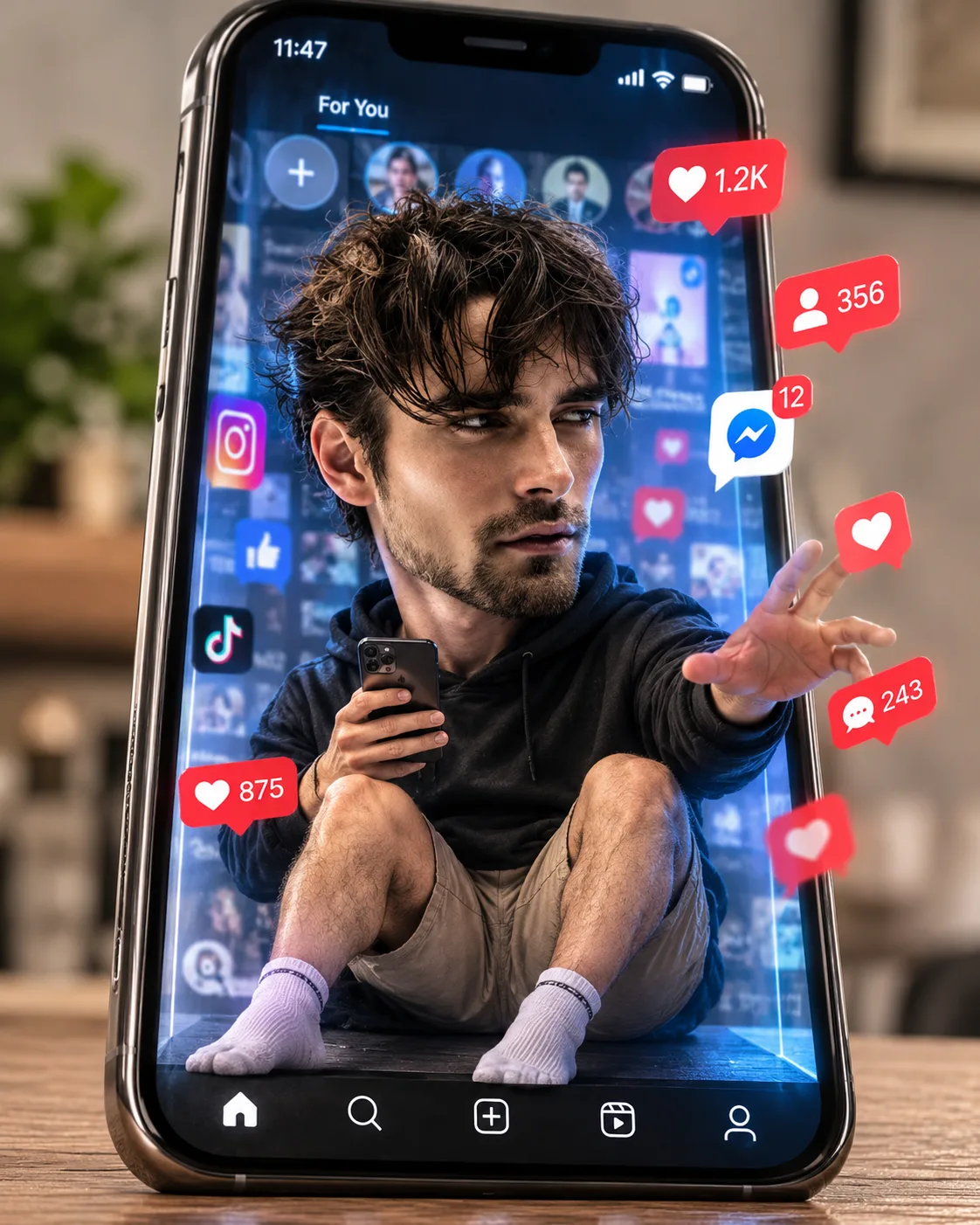
Social Media Addiction – Giant Phone Scroll Prison
Turn your photo into a funny miniature character trapped inside a giant smartphone, surrounded by endless notifications and scrolling distractions.
Using the uploaded photo, create an ultra-realistic humorous miniature portrait of the same recognizable person trapped inside an enormous modern smartphone screen, illustrating social media addiction through an exaggerated oversized head and a small, realistically proportioned body. Use a vertical 4:5 composition with detailed facial rendering and believable miniature scale. KEEP — Preserve the person's exact recognizable facial identity and original facial geometry from the uploaded photograph. Retain the original forehead proportions, facial width, eyebrow shape and placement, eye shape and natural eye colour, nose bridge and tip, lip contours, cheek volume, cheekbones, jawline, chin, ears, natural skin tone, visible pores, fine lines, facial marks and authentic skin texture. Preserve the original hairline, hairstyle, hair density, texture and colour, along with facial hair, moustache or stubble wherever naturally present. Maintain the person's original body proportions, shoulder width, natural build and recognizable physical characteristics. Do not replace, reconstruct, beautify or blend the face. The oversized head must retain the same facial anatomy rather than becoming a different cartoon character. CHANGE — Transform the body into a miniature version of the same person with a dramatically oversized head. Dress the character in a charcoal-black oversized cotton hoodie, dark beige cargo shorts and clean white ankle socks. Place him sitting helplessly inside a gigantic smartphone display, with knees slightly bent, one hand holding a tiny smartphone and the other reaching toward an endless stream of floating notifications. Give him exhausted half-open eyes, a naturally tired expression and slightly slouched shoulders. SCENE — Build a giant vertically positioned black smartphone with a glossy glass screen, thin metallic graphite edges and realistic reflections. Surround the character with floating heart notifications, message bubbles, follow alerts, red notification badges and scrolling social media icons. Add tiny digital interface elements behind him, creating the illusion of an endless scrolling prison. Keep the room background softly blurred in warm neutral grey tones. LIGHT — Use soft daylight entering from the upper left, supported by subtle cool-blue screen illumination across the face and hoodie. Maintain consistent highlights and natural shadows beneath the chin. CAMERA — Shoot with an 85mm portrait lens at f/2.8, positioned slightly below the smartphone's screen centre, keeping the face sharply focused and the distant interface elements softly blurred. GRADE — Apply a balanced cinematic colour grade with cool digital blues, muted charcoal shadows, natural skin tones and controlled highlights. Preserve realistic glass reflections and detailed fabric texture. OUTPUT — Vertical 4:5 Instagram portrait, high-resolution 4K rendering, crisp facial details, realistic miniature proportions and professional editorial photography quality. DO NOT — Change facial identity, slim the face, alter eye shape or colour, whiten skin, smooth natural pores, modify facial hair, invent jewellery or tattoos, distort hands, add extra fingers, or turn the face into an unrecognizable animated character.
Photo Guide
- Use a sharp, high-resolution front-facing portrait with visible facial details.
- Choose an eye-level photo so the original facial geometry remains clear.
- Use even lighting with visible eyes, eyebrows, nose and natural skin texture.
- Keep the original hairstyle and hairline unobstructed by hats or filters.
- A neutral expression blends well with the exhausted digital-addiction scene.
- Avoid sunglasses or heavy beauty filters that hide the eye and skin details.
How to Build
- 1Open Gemini or ChatGPT and select the image generation feature.
- 2Upload one clear photograph of the person whose identity must remain unchanged.
- 3Paste the complete prompt without removing the KEEP and CHANGE sections.
- 4Choose a vertical 4:5 aspect ratio and the highest available image quality.
- 5Generate the image with facial identity preservation enabled if available.
- 6If the face changes, regenerate using the original photo and reinforce KEEP.
Pro Tips
- Choose a photo with clearly visible eyes so the tired expression stays recognizable.
- Use natural hair visibility so the miniature character retains the original hairline.
- Avoid busy source backgrounds so the giant phone remains the visual focus.
- Keep the face near the centre of the screen for accurate facial proportions.
- Use a front-facing portrait so the oversized head does not distort facial geometry.
Share This Prompt
About the Author
Naziya
Creative AI writer at MFDA, sharing trendy photo-editing prompts and fresh ideas for beautiful, stylish AI images.