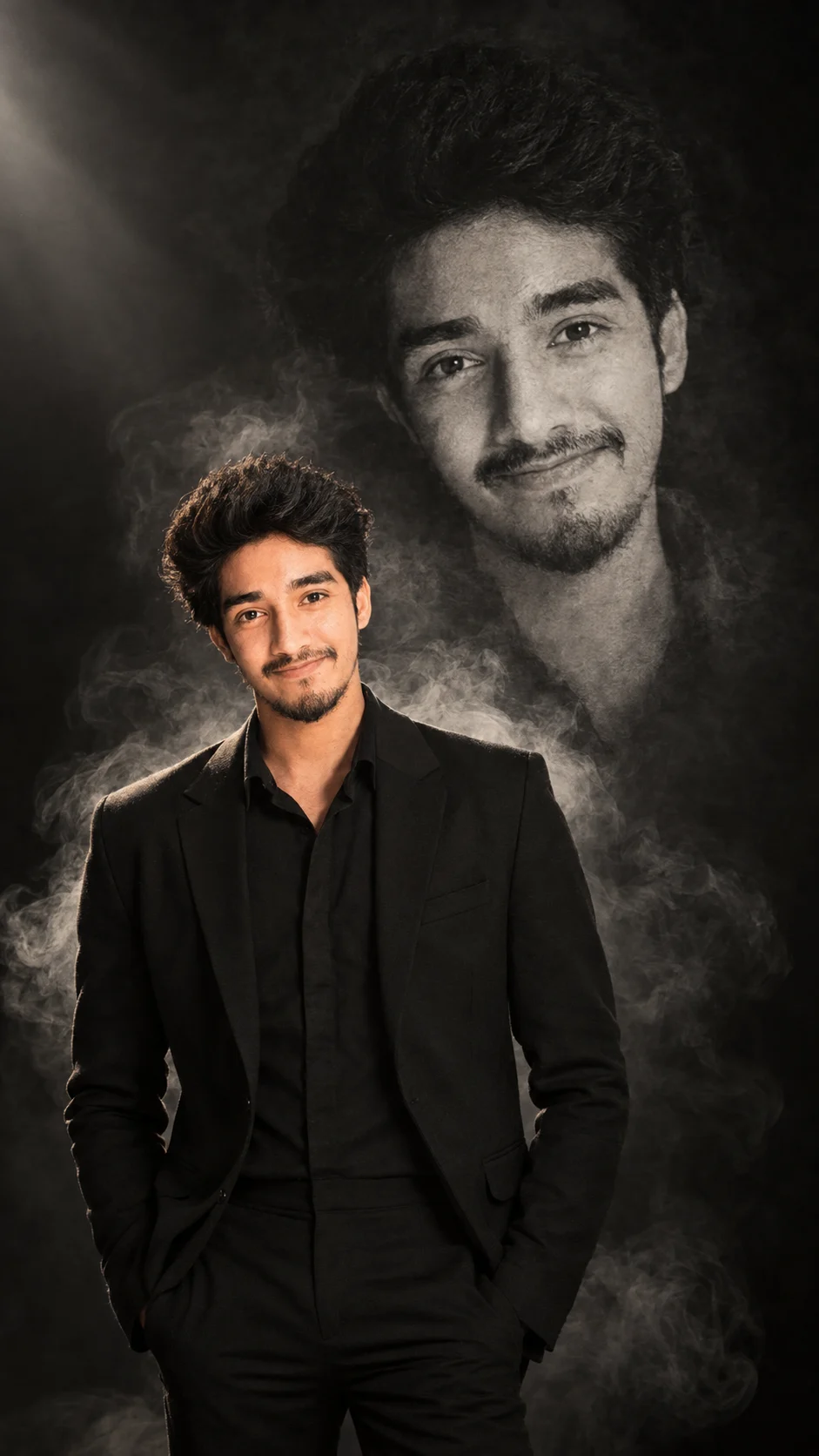
Smoke Sketch Twin Portrait
Create a cinematic studio portrait where your real appearance stays intact while a giant charcoal sketch of you forms from swirling smoke.
Using the uploaded photo, create a vertical cinematic editorial portrait of the same person standing in a dark studio while a giant charcoal-and-smoke version of them forms behind their body. KEEP: Keep the uploaded face structure exactly, including the jaw shape, cheekbone placement, chin shape, eye shape and eye colour, nose structure, lip shape, skin tone and natural skin texture. Keep the original hairline, hairstyle characteristics, facial hair if present, and natural body proportions. Keep the person's recognizable identity unchanged and use the uploaded face as the identity anchor throughout the image. CHANGE: Change the wardrobe to a tailored black cotton or matte wool outfit with clean construction and minimal visible accessories. Change the background to a nearly black studio filled with controlled grey smoke. Change the pose to a straight, confident standing position with the shoulders slightly angled and the head turned subtly toward the camera. Change the lighting to a single controlled studio spotlight from the upper front-left. Change the colour grade to muted charcoal, black, warm skin tones, and restrained highlights. SCENE: Place the person in a spacious black studio with a dark seamless backdrop. Dense smoke should curl upward behind the shoulders and expand into a large monochrome charcoal portrait of the same person. The illustrated twin should appear several feet behind the real subject and remain slightly softer at its outer edges. LIGHT: Use a large soft spotlight from camera-left and slightly above eye level, producing gentle shadow falloff across the opposite cheek. Add a weak rear rim light through the smoke so the real person's outline separates naturally from the dark background. CAMERA: Shoot at 85mm, f/2.0, camera at chest height, with the real face sharply focused and the smoke twin gradually softer with distance. GRADE: Use restrained blacks, warm-neutral skin, soft highlight roll-off, fine film grain, and low-saturation charcoal tones inspired by luxury monochrome editorial photography. OUTPUT: Create a high-resolution vertical 9:16 composition at 2160 × 3840 pixels. DO-NOT: no face slimming, no skin whitening, no changed eye colour, no plastic smoothing, no invented jewellery or tattoos.
Photo Guide
- Use a sharp photo with at least 1500px on the shortest side.
- A front or slight three-quarter face angle gives the smoke twin cleaner structure.
- Use even soft light so facial features remain visible for identity matching.
- Keep the full hairline and facial outline visible; avoid cropped heads.
- A dark outfit blends naturally into this charcoal-and-smoke studio look.
- Heavy beauty filters can erase texture and cause the face to drift.
How to Build
- 1Open Gemini and upload your clearest identity photo.
- 2Paste the full prompt and choose image generation.
- 3Set the canvas to vertical 9:16 if the tool offers aspect ratio.
- 4Keep the real face sharp while placing the smoke twin behind it.
- 5Check the eyes, jawline, hairline, and skin tone against the photo.
- 6If the first result is wrong, regenerate using the same photo and prompt.
Pro Tips
- Use a neutral expression so the smoke portrait can echo facial structure clearly.
- Keep both eyes unobstructed so the identity anchor remains strong.
- Choose matte black clothing so smoke edges remain visually distinct.
- Avoid busy backgrounds because they compete with the charcoal twin.
- Keep smoke behind the shoulders so it reads as one connected portrait.
Share This Prompt
About the Author
Naziya
Creative AI writer at MFDA, sharing trendy photo-editing prompts and fresh ideas for beautiful, stylish AI images.