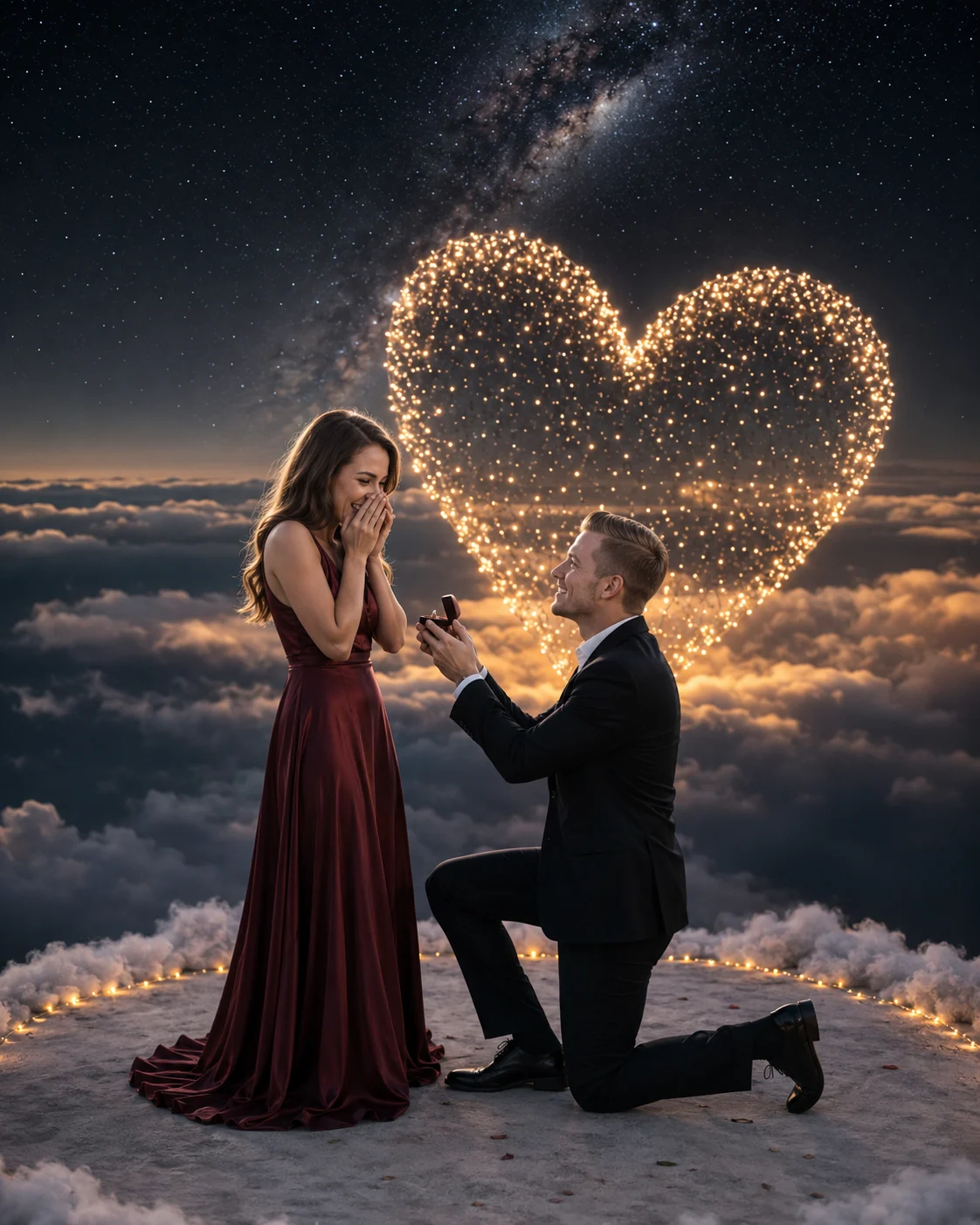
Sky Written With Light: Cinematic Proposal
Create a cinematic night proposal above the clouds, with a glowing heart of golden lights, moonlit faces, mist, and a realistic romantic film look.
Using the uploaded photo, create a photorealistic cinematic proposal scene high above the clouds at night, keeping the people recognisably identical to the uploaded subjects. KEEP - Keep the exact face structure, eye shape and eye colour, natural skin tone and visible skin texture, hairline, facial hair, and body proportions from the uploaded photo. Keep distinctive facial features, natural asymmetry, nose shape, lips, cheek structure, and jaw structure unchanged. Preserve each person's identity rather than generating a similar-looking replacement. CHANGE - Change the wardrobe into elegant evening proposal clothing: the man wears a tailored black wool suit with a crisp white cotton shirt, while the woman wears a flowing deep burgundy satin evening dress. Change the pose so the man kneels on one knee and presents an engagement ring toward the woman, while she stands facing him with a natural emotional reaction. Change the background into a cloud-top night setting with illuminated mist, a Milky Way sky, and thousands of tiny warm-gold lights forming one enormous glowing heart behind the couple. SCENE - Place the couple on a small circular cloud platform surrounded by soft white mist. It is deep night, with the Milky Way clearly visible above and behind them. Keep the golden heart large but several metres visually behind the couple, with its lights slightly softened by atmospheric haze rather than appearing pasted onto the sky. LIGHT - Use a soft cool moonbeam from high camera-left to illuminate both faces and the upper edges of their clothing. Add a subtle warm reflection from the golden heart behind them, especially along the hair and shoulders. Keep the light direction consistent across faces, bodies, ring, mist, and clothing. CAMERA - Shoot at 85mm, f/1.8, camera at chest height, with the couple sharply focused and the distant heart, stars, and clouds falling into gentle optical blur. GRADE - Use a deep navy-black night grade with warm gold highlights, restrained contrast, natural skin colour, soft highlight roll-off, and subtle cinematic film grain. OUTPUT - Create a vertical 4:5 composition at 4096×5120 resolution, keeping both full figures and the glowing heart comfortably inside the frame. DO-NOT - No face slimming, no skin whitening, no changed eye colour, no plastic smoothing, no invented jewellery or tattoos.
Photo Guide
- Use a sharp photo of both faces with enough resolution for facial details.
- A front or three-quarter angle keeps the original eye shape easier to preserve.
- Use even daylight so natural skin texture is clearly visible before editing.
- Keep the hairline, jaw, ears, and facial outline unobstructed.
- Avoid sunglasses, heavy filters, or cropped faces; they can cause identity drift.
- A dark indoor selfie is worse here because the moonlit face needs clean detail.
How to Build
- 1Use Gemini and choose image generation/editing with the uploaded photo.
- 2Upload the clearest source photo containing both people.
- 3Paste the full prompt without changing the KEEP section.
- 4Choose a 4:5 vertical output and highest available resolution.
- 5Check faces first, then inspect the ring, golden heart, mist, and clothing.
- 6If faces drift, regenerate using the same photo and strengthen identity preservation.
Pro Tips
- Use a photo with matching face angles so both identities remain stable.
- Keep the original facial hair visible so the groom's identity does not change.
- Avoid extreme smiles because subtle expressions fit the moonlit scene better.
- Keep the golden heart behind the couple so it reads as distant light.
- Use a clear hairline in the source so the moon rim light looks natural.
Share This Prompt
About the Author
Naziya
Creative AI writer at MFDA, sharing trendy photo-editing prompts and fresh ideas for beautiful, stylish AI images.