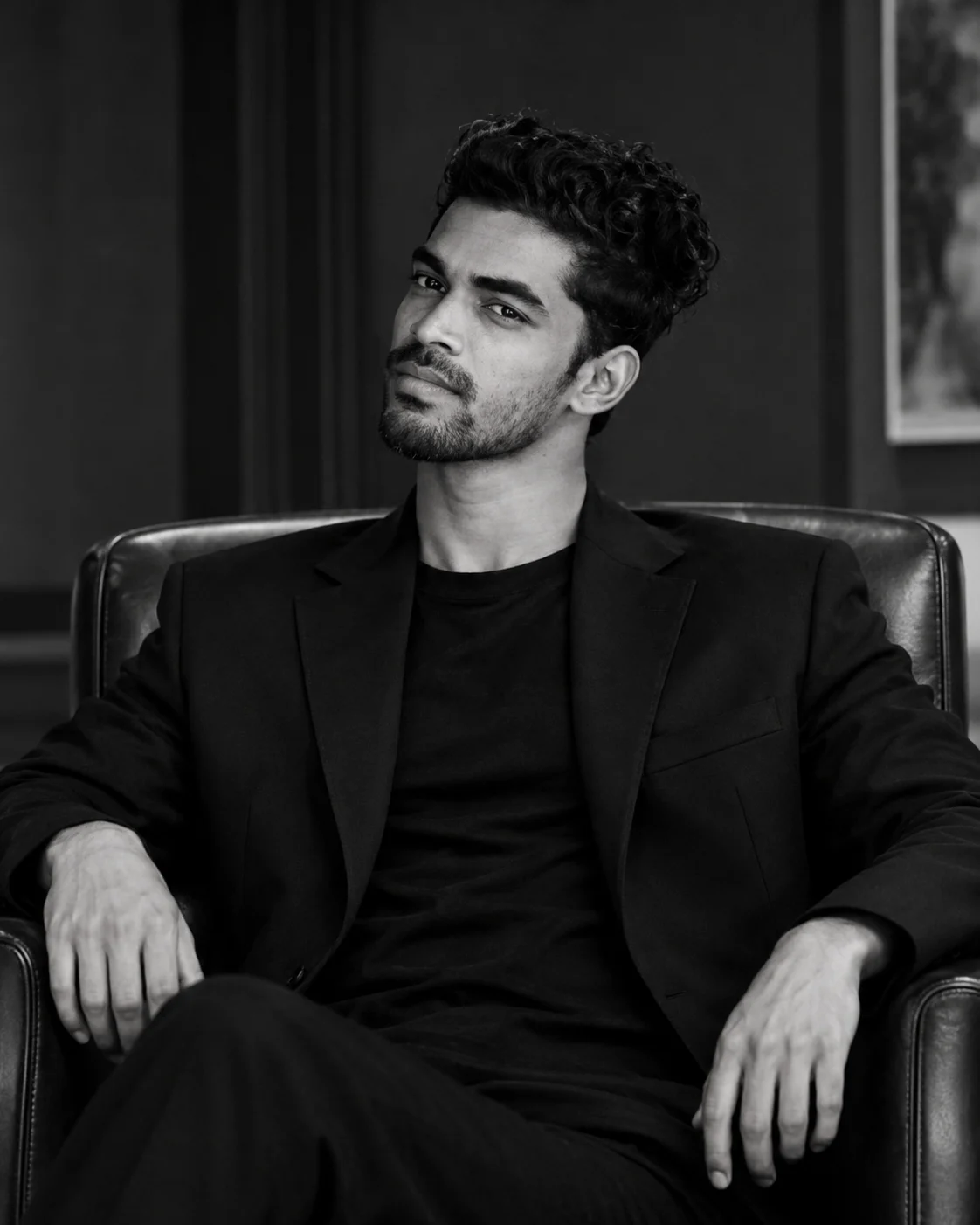
Silent Chairman Black Suit Luxury Editorial Portrait
Create a powerful luxury chairman portrait in a black tailored suit, seated in a leather armchair with dramatic overhead studio lighting.
Using the uploaded photo, create an ultra-realistic black-and-white luxury fashion editorial portrait of the same recognizable man seated in a sophisticated executive leather armchair, projecting quiet authority through a composed posture and direct eye contact. Use a vertical 4:5 upper-body composition with a slightly low camera perspective. KEEP — Preserve the man's exact facial identity and original facial geometry from the uploaded photograph. Retain his natural forehead height, facial width, eyebrow shape and placement, original eye shape and natural eye colour, nose bridge and tip, lip contours, cheek volume, cheekbones, jawline, chin, ears and natural facial asymmetry. Maintain his original skin tone, pores, fine lines, texture and natural age. Keep his existing hairline, hairstyle, hair density, texture and colour unchanged. Preserve existing facial hair exactly, including its natural outline and density. Retain his authentic neck width, shoulder structure, body proportions and recognizable physical build. Do not replace his face with a generic fashion model. CHANGE — Dress him in a precisely tailored black single-breasted suit jacket with structured shoulders, narrow notch lapels and a matte wool finish. Add a plain black premium cotton crew-neck shirt underneath. Remove visible accessories unless they already belong to the reference identity and are essential to preserving its appearance. Position him in a deep black or charcoal-brown leather executive armchair with broad padded armrests. SCENE — Place him inside a minimalist private executive office at approximately 8 PM. The dark charcoal background should contain subtle architectural wall panels, softly blurred to keep attention on his face. Both forearms rest naturally on the chair armrests, with relaxed fingers clearly visible. His back remains comfortably supported, shoulders level and chest naturally open. His head faces forward with a steady, confident gaze directly into the camera. LIGHT — Use a focused overhead softbox positioned slightly in front of the subject, approximately 35 degrees above eye level. Add gentle frontal fill to preserve detail beneath the eyebrows and chin. Maintain realistic shadow transitions across the cheeks and neck, with a faint rear rim light separating the black jacket from the background. Use neutral 5200K lighting translated into grayscale. CAMERA — Photograph at 85mm, f/2.0, ISO 200, with the camera positioned slightly below chest height and angled upward. Keep the eyes and facial features critically sharp while allowing the office background to fall into soft optical blur. Ensure both hands and the armchair's upper structure remain naturally proportioned. GRADE — Apply a refined monochrome silver-gelatin treatment with deep charcoal blacks, controlled highlights, detailed midtones and subtle fine-grain texture. Avoid crushed facial shadows and artificial HDR contrast. OUTPUT — Vertical 4:5 aspect ratio, 8K-quality detail, professional luxury magazine photography, realistic anatomy and natural skin rendering. DO NOT slim the face, whiten the skin, change eye colour, smooth skin into plastic, alter facial hair, invent jewellery or tattoos, distort fingers, exaggerate shoulders or modify the person's identity.
Photo Guide
- Upload a sharp, high-resolution photo with clearly visible facial features.
- Choose a straight-on or slightly low-angle photograph for natural perspective.
- Use even frontal lighting so the original facial structure remains readable.
- Keep the forehead, hairline, jawline and existing facial hair unobstructed.
- A dark outfit helps preview the black-suit transformation more accurately.
- Avoid heavily shadowed selfies that hide the eyes and cheek structure.
How to Build
- 1Open Gemini or ChatGPT and select image generation.
- 2Upload your original photograph as the identity reference.
- 3Paste the complete prompt content without removing KEEP or CHANGE.
- 4Choose portrait orientation and set the aspect ratio to 4:5.
- 5Select the highest available image quality or resolution setting.
- 6Generate the portrait and inspect facial identity and hand anatomy.
- 7If the first result is wrong, regenerate with specific corrections.
Pro Tips
- Use a photograph with both eyes clearly visible so eye geometry stays accurate.
- Choose a relaxed expression so the chairman pose does not distort the face.
- Keep the original hairline visible so the overhead light does not invent a new one.
- Request visible fingers resting on both armrests to avoid hidden-hand distortions.
- Keep the leather chair dark so it blends naturally into the monochrome setting.
- Preserve gentle frontal fill so the eyes remain detailed beneath the overhead light.
Share This Prompt
About the Author
Naziya
Creative AI writer at MFDA, sharing trendy photo-editing prompts and fresh ideas for beautiful, stylish AI images.