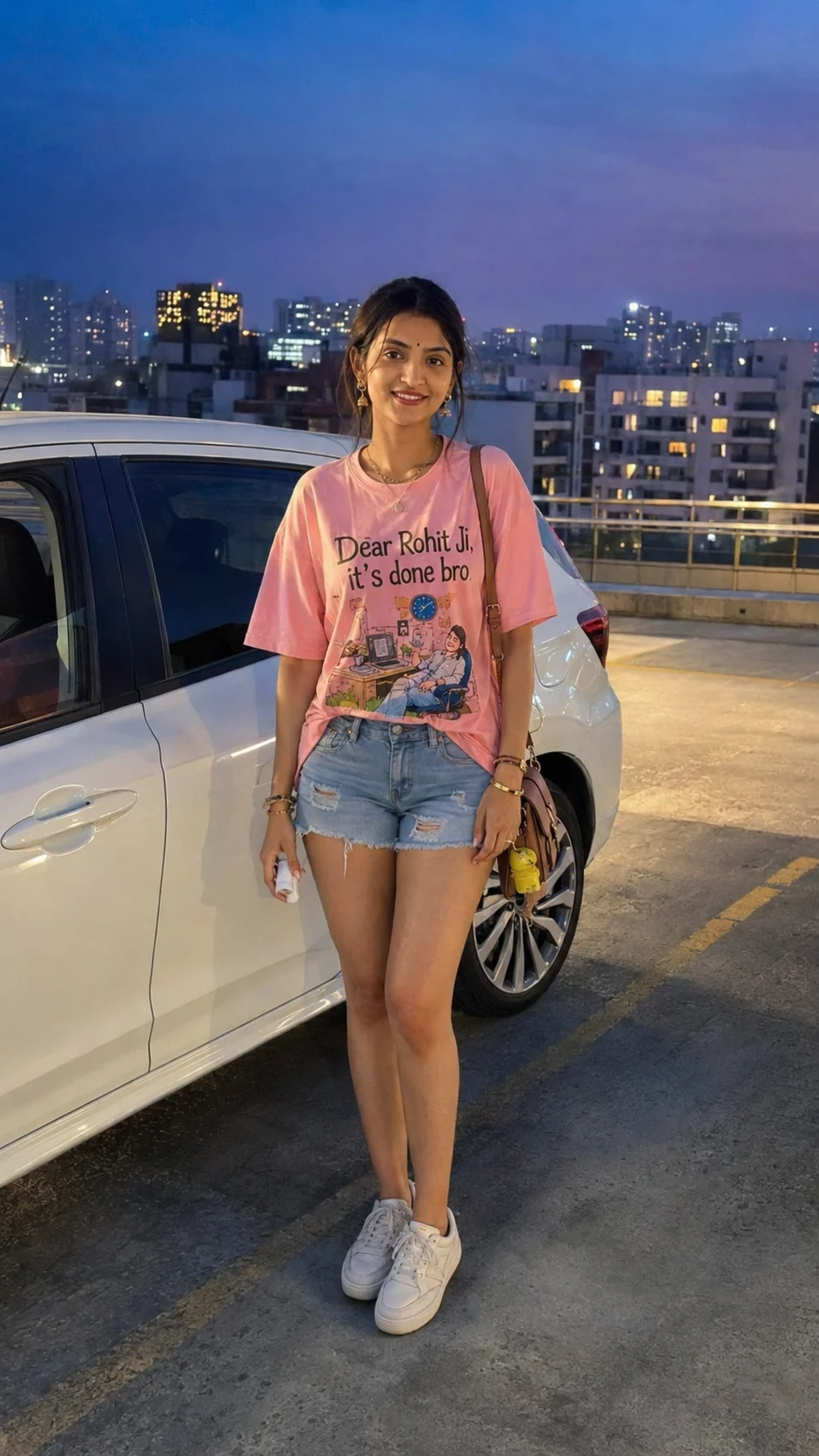
Rooftop Parking Blue Hour Girl Portrait AI Prompt
Create a realistic rooftop parking portrait at blue hour with your original face, pink graphic T-shirt, denim shorts, white car, and city lights.
Using the uploaded photo, create a photorealistic vertical 9:16 full-body candid street-style portrait of the same woman standing beside a white hatchback on a rooftop parking deck just after sunset. KEEP — Preserve her exact facial identity, including forehead shape, eyebrow placement, eye shape and natural eye colour, nose bridge and tip, lip shape, cheeks, cheekbones, jawline, chin, ears, facial width, and natural asymmetry. Keep her original skin tone, visible pores, fine texture, youthful appearance, and natural smile with visible teeth. Preserve her dark hair in its casual, slightly messy updo, including loose face-framing strands and the original hairline. Maintain her head tilt, body proportions, shoulder width, neck length, limb proportions, and relaxed posture. Keep the original oversized pink cotton graphic T-shirt with its colourful illustration and exact wording, “Dear Rohit Ji, it's done bro”. Retain the light-blue distressed denim shorts, frayed hems, thin necklace, small earrings, wrist bangles, crossbody bag, and bright yellow accessory visible in the reference. CHANGE — Place her beside a realistically proportioned white hatchback, with its side windows, door handles, and glossy painted panels visible. Position her slightly off-centre, with one hand relaxed near her thigh and the other holding a small white object below the shirt print. Keep her full outfit visible from head to shoes. SCENE — Set the portrait on an urban rooftop parking deck in an Indian city at blue hour. Show distant apartment buildings, illuminated windows, concrete flooring, faint parking lines, and scattered amber city lights. Keep the skyline softly blurred but recognizable, with the woman and shirt lettering in sharp focus. LIGHT — Use cool blue ambient twilight from the open sky, balanced by warm amber practical lights in the background. Light her face naturally from the front and slightly above, maintaining realistic skin colour, soft facial shadows, and believable contact shadows beneath her shoes and the car. CAMERA — Simulate a handheld smartphone photograph using a 28mm equivalent focal length at approximately f/2.8, camera positioned around waist height with a slight upward angle. Avoid perspective distortion and keep the full body comfortably inside the frame. GRADE — Apply muted blue-hour blues, dusty lavender near the horizon, restrained amber highlights, natural pink fabric colour, moderate contrast, and subtle photographic grain. Avoid excessive HDR, artificial bokeh, and oversaturated neon tones. TEXT — Reproduce “Dear Rohit Ji, it's done bro” exactly, with correct spelling, apostrophe, word order, and readable individual letters. Keep the print on a visible, relatively flat area of the shirt, unobstructed by the bag strap, hands, hair, or deep folds. Preserve the original colourful illustration and natural printed-ink texture. OUTPUT — Generate one photorealistic vertical 9:16 image at 1080 × 1920 pixels, with natural proportions, detailed fabric texture, and authentic nighttime exposure. DO NOT slim or reshape the face, whiten the skin, change eye colour, smooth skin into plastic, alter body proportions, invent jewellery or tattoos, change the original shirt design, misspell its text, distort the car, or crop the feet.
Photo Guide
- Upload the highest-resolution photo with the face clearly visible.
- Use a front-facing or three-quarter view to retain facial proportions.
- Keep the original pink shirt print visible and sharp in the reference.
- Include the hairline, accessories, shorts, and full body where possible.
- A natural daylight reference helps retain accurate skin colour at blue hour.
- Obstructed shirt lettering is the main risk to text accuracy.
How to Build
- 1Open Gemini and select image generation with photo upload enabled.
- 2Upload your original photo as the identity and styling reference.
- 3Paste the complete prompt into the image-generation input.
- 4Choose a 9:16 portrait aspect ratio if the setting is available.
- 5Set output resolution to 1080 × 1920 if supported.
- 6Check the face, shirt lettering, accessories, and full-body framing.
- 7If the result is wrong, regenerate with a specific correction instruction.
Pro Tips
- Keep the shirt front facing the camera so its wording stays readable.
- Keep the bag strap away from the print to prevent letters being obscured.
- Use restrained blue lighting so the original skin tone remains accurate.
- Keep the camera near waist height to avoid enlarged head proportions.
- Leave space below the shoes so the full outfit is not accidentally cropped.
- If lettering remains incorrect, replace it with edited text after generation.
Share This Prompt
About the Author
Naziya
Creative AI writer at MFDA, sharing trendy photo-editing prompts and fresh ideas for beautiful, stylish AI images.