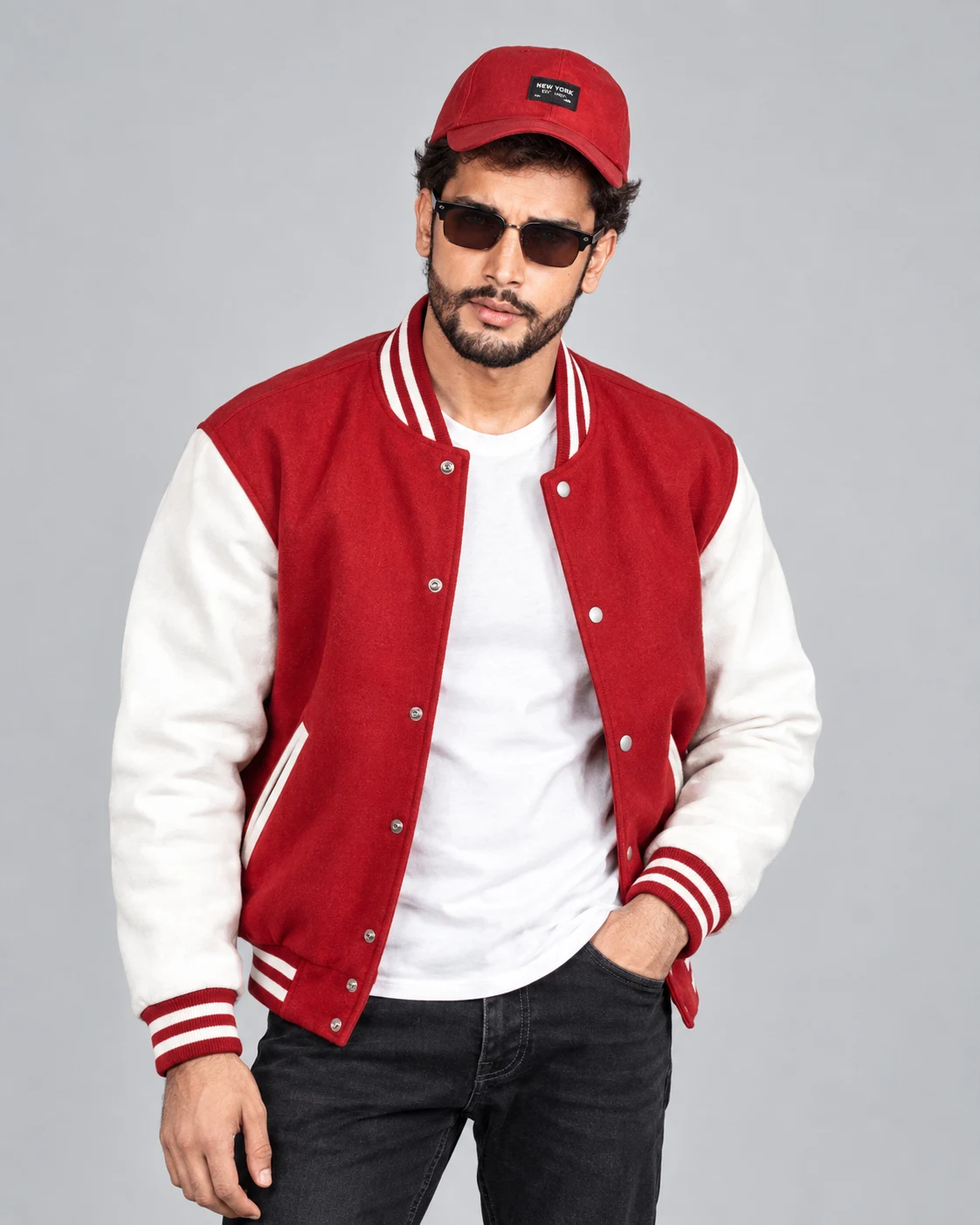
Red Varsity Jacket Streetwear Portrait With Cap and Sunglasses
Create a sporty streetwear portrait with a red-and-white varsity jacket, baseball cap, dark sunglasses and clean studio lighting while preserving your identity.
Using the uploaded photo, create a photorealistic men's streetwear fashion portrait featuring a red-and-white varsity jacket, white T-shirt, black jeans, red baseball cap and dark sunglasses against a clean light-gray studio background. KEEP — Preserve the exact identity of the person in the uploaded photo. Keep the original face shape, forehead width, cheekbone placement, jawline, chin, nose bridge and tip, lip shape, eyebrow position, eye shape and natural eye colour unchanged. Retain the original skin tone, visible pores, natural skin texture, facial asymmetry, hairline, hairstyle, facial hair and body proportions. Keep the person's recognizable age and natural expression. The face must remain the same person, not a similar-looking model. Preserve the original shoulder width, neck proportions and natural body build. CHANGE — Replace the clothing with a red-and-white varsity jacket made from matte wool-blend fabric, featuring white sleeves, ribbed striped cuffs, a striped collar and realistic stitched seams. Add a plain white cotton crew-neck T-shirt underneath and straight-fit black denim jeans with visible twill texture. Place a red cotton baseball cap with a curved brim on the head and dark rectangular sunglasses with glossy black frames. Keep accessories minimal and consistent with the reference person's existing visible jewellery. SCENE — Position the subject standing upright in a relaxed, confident pose, body turned slightly three-quarters while the face points toward the camera. Let both arms rest naturally, with one hand near a jeans pocket. Use a seamless light-gray studio backdrop without furniture, props or visible texture. LIGHT — Use a large softbox positioned in front and slightly to camera-left, with gentle fill from the opposite side. Keep the face, red jacket and white sleeves evenly exposed, with soft shadows beneath the chin and natural highlights on the sunglasses. Use neutral daylight-balanced lighting around 5500K. CAMERA — Shoot at eye level with an 85mm portrait lens at f/4. Frame vertically from the head to the upper thighs, keeping the face and jacket stitching sharp while the background remains smooth. GRADE — Apply neutral commercial fashion colour grading, balanced contrast, realistic skin colour and rich red fabric without oversaturation. Preserve detail in the white sleeves and black denim. OUTPUT — Generate a high-resolution, photorealistic 4:5 vertical portrait with realistic anatomy, detailed fabric and natural skin texture. DO NOT slim the face, whiten the skin, change eye colour, smooth skin into plastic, alter body proportions, invent jewellery or tattoos, distort hands, or replace the person's identity.
Photo Guide
- Upload a sharp, high-resolution photo with the face clearly visible.
- Choose a front-facing or slight three-quarter angle for accurate facial matching.
- Use even daylight so skin texture remains clear without harsh shadows.
- Keep the forehead and hairline visible; the red cap will cover part of them.
- Avoid heavy filters, motion blur or sunglasses in the reference photo.
How to Build
- 1Open Gemini or ChatGPT and select image generation.
- 2Upload one clear photo of the person whose identity must be preserved.
- 3Paste the complete prompt into the image-generation message.
- 4Choose a 4:5 vertical portrait ratio if the tool offers aspect-ratio controls.
- 5Generate the image and check the face, cap, jacket colours and hand anatomy.
- 6If the first result is wrong, regenerate with a specific correction to that detail.
Pro Tips
- Use a photo with visible forehead and hairline so the cap fits naturally.
- Choose a red cap close to the jacket's red tone for a coordinated outfit.
- Keep the white sleeves evenly lit so wool texture does not disappear.
- Use a relaxed standing reference to reduce unnatural shoulders and hands.
- If sunglasses hide too much of the face, request a slightly lower frame position.
Share This Prompt
About the Author
Naziya
Creative AI writer at MFDA, sharing trendy photo-editing prompts and fresh ideas for beautiful, stylish AI images.