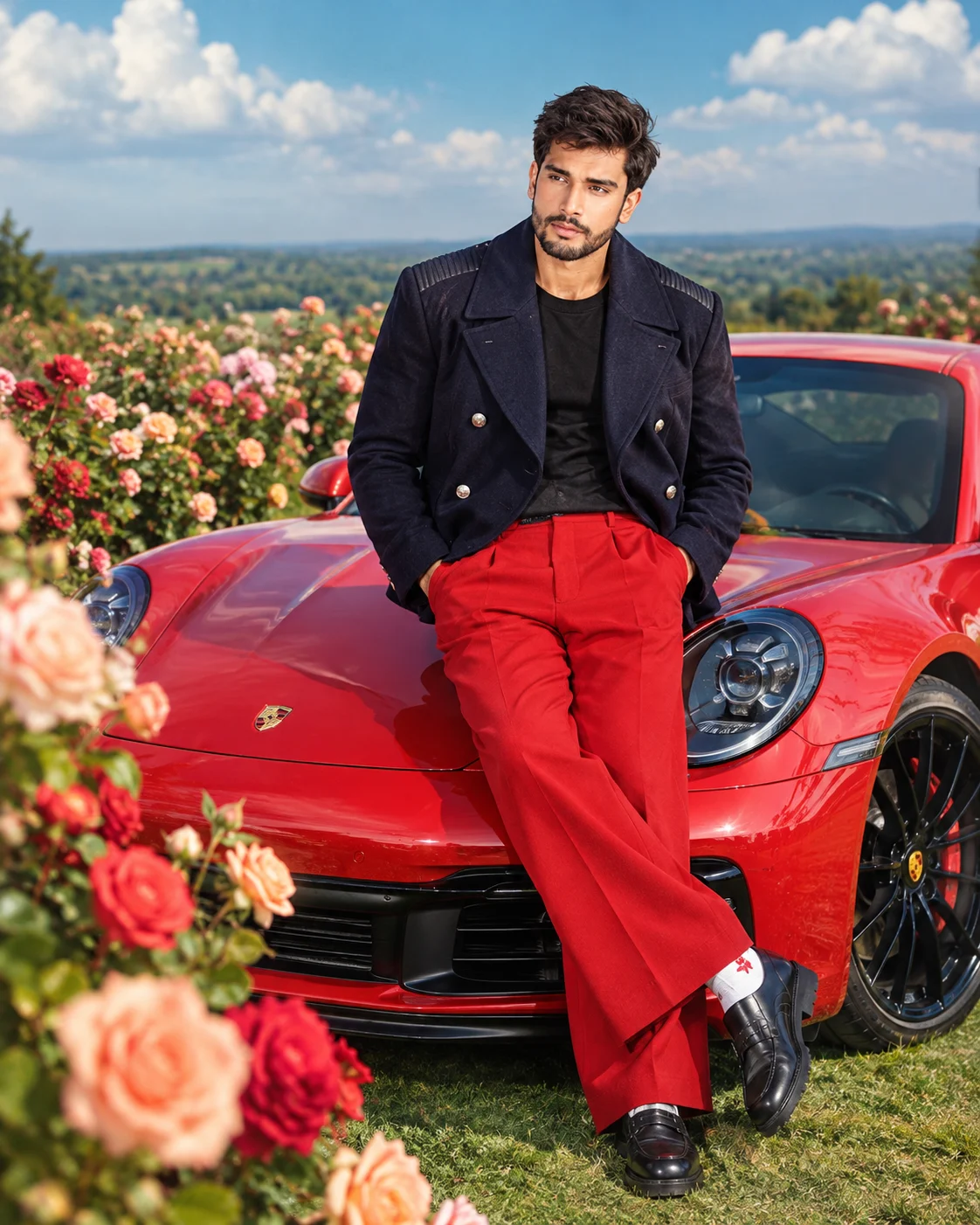
Red Porsche Rose Garden Luxury Fashion Portrait
Create a luxury fashion portrait beside a glossy red Porsche 911 in a rose garden, with a navy pea coat, vivid red trousers, and cinematic daylight.
Using the uploaded photo, create a photorealistic luxury fashion editorial portrait of the same person leaning casually against the front-side hood area of a glossy red Porsche 911 in an expansive rose garden. KEEP — Preserve the person's exact recognizable facial identity, including forehead shape, eyebrow placement, eye shape and natural eye colour, nose bridge and tip, lips, cheeks, cheekbones, jawline, chin, ears, facial width, and natural asymmetry. Keep the original skin tone, visible pores, fine lines, pigmentation, and realistic skin texture. Preserve the natural hairline, hair density, hair texture, and hairstyle, along with any visible facial hair. Maintain the person's original body proportions, shoulder width, neck, arms, hands, height relationship, and natural anatomy. Keep the face clearly recognizable and avoid blending it with another identity. CHANGE — Dress the subject in a dark navy double-breasted cropped wool pea coat with structured lapels, metallic silver-tone buttons, and subtle textured shoulder panels. Add a plain black T-shirt, vivid red wide-leg trousers, polished black leather platform shoes, and white socks with small red graphic details. Add black rectangular sunglasses only if requested: [sunglasses preference]. Pose the subject with both hands inside the trouser pockets, one leg slightly crossed over the other, torso angled gently toward the camera, and gaze directed to the left off-camera. Give the portrait a relaxed, confident editorial mood. SCENE — Place a bright red Porsche 911 beside and behind the subject, with rounded headlights, black wheels, glossy reflective paint, and realistic body contours. Surround the car with lush green grass and dense rose bushes. Large peach, coral, pink, and red roses fill the left foreground, softly blurred near the lens. Extend the garden into open countryside beneath a deep turquoise-blue sky with large white clouds. Keep the man and car prominent in the center-right. Set the scene in bright late-morning daylight. LIGHT — Use warm natural sunlight from the upper left, illuminating the face evenly while creating soft shadows beneath the coat lapels and chin. Match the highlights on the man's skin, clothing, and car to the same light direction. Keep the red paint reflective without clipping its highlights. CAMERA — Simulate a professional full-frame camera with an 85mm lens at f/2.8, positioned around chest-to-eye height. Use shallow depth of field, sharp facial details, natural perspective, and realistic optical falloff. Keep the subject sharply focused while the nearest roses blur gently. GRADE — Apply sophisticated fashion-magazine colour grading with rich reds, deep navy, natural greens, clean highlights, balanced contrast, and realistic skin tones. Preserve wool fibres, leather grain, individual hair strands, flower petals, and natural reflections. OUTPUT — Generate a vertical 4:5 portrait at the highest available resolution, preferably 2048 pixels or higher on the long edge. Keep the entire pose, shoes, car details, and foreground roses compositionally coherent. DO NOT alter facial identity, slim the face, whiten the skin, change eye colour, reshape the jaw, modify body proportions, apply plastic skin smoothing, invent jewellery or tattoos, distort hands, change the coat or trouser colours, or create inaccurate vehicle geometry.
Photo Guide
- Use a sharp, high-resolution photo with clearly visible facial features.
- Choose a front-facing or three-quarter angle with the hairline unobstructed.
- Use even daylight so the face blends naturally into the outdoor garden.
- Keep shoulders and upper torso visible to guide the relaxed leaning pose.
- A daylight reference blends better with the sunlit roses and glossy red Porsche.
- Avoid heavy filters, deep facial shadows, and sunglasses hiding the eyes.
How to Build
- 1Open Gemini and choose image generation with photo upload enabled.
- 2Upload your clearest portrait as the identity reference.
- 3Select a 4:5 vertical aspect ratio if the tool offers it.
- 4Paste the complete prompt into the image-generation instruction field.
- 5Generate the image at the highest available quality setting.
- 6If the face or car looks wrong, strengthen reference guidance and regenerate.
Pro Tips
- Use a clear face reference so the jawline and eye spacing remain consistent.
- Keep the navy coat and red trousers explicit so the outfit colours do not drift.
- Describe roses on the left to preserve the intended foreground composition.
- Request matching sunlight on the face and hood so the subject does not look pasted in.
- Keep the 85mm perspective to avoid exaggerated car proportions near the camera.
- If sunglasses hide too much identity, remove them for the first generation and edit later.
Share This Prompt
About the Author
Naziya
Creative AI writer at MFDA, sharing trendy photo-editing prompts and fresh ideas for beautiful, stylish AI images.