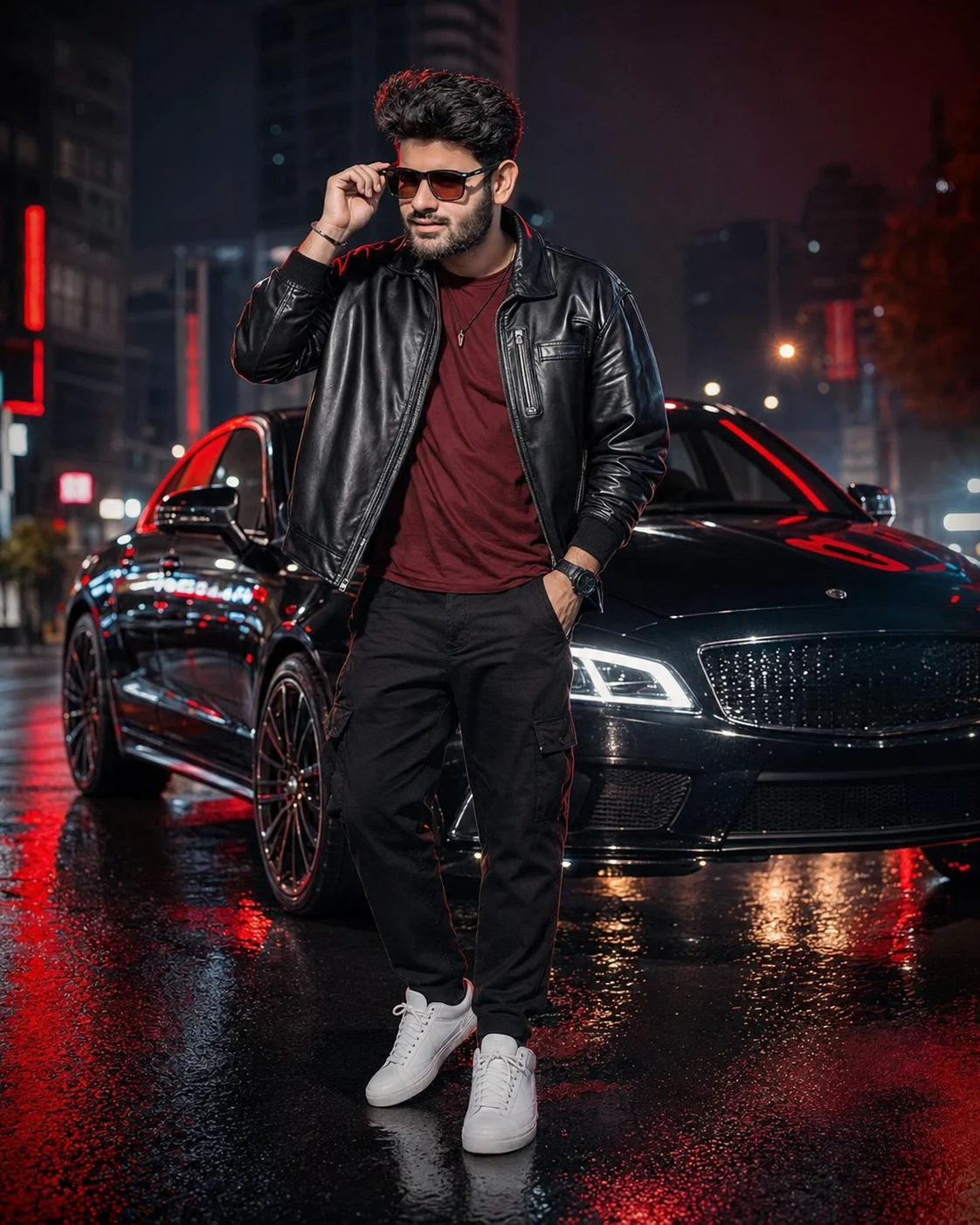
Red Neon Urban King Fashion Portrait
Create a full-body night fashion portrait with your real facial identity, black leather styling, red neon reflections, and a luxury city backdrop.
Using the uploaded photo, create a photorealistic full-body cinematic fashion portrait of the same person in a rain-soaked luxury city street at night. KEEP: Keep the exact face structure, eye shape and natural eye colour, nose, lips, jawline, cheek structure, skin tone, natural skin texture, hairline, hairstyle, facial hair pattern, and recognizable facial details from the uploaded photo. Keep the person's natural body proportions, approximate height-to-width relationship, shoulder structure, hand size, and overall physique. Do not reshape the face or body to match a model. CHANGE: Change the wardrobe to a premium black oversized leather jacket over a fitted deep-red cotton T-shirt, relaxed black tailored cargo trousers, clean white high-top sneakers, a black luxury-style wristwatch, and minimal silver accessories. Change the pose to a confident stance with one shoulder slightly turned toward the camera, one hand inside a trouser pocket, and the other hand naturally adjusting black sunglasses. Change the setting to a wet modern city street with a black luxury sports sedan behind the subject. Change the lighting to strong red rim light with cool blue shadow fill. Change the colour grade to a high-contrast blue-and-red cinematic treatment. SCENE: Place the subject on reflective wet asphalt at night. A sleek black sports sedan sits behind him at a three-quarter angle, with bright headlights glowing through light atmospheric haze. Tall modern buildings, blurred red signage, and architectural lights remain in the distance. Keep the background noticeably softer than the subject while retaining recognizable red reflections across the road and vehicle. LIGHT: Use a soft frontal key light from slightly above camera direction so facial features remain naturally readable. Add red light from behind and slightly to one side to trace the hair and shoulders, with cool blue ambient fill from the opposite side. Keep the face naturally balanced rather than letting the red light overpower skin tones. CAMERA: Use a full-frame 35mm lens at f/2.8, camera positioned around chest height with a slightly low perspective. Frame the complete body from hair to shoes, keeping the subject centered with enough space around the car and reflected pavement. GRADE: Apply controlled contrast, deep blacks, restrained red highlights, cool blue shadows, realistic skin colour, and subtle cinematic film texture inspired by premium automotive fashion campaigns. OUTPUT: Generate a vertical 4:5 image at 8K resolution with sharp facial detail, realistic leather texture, believable hands, accurate wet-surface reflections, and natural depth of field. DO-NOT: No face slimming, no skin whitening, no changed eye colour, no plastic smoothing, no invented jewellery or tattoos, no altered facial proportions, no distorted hands, no extra fingers, no extra limbs, no artificial-looking reflections, no text, no watermark, and no CGI or cartoon appearance.
Photo Guide
- Use a sharp photo where the full face and hairline are clearly visible.
- A front or three-quarter face angle gives the identity model more detail.
- Use even natural light so facial texture is not hidden by harsh shadows.
- Keep eyes, jawline, hairline, and facial hair unobstructed.
- A clean daytime source photo blends better than a dark neon-lit source.
- Heavy blur or sunglasses hiding the eyes can cause identity drift.
How to Build
- 1Open Gemini and choose its image generation or editing option.
- 2Upload one clear reference photo with the face fully visible.
- 3Paste the full prompt without removing the KEEP and CHANGE sections.
- 4Choose a vertical 4:5 output if the tool offers aspect-ratio controls.
- 5Generate the first image and inspect the face before judging the styling.
- 6If the face changes, regenerate using the same photo and stress the KEEP list.
Pro Tips
- Use a high-resolution face photo so the jawline survives the neon lighting.
- Avoid source sunglasses so the model can preserve the eye shape accurately.
- Choose natural facial lighting so red rim light does not tint the skin excessively.
- Keep the hairline visible because it anchors the generated hairstyle to the source.
- Use a clear full-body source when possible so body proportions remain stable.
Share This Prompt
About the Author
Naziya
Creative AI writer at MFDA, sharing trendy photo-editing prompts and fresh ideas for beautiful, stylish AI images.