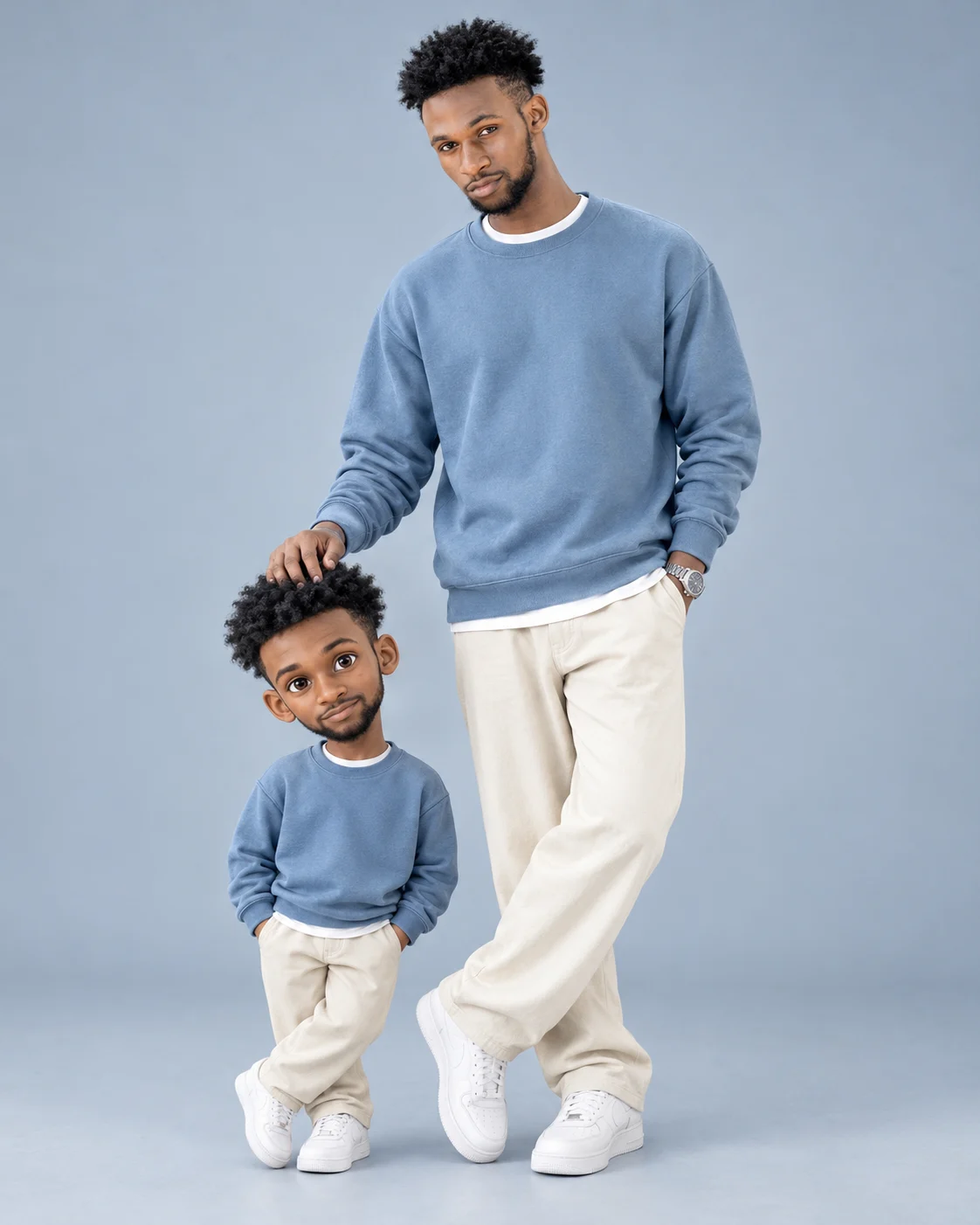
Real Man and 3D Mini Me Best Friends Portrait
Create a full-body fashion portrait of yourself beside a cute 3D cartoon mini-me, matching dusty-blue streetwear, relaxed poses, and a clean studio backdrop.
Using the uploaded photo, create a photorealistic full-body fashion studio portrait of the same man standing beside his miniature 3D cartoon counterpart, styled as best friends wearing matching outfits. KEEP — Preserve the man's exact facial identity, forehead shape, eyebrow placement, eye shape and natural eye colour, nose bridge and tip, lip shape, cheek contours, jawline, chin, ears, facial width, and natural asymmetry. Retain his original skin tone, visible pores, fine lines, natural marks, hairline, hair density, hairstyle, facial hair if present, and body proportions. Keep his real human appearance distinct from the miniature character. Do not reshape his face or make him look younger. CHANGE — Dress him in a relaxed dusty-blue cotton sweatshirt over a plain white T-shirt, loose cream trousers, and clean white sneakers. Add a simple silver wristwatch without inventing other accessories. Position him slightly right of centre, with his legs crossed casually, one hand in his trouser pocket, and the other resting gently on the miniature's head. Create a miniature version wearing the same outfit, with fluffy black hair, a rounded youthful face, oversized expressive brown eyes, and a cheerful smile. Give the miniature hands-in-pockets styling and a relaxed crossed-leg stance. Only the miniature should have stylised 3D cartoon proportions and polished animated surfaces. SCENE — Place both characters in a seamless pale-blue-grey photography studio. Keep the adult full-sized and the miniature in the lower-left foreground. Show both from head to toe, including every shoe. The miniature should tilt its head slightly toward the adult's hand. Add subtle floor contact shadows beneath both figures and a faint background gradient. LIGHT — Use a large diffused softbox positioned above and to the left of the camera, with gentle frontal fill. Keep facial shadows soft and consistent across the adult, miniature, and floor. Use neutral daylight around 5200K to preserve natural skin colour and the dusty-blue fabric. CAMERA — Shoot at 85mm, f/5.6, with the camera at approximately chest height. Maintain realistic perspective, sharp facial detail, natural body proportions, and enough depth of field to keep both figures clear. GRADE — Apply a clean editorial colour grade with muted blue-grey tones, balanced contrast, natural skin colour, and detailed cotton texture. Keep the adult's skin photographic rather than glossy or computer-rendered. OUTPUT — Vertical 4:5 composition, 8K-resolution target, full-body framing, clean edges, and no cropping of either character. DO NOT slim the face, whiten the skin, change eye colour, smooth skin into plastic, invent jewellery or tattoos, replace the face, blend the two identities, or render the adult as CGI. Do not add extra fingers, limbs, logos, text, or watermarks.
Photo Guide
- Upload a sharp, high-resolution photo with the full face clearly visible.
- Choose a front-facing or slight three-quarter angle with natural facial proportions.
- Use even daylight or soft indoor lighting to preserve skin tone and facial detail.
- Keep the hairline, shoulders, hands, and enough body visible to guide proportions.
- A dusty-blue or neutral background helps preview the studio's cool colour palette.
- Avoid blurry faces or heavy beauty filters that weaken identity preservation.
How to Build
- 1Open ChatGPT or Gemini and select an image-generation feature.
- 2Upload a clear photo of the person whose identity must remain unchanged.
- 3Paste the complete prompt into the image-generation input.
- 4Choose a vertical 4:5 aspect ratio if the tool offers that setting.
- 5Select the highest available image quality or resolution setting.
- 6Generate the image and check both faces, outfits, hand contact, and footwear.
- 7If the result is wrong, specify the exact error and regenerate with the same photo.
Pro Tips
- Use a sharp face photo so the adult's identity stays consistent.
- Choose a photo with visible hair to reduce unwanted hairline changes.
- Keep the miniature's oversized eyes exclusive to the cartoon character.
- Request matching sweatshirt colours so both outfits look coordinated.
- Check the hand resting on the miniature's head to prevent awkward contact.
- Keep both pairs of shoes inside the frame to preserve the full-body composition.
Share This Prompt
About the Author
Naziya
Creative AI writer at MFDA, sharing trendy photo-editing prompts and fresh ideas for beautiful, stylish AI images.