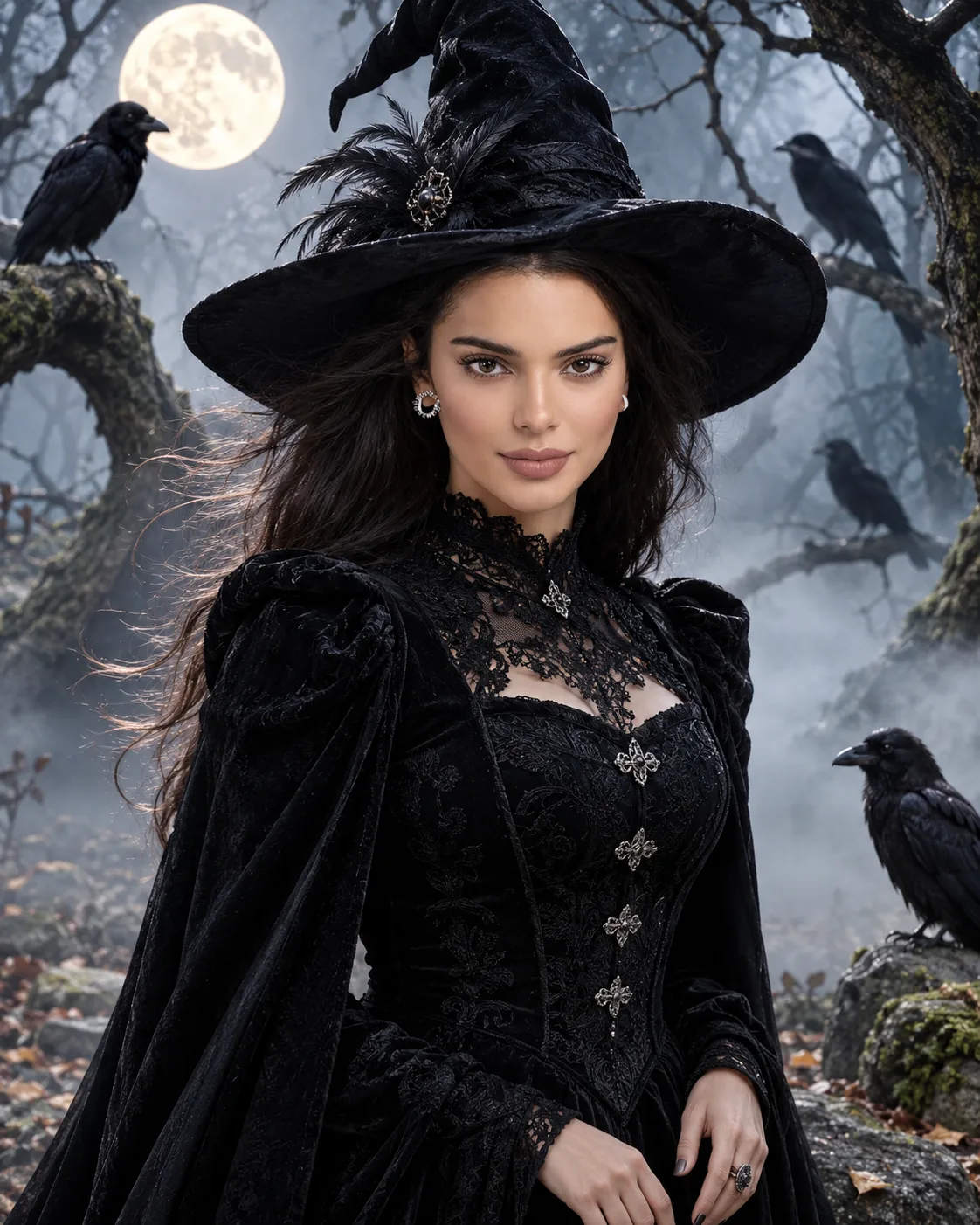
Raven Witch Gothic Forest Portrait
Create a cinematic raven-witch portrait with a black brocade gown, twisted forest trees, silver mist, and moonlight while preserving your facial identity.
Using the uploaded photo, create a photorealistic Gothic witch portrait of the same woman standing in an ancient forest on Halloween night, surrounded by ravens, twisted trees, and silver mist. Use a vertical 4:5 composition. KEEP — Preserve the woman's exact facial identity and recognizable facial structure, including forehead proportions, eyebrow placement, eye shape and original eye colour, nose bridge and tip, lip shape, cheek volume, cheekbones, jawline, chin, ears, facial width, and natural asymmetry. Retain her original skin tone, visible pores, natural marks, authentic age, hairline, and recognizable hair texture. Preserve her natural body proportions, shoulder width, neck length, and hand structure. Do not replace her face with a generic fantasy model. CHANGE — Dress her in a fitted black brocade gown with a high lace collar, structured shoulders, antique-silver clasps, layered velvet panels, and a floor-length cloak. Add a wide-brimmed black witch hat with subtle feather detailing and a weathered silver pendant. Let her natural hair move gently in the cold breeze. Use restrained charcoal eye makeup and dark-plum lipstick without changing her facial features. Position her in a confident three-quarter stance with relaxed shoulders and naturally formed hands. SCENE — Place her among massive twisted trees, damp fallen leaves, moss-covered stones, and scattered black feathers. Several realistic ravens perch on branches at different distances, with one resting on a nearby stone. A pale full moon shines through the canopy, while silver mist separates the foreground from the softly blurred forest behind her. LIGHT — Use cool moonlight from behind and slightly to one side, creating a silver rim along her hat, hair, and cloak. Add soft neutral fill light from the front so her face remains naturally exposed. Keep subtle warm reflections on her skin consistent with the scene. CAMERA — Shoot at chest height using an 85mm lens at f/2.0. Focus sharply on her eyes and face, with natural perspective, realistic proportions, and shallow depth of field. GRADE — Apply muted forest greens, charcoal blacks, silver-blue highlights, restrained warm skin tones, and cinematic contrast. Preserve realistic fabric texture and fine skin detail. OUTPUT — Vertical 4:5 portrait, high-resolution 4K output, three-quarter-body framing, and detailed photorealistic rendering. DO NOT slim the face, whiten skin, change eye colour, smooth skin into plastic, invent jewellery or tattoos, alter body proportions, replace facial identity, distort hands, or add extra limbs. Keep the witch hat from obscuring the visible forehead and facial features.
Photo Guide
- Use a sharp, high-resolution photo with the face clearly visible.
- Choose a front-facing or slight three-quarter angle for accurate facial structure.
- Use even lighting so your original skin tone remains easy to reproduce.
- Keep your hairline and forehead visible; the witch hat will be added later.
- Avoid sunglasses or heavy shadows because they obscure the eye shape.
- A clear portrait works best; blurry facial details can cause identity drift.
How to Build
- 1Open ChatGPT or Gemini and select an image-generation feature.
- 2Upload your original photo as the identity reference.
- 3Paste the complete prompt into the image-generation input.
- 4Select a vertical 4:5 aspect ratio if the tool supports it.
- 5Choose high-quality or highest available image resolution.
- 6Generate the portrait and compare the face with your original photo.
- 7If the face changes, regenerate with stronger identity preservation instructions.
Pro Tips
- Use a sharp source photo so the eyes and jawline remain consistent.
- Keep the original eye colour explicit so moonlight does not recolour the eyes.
- Choose a photo with visible hairline details so the witch hat fits naturally.
- Keep the face unobstructed so the hat brim does not hide important features.
- Use a simple source background so the forest atmosphere remains visually coherent.
- If ravens look artificial, reduce their number to preserve realistic scale and detail.
Share This Prompt
About the Author
Naziya
Creative AI writer at MFDA, sharing trendy photo-editing prompts and fresh ideas for beautiful, stylish AI images.