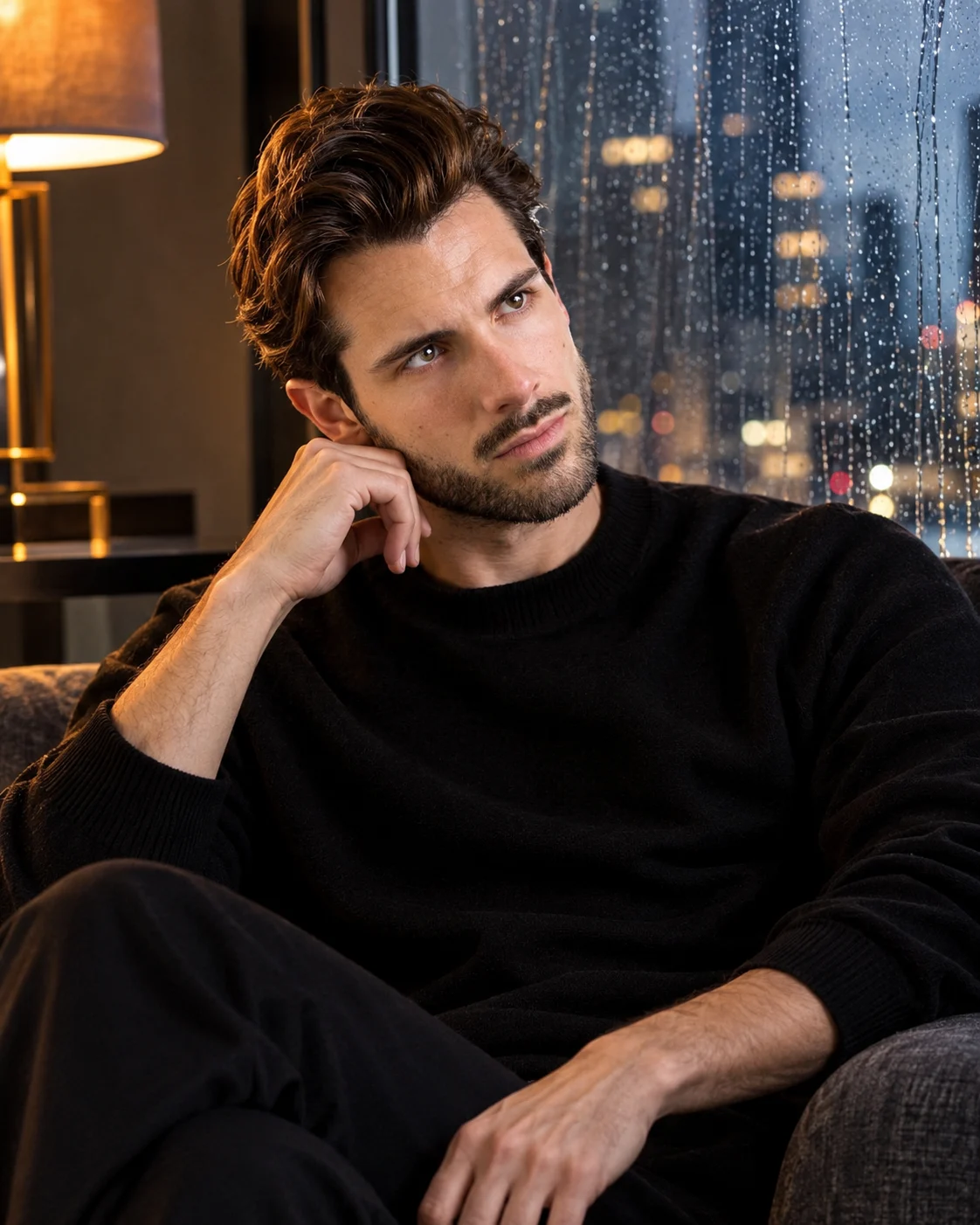
Rainy Window Reflection Dark Luxury Portrait
Create a moody luxury portrait beside a rain-covered window, featuring an oversized black sweater, blurred city lights and warm amber studio lighting.
Using the uploaded photo, create an ultra-realistic cinematic dark luxury portrait of the same recognizable person seated beside a large rain-covered floor-to-ceiling window in a sophisticated modern interior. KEEP — Preserve the exact facial identity and natural anatomy of the person in the uploaded photograph. Retain the original forehead shape, eyebrow thickness and placement, eye shape and natural eye colour, nose bridge and tip, lip shape, cheek volume, cheekbone position, jawline, chin, ears and natural facial asymmetry. Maintain the original skin tone, visible pores, fine lines, natural marks and realistic skin texture. Preserve the original hairline, hairstyle, hair density, individual hair strands and facial hair. Keep the original neck, shoulder width, body proportions and natural physical build. Do not beautify, reinterpret or replace the face. CHANGE — Dress the person in an oversized matte-black cashmere crew-neck sweater with relaxed sleeves and tailored black trousers. Seat him sideways on a low dark charcoal upholstered lounge chair. Let his left elbow rest on the chair arm while his left hand gently supports his chin. His other hand rests naturally on his thigh. Turn his upper body slightly toward the window while keeping his face visible in a thoughtful three-quarter profile. His gaze should look outside rather than directly at the camera. SCENE — Set the portrait inside a luxurious high-rise apartment at approximately 9:30 PM during steady rainfall. A large glass window fills the background, covered with sharply visible water droplets and delicate vertical rain trails. Beyond the glass, distant skyscrapers, apartment windows and traffic lights form softly blurred circles of amber, white and muted blue. Include a subtle dark interior reflection on the glass without duplicating the subject's face. LIGHT — Use a warm amber practical lamp positioned above and to the front-left of the subject, approximately 3200K. Let its soft light illuminate the forehead, cheek, nose, fingers and sweater texture. Cool blue city light should enter from the window on the opposite side, creating a natural contrast without hiding facial details. CAMERA — Use an 85mm portrait lens at f/1.8, positioned slightly below eye level at seated chest height. Focus precisely on the visible eye and facial features while keeping the rain-covered window softly separated. GRADE — Apply deep charcoal blacks, muted midnight-blue shadows, warm amber highlights and subtle cinematic film grain. Preserve natural skin colour and realistic contrast. OUTPUT — Vertical 4:5 composition, medium-full seated portrait, ultra-photorealistic textures and 8K-quality detail. DO NOT slim the face, whiten the skin, change eye colour, alter the hairline, smooth skin into plastic, invent jewellery or tattoos, duplicate facial features or distort hands and fingers.
Photo Guide
- Use a high-resolution photo with sharp facial and eye details.
- Choose a front-facing or natural three-quarter facial angle.
- Use soft lighting so the original skin texture remains visible.
- Keep the complete hairline, eyebrows and facial hair unobstructed.
- A slightly dark outfit blends naturally with the black sweater styling.
- Avoid photos with harsh flash or completely hidden facial shadows.
How to Build
- 1Open Gemini or ChatGPT and select the image generation feature.
- 2Upload one clear, high-resolution photograph of the person.
- 3Copy and paste the complete PROMPT CONTENT into the prompt box.
- 4Choose a vertical 4:5 aspect ratio in the image settings.
- 5Select the highest available image quality or resolution.
- 6Generate the portrait and check the face, hands and rain details.
- 7If the face changes, strengthen the KEEP instructions and regenerate.
Pro Tips
- Choose a photo with visible eyes so the thoughtful gaze remains natural.
- Keep the original hairstyle to prevent hairline changes.
- Use a three-quarter face photo for a believable window-side pose.
- Avoid bright clothing because it conflicts with the dark interior.
- Preserve natural skin texture so amber lighting does not create plastic skin.
- Keep city lights softly blurred so the rain-covered glass remains visible.
Share This Prompt
About the Author
Naziya
Creative AI writer at MFDA, sharing trendy photo-editing prompts and fresh ideas for beautiful, stylish AI images.