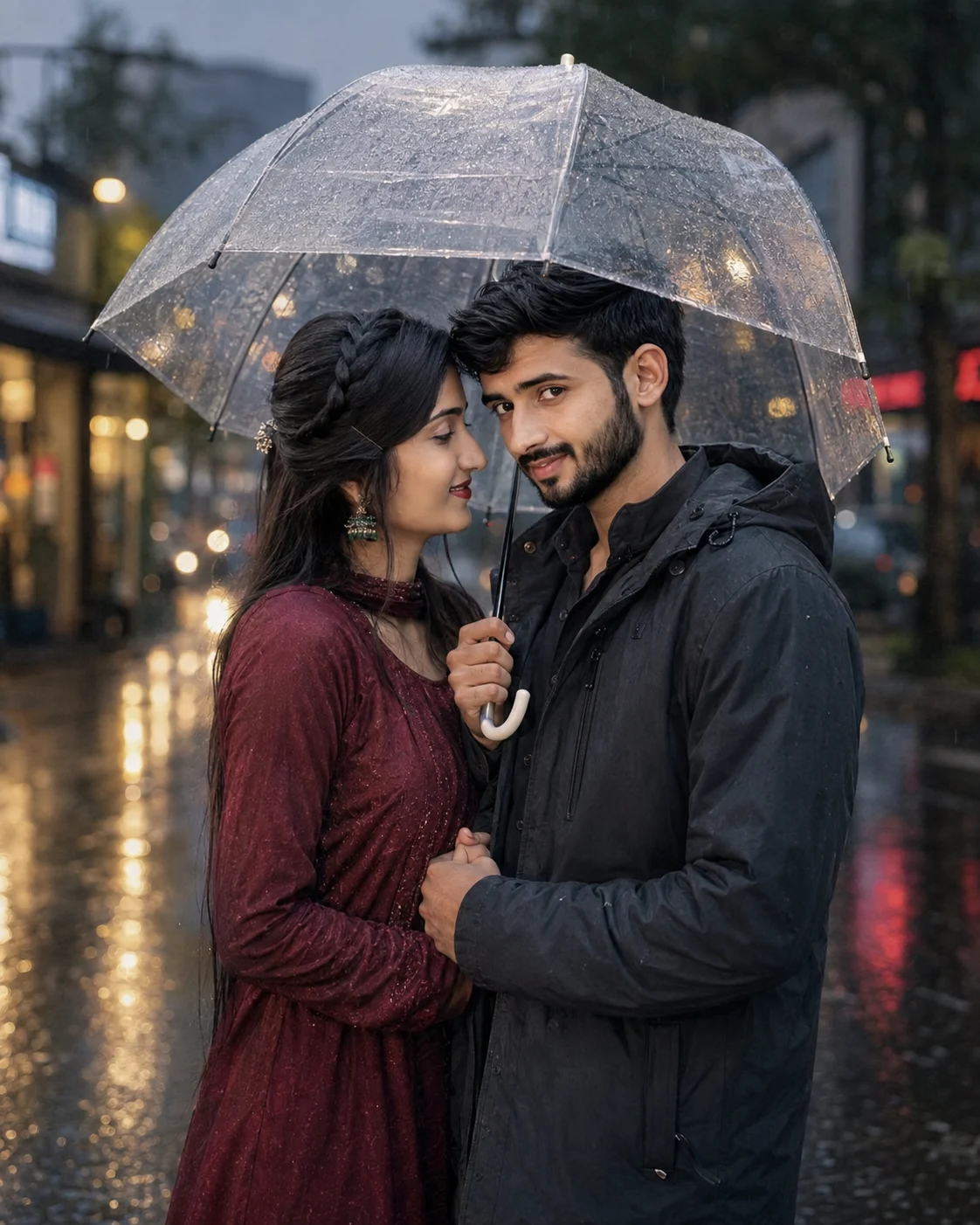
Rainy Street Couple Portrait Under Umbrella
Create a natural rainy-evening couple portrait with an umbrella, wet street reflections, soft expressions, and accurate facial identity.
Using the uploaded photo, create an ultra-realistic vertical DSLR photograph of the same couple in a quiet city street during light evening rain. KEEP — Keep each person’s exact face structure, facial proportions, eye shape and natural eye colour, nose, lips, jawline, cheek structure, skin tone and real skin texture. Keep the original hairline, hairstyle characteristics, facial hair where present, and natural body proportions. Preserve their recognizable identity rather than generating idealized or altered versions of either person. Keep the natural relative height and physical build of both people. CHANGE — Change the wardrobe to realistic rain-ready evening clothing: the man wears a dark charcoal waterproof jacket with a subtle matte texture, while the woman wears a deep burgundy long-sleeve outfit with natural fabric folds. Change the pose so they stand close together beneath one transparent umbrella; the man holds the umbrella above both people and gently holds the woman’s hand. The woman turns slightly toward him with a soft smile, while the man faces the camera with a relaxed, confident expression. Change the lighting to soft evening street illumination and apply a restrained cinematic colour grade. SCENE — Place them on a quiet urban street immediately after or during light rainfall. Behind them, show wet asphalt, faint storefront or street lights, and small reflected highlights on the road. Keep the background strongly defocused but recognizable enough to suggest a real city street. Include naturally suspended rain droplets and subtle moisture on the pavement. LIGHT — Use soft light coming from the front-left and slightly above eye level, with gentle warm street-light spill from behind. Keep skin illumination neutral-warm at approximately 4000–4500K so both faces blend naturally into the rainy environment without looking pasted in. CAMERA — Photograph at 85mm, f/1.8, camera positioned at chest height, with realistic full-body-to-three-quarter framing and shallow depth of field. Maintain natural perspective and believable proportions. GRADE — Use a muted cinematic grade with cool grey-blue shadows, restrained warm highlights, moderate contrast, realistic skin tones, and no excessive teal-orange effect. OUTPUT — Create a vertical 4:5 composition at 2048 × 2560 pixels, with both people fully readable and the umbrella comfortably inside the frame. DO-NOT — No face slimming, no skin whitening, no changed eye colour, no plastic smoothing, no invented jewellery or tattoos, no altered facial structure, no extra fingers, no duplicated people, and no artificial-looking rain.
Photo Guide
- Use a clear, high-resolution photo where both faces are sharply visible.
- A front-facing or slight three-quarter angle works best for accurate facial structure.
- Use even daylight if possible; harsh side shadows can distort the rainy lighting.
- Keep both faces, hairlines, and natural facial hair unobstructed.
- A daylight photo blends especially well with the soft evening street-light setup.
- Avoid sunglasses or heavy filters because they can cause identity drift.
How to Build
- 1Gemini — upload both photos, then paste the full prompt.
- 2Choose 4:5 portrait output at the highest available resolution.
- 3Keep image enhancement or face-restoration features turned off.
- 4Upload clear individual photos so each face has a strong identity reference.
- 5Check the first result against eye shape, jawline, hairline, and skin tone.
- 6If wrong, regenerate while stating which kept facial feature drifted.
Pro Tips
- Use photos with visible hairlines so forehead proportions stay consistent.
- Choose naturally lit source photos so rainy highlights do not overpower skin.
- Keep both reference faces similar in size so one identity does not dominate.
- Avoid heavily edited selfies so real skin texture survives the transformation.
- Use sharper facial references to prevent eye and mouth shape from drifting.
Share This Prompt
About the Author
Naziya
Creative AI writer at MFDA, sharing trendy photo-editing prompts and fresh ideas for beautiful, stylish AI images.