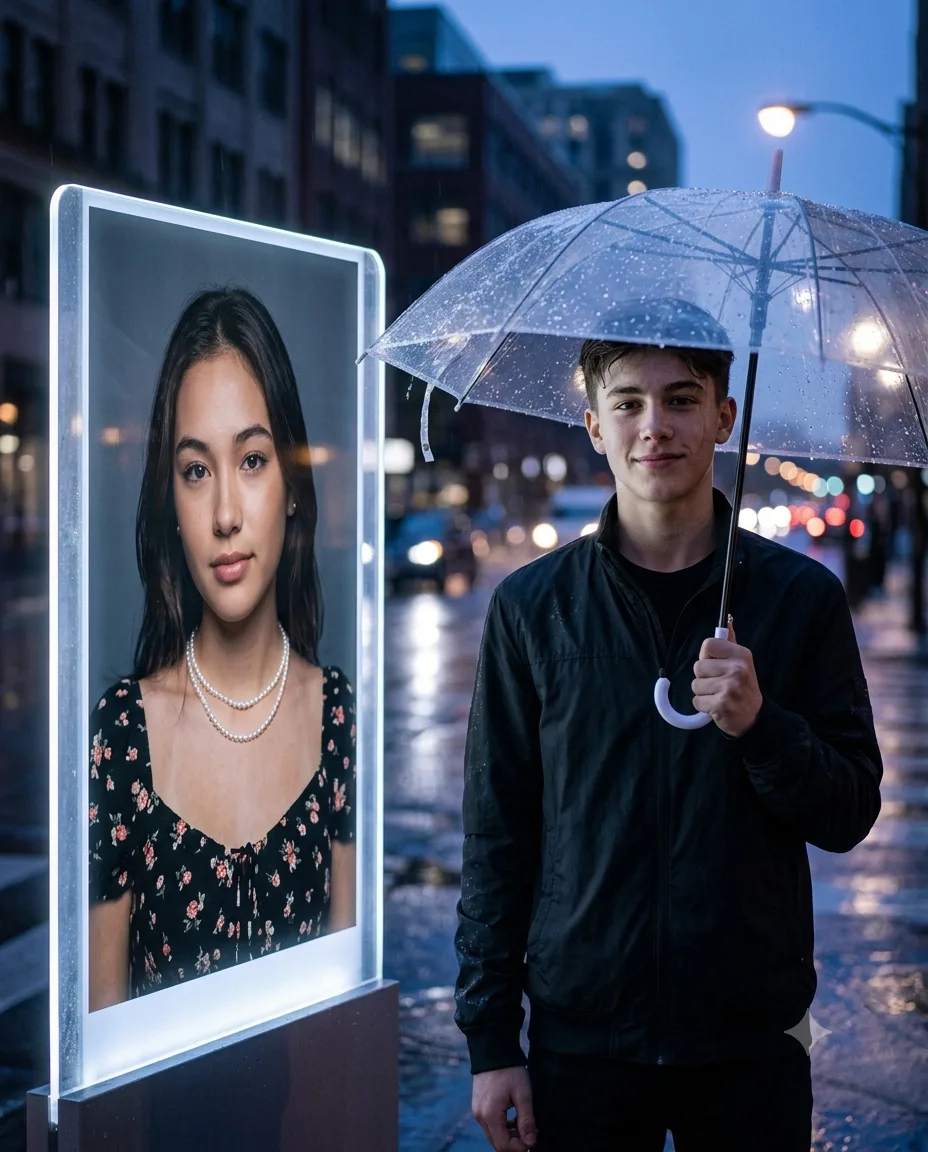
Rainy Night Boy With Girl Portrait Panel
Create a cinematic rainy-night portrait with your face preserved, a black jacket, transparent umbrella, wet reflections, and her portrait beside you.
Using the uploaded photo, create a photorealistic cinematic rainy-night portrait of the same boy standing confidently under a transparent umbrella, with the same girl appearing only as a realistic illuminated portrait on a large transparent advertising panel beside him. KEEP - Keep the boy’s exact face structure, jawline, nose, lips, cheek shape, eye shape and natural eye colour from the uploaded photo. Keep his original skin tone, natural pores and fine facial texture, hairline, hairstyle and facial hair exactly as visible. Keep his natural body proportions, shoulder width, height impression and recognizable physical build. Keep the girl’s facial identity, face structure, eye shape, natural eye colour, skin tone, hairline and visible facial texture from the supplied girl reference. CHANGE - Dress the boy in a fitted matte black jacket with a subtle water-resistant nylon texture over a plain dark shirt. Place a clear transparent umbrella above him, with realistic raindrops collecting on its surface. Change the background to a wet urban street at blue hour, with cool blue and muted violet tones. Add the girl’s portrait inside a tall transparent advertising panel immediately beside him; keep her strictly inside the panel rather than placing her physically beside him. Give the panel a softly glowing white-blue edge light. SCENE - Set the scene outdoors just after sunset during steady light rain. Wet asphalt stretches behind the boy, reflecting blurred street lights and the illuminated panel. Keep distant buildings, vehicles and lamps strongly defocused so the boy and panel remain the visual focus. LIGHT - Use soft cool light from the front-left to illuminate the boy’s face naturally, with a gentle warm reflection from the panel on his right side. Keep the umbrella casting believable soft shadow across his hair and forehead. CAMERA - Shoot at 85mm, f/1.8, camera at chest height, with shallow depth of field and natural perspective compression. GRADE - Use a cool blue-hour grade with restrained contrast, realistic skin tones, subtle highlights and fine cinematic film grain. OUTPUT - Create a vertical 4:5 composition at 2160 × 2700 pixels, with the boy and portrait panel fully visible. DO-NOT - No face slimming, no skin whitening, no changed eye colour, no plastic smoothing, no invented jewellery or tattoos.
Photo Guide
- Use a sharp 2K+ photo where the full face and hairline are visible.
- Choose a front-facing or slight 10° angle; avoid extreme side profiles.
- Use even daylight so facial texture is captured without deep shadows.
- Keep both eyes, jawline, nose, lips and hairline unobstructed.
- A daylight source photo blends better with the cool rain lighting than dim indoor light.
- Avoid sunglasses or heavy filters; they can cause facial features to drift.
How to Build
- 1Gemini: upload the boy photo and girl reference, then paste this prompt.
- 2Set image output to 4:5 portrait before generating.
- 3Use the highest available image quality or resolution setting.
- 4Keep both reference images attached throughout the generation.
- 5Check that the girl stays inside the transparent panel, not beside the boy.
- 6If the first result is wrong, regenerate with the failed detail stated explicitly.
Pro Tips
- Keep the boy’s face well exposed so the jawline stays stable in rain.
- Use a clean girl reference so her portrait remains recognizable inside the panel.
- Keep the umbrella transparent so it does not hide the hairline or forehead.
- Avoid adding extra people so the composition stays focused on the two identities.
- Retain shallow background blur so the panel remains readable without looking pasted on.
Share This Prompt
About the Author
Naziya
Creative AI writer at MFDA, sharing trendy photo-editing prompts and fresh ideas for beautiful, stylish AI images.