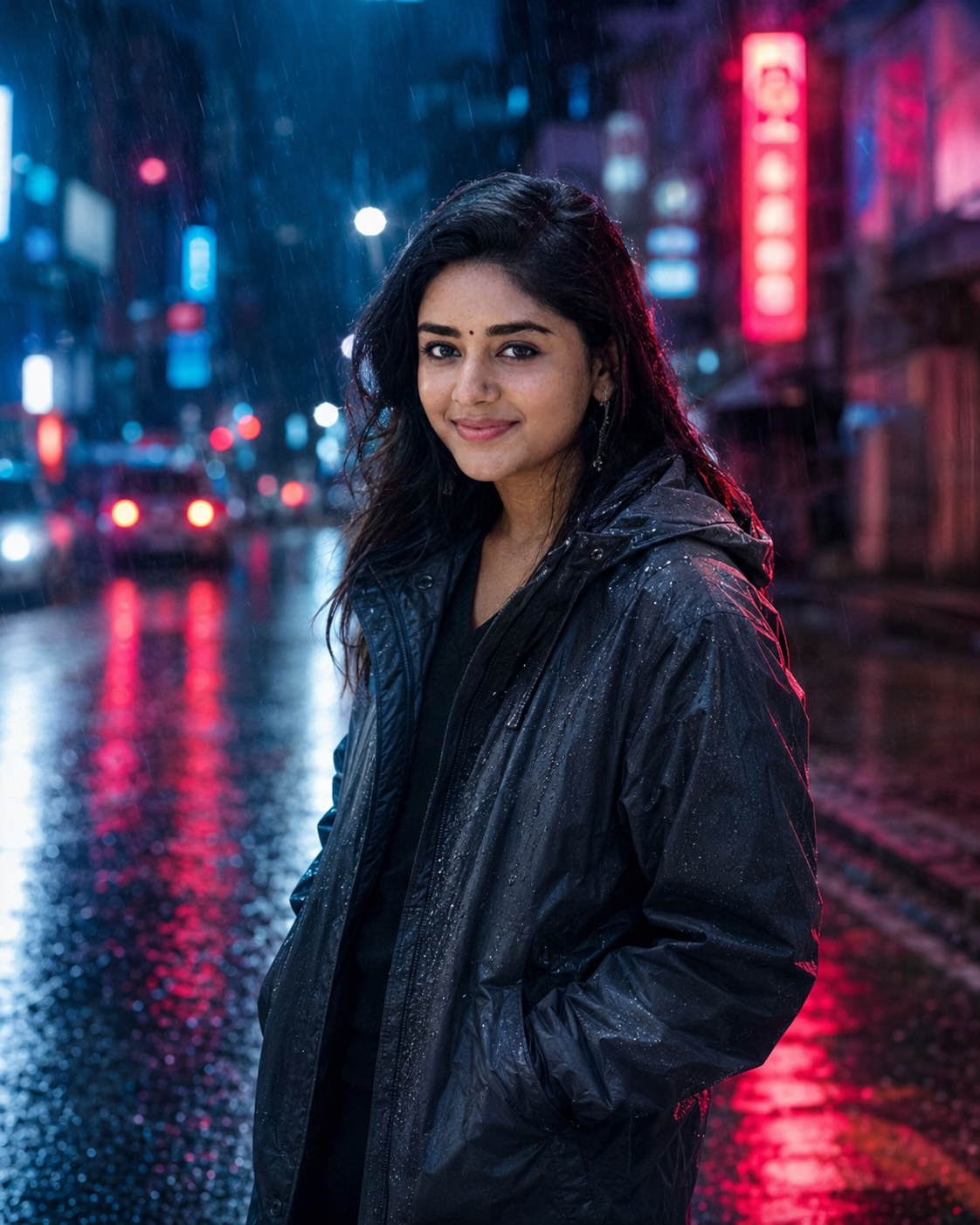
Rainy Neon Reflection Cinematic Portrait
Create a cinematic rainy-night portrait with neon reflections, wet streets, realistic skin, and strong subject identity from your uploaded photo.
Using the uploaded photo, create a cinematic rainy-night street portrait of the same person standing naturally in light rain beside a wet reflective street. KEEP — Keep the exact face structure, eye shape and eye colour, natural skin tone and visible skin texture, hairline, facial hair if present, and original body proportions from the uploaded photo. Keep the person's recognizable facial geometry, including forehead width, cheek structure, nose shape, lips, chin, and jawline. Do not reinterpret the person's identity or make the face more symmetrical than the reference. CHANGE — Change the wardrobe to a dark charcoal waterproof jacket with a realistic matte nylon texture over a simple black top. Change the background to a city street at night with blurred red, blue, and magenta neon signage. Change the pose to a relaxed standing position with the shoulders slightly angled and the face turned naturally toward the camera. Add fine rain droplets on the clothing and visible wet pavement reflections. Use cinematic night lighting and a controlled teal-and-magenta colour grade. SCENE — Place the person outdoors on a modern city street shortly after sunset, during steady light rain. Wet asphalt should reflect elongated neon colours behind and below the subject. Keep distant signs, vehicles, and buildings strongly blurred so they support the portrait without competing with the face. LIGHT — Use a large cool-blue ambient source from the front-left to illuminate the facial features, with a subtle magenta neon rim from the right. Keep the light soft and directional so both eyes, nose, cheeks, and jaw remain naturally readable. CAMERA — Shoot as an 85mm portrait photograph at f/1.8, camera at chest height, with shallow depth of field and realistic compression. Keep the face sharply focused while rain and distant neon fall progressively out of focus. GRADE — Apply a cinematic teal-and-magenta grade with deep blacks, controlled highlights, moderate contrast, realistic skin colour, and restrained saturation. Keep neon reflections vivid without turning the skin or rain artificially coloured. OUTPUT — Create a vertical 4:5 composition at 2048 × 2560 resolution, with the person occupying most of the frame and enough wet street visible for reflections. DO-NOT — No face slimming, no skin whitening, no changed eye colour, no plastic smoothing, no invented jewellery or tattoos, no altered body proportions, and no artificial facial features.
Photo Guide
- Use a sharp photo with the face and hairline fully visible.
- A front or slight three-quarter angle works best for the neon side lighting.
- Even indoor lighting is acceptable, but avoid strong coloured light on the face.
- Keep the full face, shoulders, and natural body proportions visible.
- A daylight reference blends less cleanly than a neutral-lit portrait for this look.
- Avoid sunglasses or anything covering the eyes, as they weaken identity matching.
How to Build
- 1Open Gemini and upload your clearest identity reference photo.
- 2Paste the full prompt without changing the KEEP section.
- 3Choose image generation and use a vertical 4:5 output setting.
- 4Generate once, then check the eyes, jawline, hairline, and skin texture.
- 5If the first result drifts, regenerate using the same photo and prompt unchanged.
- 6If needed, strengthen only the KEEP instructions before the next generation.
Pro Tips
- Use a neutral facial expression so the eye shape stays consistent between runs.
- Keep the original hairline visible so rain styling does not alter the forehead.
- Choose a high-resolution face photo so neon does not create false skin texture.
- Avoid coloured source lighting so the requested magenta rim stays controlled.
- Keep shoulders visible so the generated jacket follows the real body proportions.
Share This Prompt
About the Author
Naziya
Creative AI writer at MFDA, sharing trendy photo-editing prompts and fresh ideas for beautiful, stylish AI images.