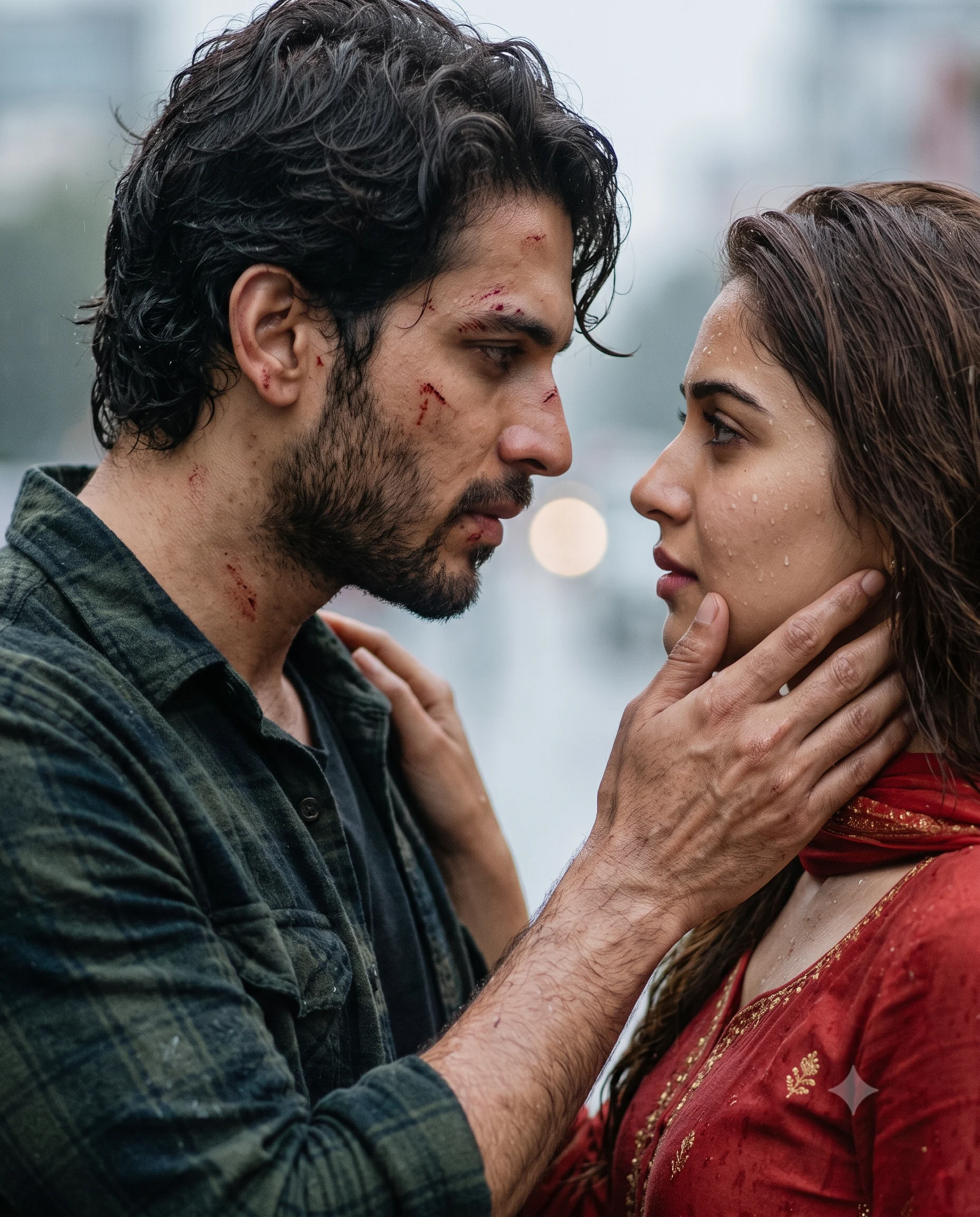
Rainy Cinematic Couple Portrait Prompt
Create an intense rainy couple portrait with natural facial identity, traditional clothing, dramatic expressions, water droplets, and cinematic blue-gray tones.
Using the uploaded photo, create a photorealistic cinematic portrait of the same adult person standing very close to an adult romantic partner in a rain-soaked dramatic scene. KEEP — Keep the uploaded person's exact face structure, jawline, cheek shape, nose, lips, eye shape and eye colour. Keep their natural skin tone and real skin texture, including visible pores and small facial details. Keep the original hairline, natural hairstyle characteristics, facial hair if present, and body proportions. Preserve recognizable asymmetry and identity-specific features from the uploaded photo. Do not reshape the face to imitate the partner or reference character. CHANGE — Change the wardrobe to a simple traditional red outfit made from lightweight cotton or soft fabric, with the material appearing slightly damp from rain. Change the pose so the person stands extremely close to their adult partner while the partner gently holds their chin with one hand. Change the partner's clothing to a dark green checked shirt with visibly wet fabric and messy wavy dark hair. Add small realistic scratches and subtle traces of blood on the partner's face and neck only. Change the lighting to soft overcast rain lighting with cool blue-gray surroundings. Apply a restrained cinematic colour grade. SCENE — Set the couple outdoors during a rainy evening, with fine rain falling between the camera and subjects. Place a distant gray-blue background behind them with no distracting objects. Keep the background strongly blurred while both faces remain clearly readable. Add small water droplets on hair and clothing without covering important facial features. LIGHT — Use soft diffused light from the front-left, similar to natural daylight filtered through heavy rain clouds. Keep the light cool at approximately 6000–7000K, with gentle shadows under the chin and cheekbones so both faces appear naturally seated in the scene. CAMERA — Use an 85mm lens at f/1.8 from chest height, focused precisely on the nearer faces. Use strong lens compression and shallow depth of field to separate the couple from the gray-blue background. GRADE — Use cool blue-gray shadows, slightly warm natural skin tones, moderate contrast, restrained saturation, and subtle cinematic film grain. OUTPUT — Create a vertical 4:5 portrait at 2048 × 2560 resolution with both faces fully inside the frame. DO-NOT — No face slimming, no skin whitening, no changed eye colour, no plastic smoothing, no invented jewellery or tattoos, and no blood or scratches added to the uploaded person's face unless they already exist in the source photo.
Photo Guide
- Use a high-resolution photo where the full face and hairline are sharp.
- A front or slight 3/4 angle preserves facial structure better.
- Use even daylight so the rain lighting can be blended naturally.
- Keep eyes, jawline, hairline, and facial edges unobstructed.
- A daylight portrait works better than a dark indoor selfie for this scene.
- Beauty filters can erase skin texture and cause facial drift.
How to Build
- 1Open Gemini and select image generation with photo upload enabled.
- 2Attach one clear photo and paste the complete prompt.
- 3Choose a vertical 4:5 image ratio in the generation settings.
- 4Set the highest available image quality or resolution.
- 5Check that rain, scratches, and wet fabric affect the correct person.
- 6If the first result is wrong, regenerate with stricter KEEP instructions.
Pro Tips
- Use a neutral-expression source photo so the new gaze changes cleanly.
- Keep both eyes visible so the romantic eye contact stays believable.
- Choose sharp hairline detail so wet hair does not alter identity.
- Use natural skin texture so cool rain light does not create waxy skin.
- Avoid heavy shadows in the source so facial proportions remain stable.
Share This Prompt
About the Author
Naziya
Creative AI writer at MFDA, sharing trendy photo-editing prompts and fresh ideas for beautiful, stylish AI images.