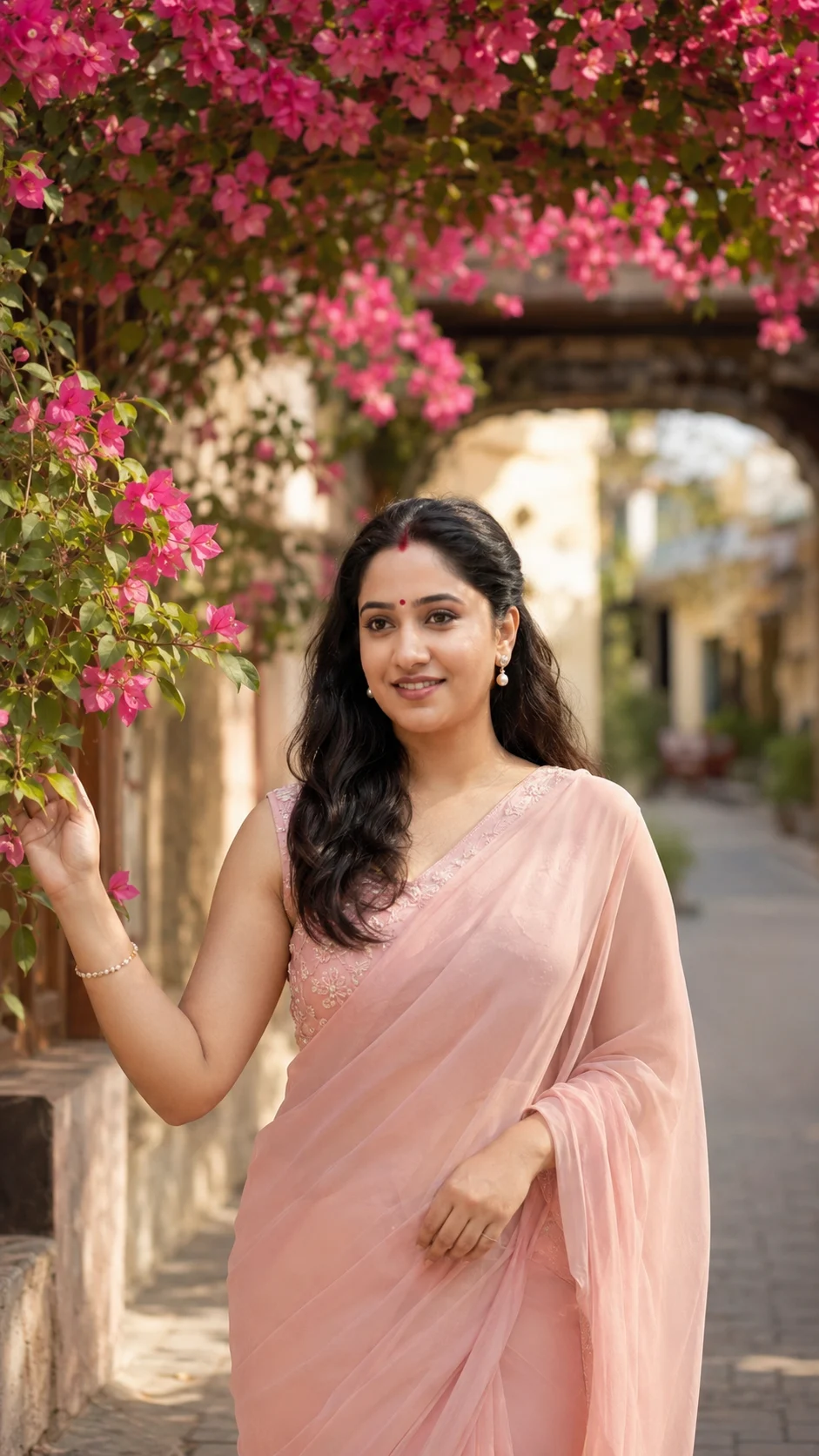
Pink Bougainvillea Heritage Street Portrait
Create a warm outdoor portrait beneath pink bougainvillea with a soft saree, natural skin texture, candid pose, and realistic background blur.
Using the uploaded photo, create a photorealistic vertical portrait of the same person standing beneath a flowering pink bougainvillea arch on a quiet heritage street. KEEP - Keep the exact face structure from the uploaded photo, including forehead shape, jawline, cheek structure, nose, lips, and natural facial proportions. Keep the exact eye shape and natural eye colour. Keep the original skin tone, realistic skin texture, pores, marks, and small facial details. Keep the existing hairline and overall facial hair pattern exactly as shown where applicable. Keep the person's real body proportions, shoulder width, height impression, and natural build. Do not reshape the identity to match a generic model. CHANGE - Change the wardrobe to a soft blush-pink chiffon saree with realistic flowing folds and a sleeveless embroidered blouse. Add small pearl earrings and one thin bracelet. Style the hair as long, naturally wavy black hair falling over the shoulders without altering the hairline. Use a gentle candid pose with one hand lightly touching the nearby bougainvillea and the face turned slightly away from the camera. Change the setting, lighting, and colour grade to a warm morning travel-portrait look. SCENE - Place the subject on a quiet heritage street beneath an arch covered with dense pink bougainvillea flowers and green leaves. Keep the architecture softly visible behind the subject, with strong background separation and circular natural bokeh. The flowers nearest the subject should remain recognizable rather than becoming an abstract colour wash. LIGHT - Use warm morning sunlight coming from the front-left side at a shallow angle, softly illuminating the face and the visible side of the body. Keep gentle leaf-filtered highlights and soft shadows so the face receives the same warm light as the surroundings. CAMERA - Capture at 85mm, f/1.8, with the camera positioned around chest height. Use shallow depth of field, realistic lens compression, sharp facial detail, and natural perspective. GRADE - Use warm skin tones, soft pink highlights, restrained contrast, slightly muted greens, and a subtle cinematic travel-photography finish without excessive HDR. OUTPUT - Create a vertical 9:16 composition at 4K resolution, keeping the subject comfortably framed from approximately waist-up. DO-NOT - No face slimming, no skin whitening, no changed eye colour, no plastic smoothing, no invented jewellery or tattoos.
Photo Guide
- Use a clear high-resolution photo where the full face and hairline are visible.
- A front or slight three-quarter angle gives the model better facial reference.
- Use even daylight; harsh coloured indoor light can distort the skin tone.
- Keep both eyes, jawline, and natural skin texture unobstructed.
- The main failure is a blurred or heavily filtered reference face.
How to Build
- 1Open Gemini and upload one clear, high-resolution face photo.
- 2Paste the full prompt exactly without removing the KEEP or CHANGE sections.
- 3Choose portrait output and set the frame to 9:16 vertical.
- 4Generate once, checking that the face remains identical to the upload.
- 5If the first result drifts, regenerate using the same photo and prompt.
Pro Tips
- Use a daylight reference so warm morning light blends naturally with the face.
- Choose a photo showing the hairline so the hairstyle does not alter identity.
- Avoid sunglasses so the eye shape and colour remain accurate.
- Keep facial skin unfiltered so pores and natural marks survive the edit.
- Use one person in the reference so body proportions stay consistent.
Share This Prompt
About the Author
Naziya
Creative AI writer at MFDA, sharing trendy photo-editing prompts and fresh ideas for beautiful, stylish AI images.