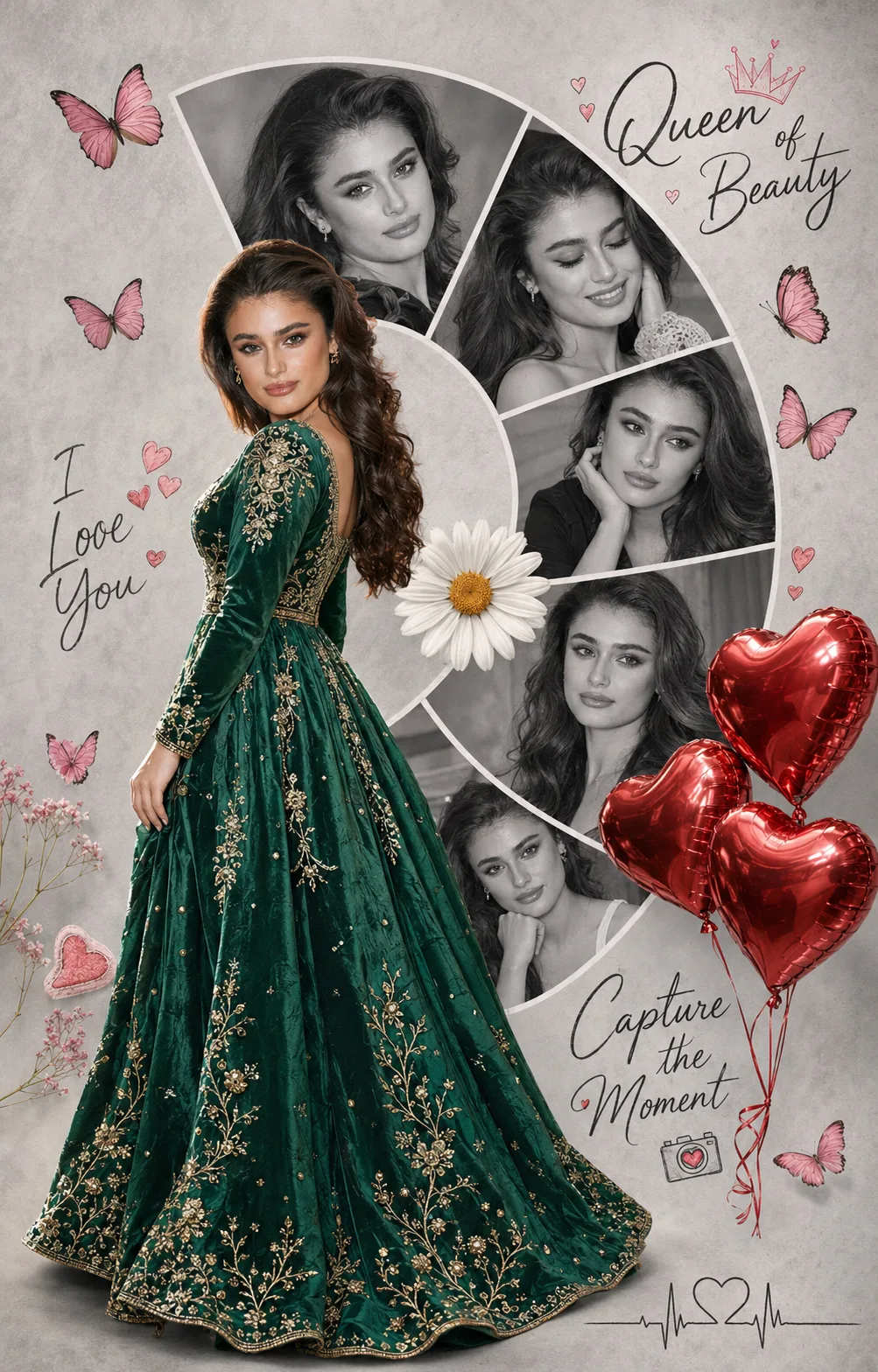
Peacock Green Queen Romantic Photo Collage
Create a romantic queen-style photo collage with a peacock green embroidered frock, curved monochrome portraits, pink butterflies, red hearts, and handwritten captions.
Using the uploaded photo, create a photorealistic vertical 4:5 romantic digital photo collage featuring the same woman as the central full-body subject, styled as a peacock green queen with a curved arrangement of monochrome portraits and delicate love-themed decorations. KEEP — Preserve the woman's exact recognizable facial identity, including forehead shape, eyebrow placement and arch, eye shape and natural eye colour, nose bridge and tip, lip shape, cheek structure, cheekbones, jawline, chin, ears, facial width, and natural asymmetry. Keep her original skin tone, visible pores, fine skin texture, natural marks, and authentic age. Preserve her hairline, hair density, natural texture, colour, and hairstyle. Maintain her original body proportions, shoulder width, neck length, arm length, hand anatomy, and overall build. Every smaller portrait must depict the same recognizable woman, not a collection of similar-looking models. CHANGE — Dress her in a rich peacock green frock made from deep emerald-green satin or velvet, with intricate antique-gold thread embroidery, small reflective embellishments, a defined waist, and a naturally flared skirt. Position the full-body cutout slightly left of centre, turning her upper body gently away while she smiles back over her shoulder. Arrange several smaller black-and-white portraits of her behind the main figure in curved segments forming a broad semicircle. Give these portraits distinct, natural expressions while preserving consistent facial structure. Use a pale grey, lightly textured paper background. SCENE — Surround the curved portrait arrangement with small pink butterflies, one white daisy with a warm yellow centre, glossy red heart-shaped balloons, and restrained romantic stickers. Add the handwritten phrases “Queen of Beauty,” “I Love You,” and “Capture the Moment,” leaving clear space around the woman's face and dress. Include a fine heartbeat line ending in a small heart icon. Keep decorations away from facial features and hands. LIGHT — Use soft frontal daylight from the upper left, with gentle shadows beneath the cutout and consistent highlights on the green fabric. Match the grayscale portraits to the same soft lighting direction so they blend naturally into the collage. CAMERA — Simulate an 85mm portrait lens at f/2.8, with a natural eye-level viewpoint for the main subject, realistic full-body proportions, sharp facial detail, and subtly softened background elements. GRADE — Apply muted romantic pastel tones, neutral grey textures, controlled emerald-green saturation, crisp monochrome portraits, and restrained red and pink accents. Retain realistic skin texture and fine fabric detail rather than a glossy artificial finish. OUTPUT — Render a vertical 4:5 composition at 2048 × 2560 pixels when supported. Keep the complete frock, curved portrait arrangement, and decorative elements inside the frame. Ensure clean cutout edges, realistic contact shadows, balanced spacing, and anatomically correct hands and limbs. DO NOT slim or reshape the face, whiten the skin, change eye colour, smooth skin into plastic, alter body proportions, invent jewellery or tattoos, duplicate facial features, create extra fingers, or replace the subject with a generic model. Do not allow the smaller portraits to drift into different identities or generate misspelled decorative text.
Photo Guide
- Use a sharp photo with enough resolution to preserve pores and fine facial details. Choose a front-facing or three-quarter angle with both eyes clearly visible. Use soft, even light so the main portrait blends with the monochrome copies. Keep the full body, hands, hairline, and original facial features visible. A plain background helps separate the frock cleanly from the collage. A cropped face-only selfie makes the full-body queen composition harder to match.
How to Build
- 1Open ChatGPT or Gemini and select image generation with photo upload enabled. Upload your clearest full-body portrait as the identity reference. Choose a 4:5 portrait ratio and the highest practical resolution available. Paste the complete prompt and generate the first collage. Check facial consistency, frock embroidery, curved portraits, and sticker placement. If the result is wrong, edit the affected area or regenerate with stronger identity guidance.
Pro Tips
- Use a full-body source photo so the flared green skirt stays proportionate. Keep the central subject in colour so she stands apart from grayscale portraits. Request fewer surrounding portraits if repeated faces begin to look inconsistent. Add the three handwritten captions manually if AI spelling is inaccurate. Keep butterflies and heart balloons near empty spaces so they do not cover faces. Use selective editing for cutout edges so hair remains natural against grey paper.
Share This Prompt
About the Author
Naziya
Creative AI writer at MFDA, sharing trendy photo-editing prompts and fresh ideas for beautiful, stylish AI images.