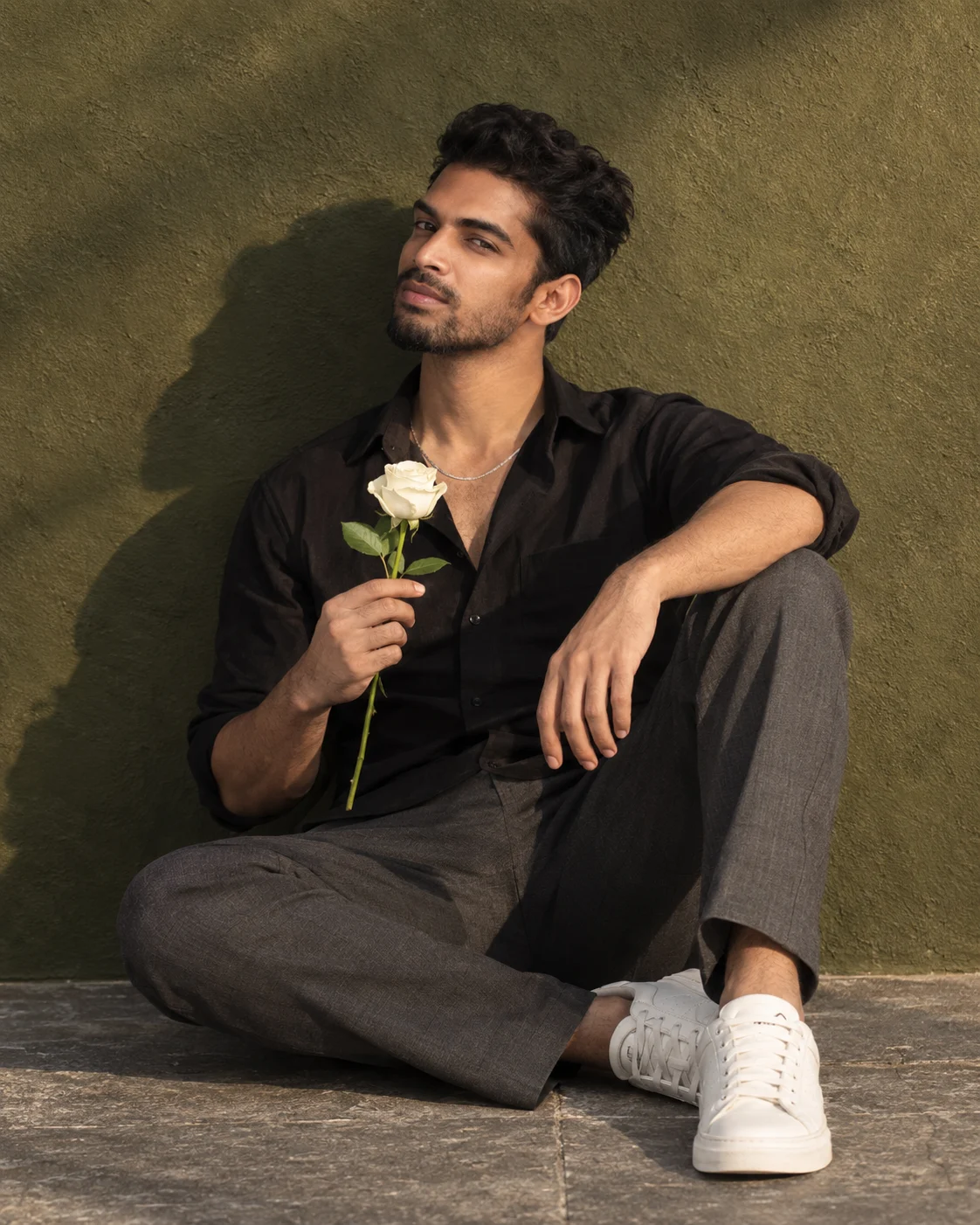
Olive Green Wall Portrait with White Rose
Create a romantic luxury portrait with a white rose, black shirt, charcoal trousers, and warm sunlight while keeping your uploaded facial identity natural.
Using the uploaded photo, create a photorealistic 4:5 seated full-body romantic luxury portrait that preserves the person's recognizable identity while changing the styling, pose, and setting. KEEP — Preserve the exact facial identity from the uploaded photo. Keep the original face shape, forehead width, cheekbone placement, jawline, chin, nose bridge and tip, lip shape, eyebrow position, and eye shape and colour unchanged. Retain the original skin tone, natural pores, fine skin texture, facial asymmetry, hairline, hairstyle, and facial hair if present. Preserve the person's apparent age and natural body proportions. Do not blend the face with another identity or invent facial details. The face must remain recognizably the same person, not a beautified reinterpretation. CHANGE — Replace the original outfit with a black cotton shirt featuring an open collar and naturally rolled sleeves, tailored charcoal-grey trousers with realistic creases, clean white low-top sneakers, and one thin silver chain. Add no other accessories unless they are visible in the uploaded photo. Place the subject in a relaxed seated pose with one knee raised on image-right and the opposite leg folded naturally across the stone pavement. One forearm rests on the raised knee. The other hand holds a single fully bloomed ivory-white rose upright at chest level, with its green stem clearly visible. Keep both shoes inside the frame. SCENE — Position the subject against a seamless, finely textured deep olive-green plaster wall. Use grey stone pavement beneath the subject, with no visible wall joints, furniture, plants, or decorative objects. The wall should appear matte, with subtle surface irregularities rather than a repeated pattern. Frame the seated subject centrally, occupying approximately 80–85% of the image height. Keep the rose separate from the face and clothing so its petals remain clearly readable. LIGHT — Simulate late-afternoon sunlight entering from the upper right, with a warm colour temperature of approximately 4800–5200K. Light the face, hands, and rose from the same direction. Create a broad, soft-edged shadow falling leftward across the olive wall. Preserve detail in the darker shirt without flattening the shadows or making the face look artificially illuminated. CAMERA — Use an 85mm portrait lens at f/4, with the camera positioned around the subject's chest height and aimed straight ahead. Maintain natural perspective, realistic body proportions, crisp facial focus, and enough depth of field to keep the rose, hands, trousers, and sneakers recognisable. Avoid excessive background blur. GRADE — Use deep olive greens, neutral charcoal, warm skin highlights, and restrained ivory whites. Apply cinematic contrast with gently rolled-off highlights, rich but natural shadows, and subtle fine-grain texture. Keep skin tones realistic and avoid excessive saturation or artificial HDR effects. OUTPUT — Render a vertical 4:5 portrait at 4K resolution, ideally 3072 × 3840 pixels or the closest supported size. Keep the full seated pose, both sneakers, raised knee, rose, and visible stem inside the frame. Prioritise sharp facial detail and anatomically correct hands. DO NOT slim the face, whiten the skin, change eye colour, alter the hairline, reshape facial features, apply plastic skin smoothing, invent jewellery or tattoos, add extra roses, distort fingers, duplicate limbs, crop the sneakers, or replace the person's identity.
Photo Guide
- Use a clear, high-resolution photo with the full face visible.
- Choose a front-facing or slight three-quarter angle with both eyes visible.
- Use soft, even light so the original skin tone and eye colour stay clear.
- Keep the hairline, jawline, and any facial hair unobstructed.
- A warm daylight reference photo complements the olive wall and golden light.
- Avoid blurry faces, beauty filters, and photos with deep facial shadows.
How to Build
- 1Open Gemini or ChatGPT and select its image-generation feature.
- 2Upload a clear reference photo showing the person's face.
- 3Paste the complete prompt, including KEEP and CHANGE instructions.
- 4Choose a vertical 4:5 aspect ratio and the highest available resolution.
- 5Generate the portrait and check the face, rose, hands, and full-body framing.
- 6If the result is wrong, regenerate using the same photo and specify the exact error.
Pro Tips
- Choose a photo with visible eyes and hairline so facial features stay consistent.
- Use a neutral expression in the reference so the direct gaze looks natural.
- Keep the original face unobstructed so the rose does not interfere with identity.
- Use a simple background in the reference to reduce unwanted visual carryover.
- Check the rose stem and fingers closely because hand placement can distort them.
- Keep the 85mm lens and f/4 settings consistent to preserve the editorial look.
Share This Prompt
About the Author
Naziya
Creative AI writer at MFDA, sharing trendy photo-editing prompts and fresh ideas for beautiful, stylish AI images.