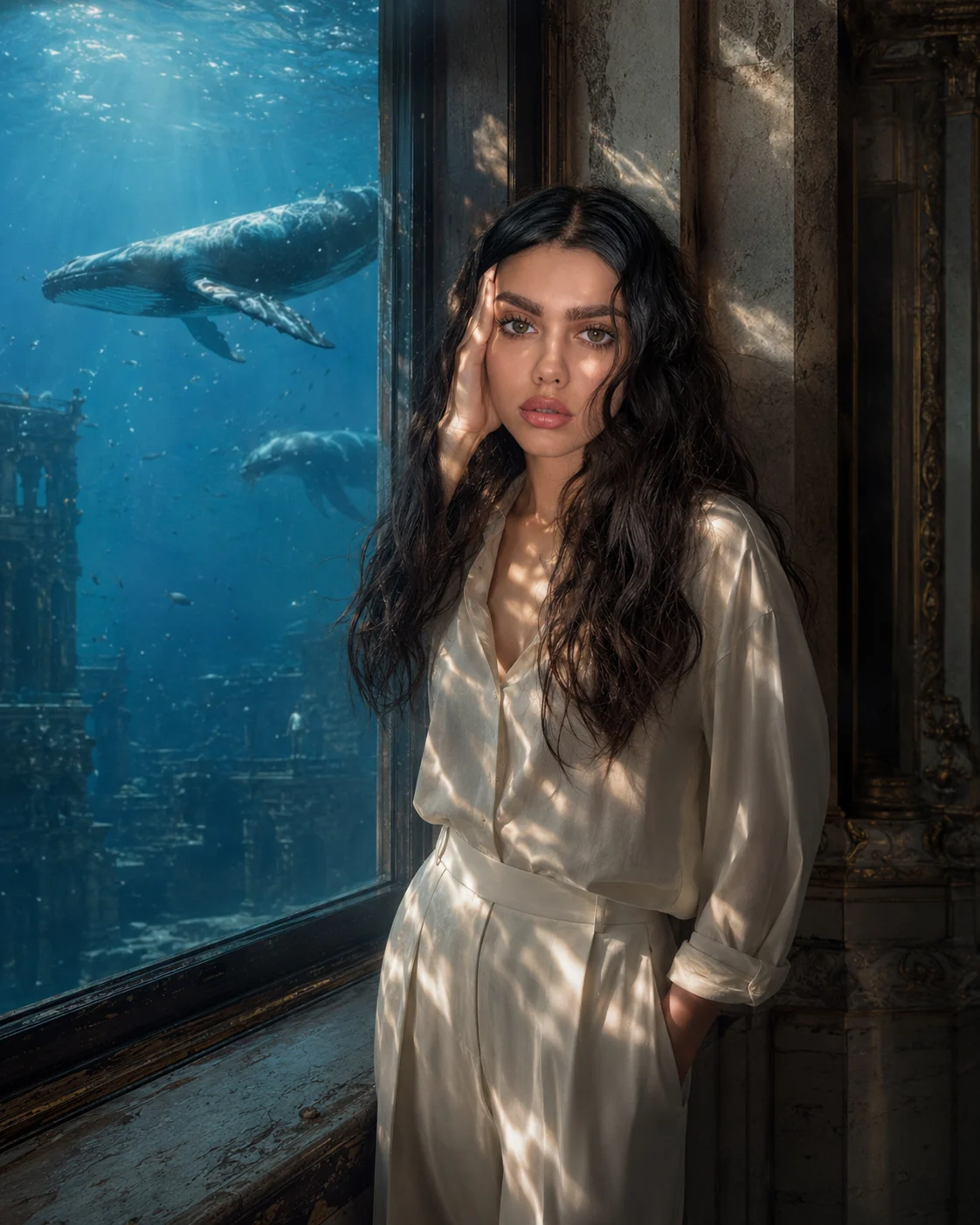
Ocean Window Cinematic Interior Portrait
Create a cinematic indoor portrait where a massive window opens onto a vertical ocean, with underwater light crossing your real face and clothes.
Using the uploaded photo, create a cinematic interior portrait of the same person standing beside a massive old architectural window that reveals a crystal-clear ocean vertically outside the building. KEEP - Keep the exact face structure, eye shape and natural eye colour, skin tone and real skin texture, hairline, facial hair if present, and body proportions from the uploaded photo. Keep the person's recognizable identity, natural facial asymmetry, nose shape, lip shape, jaw structure, and visible hair characteristics unchanged. Preserve realistic skin pores rather than replacing the face with a generic model. CHANGE - Change the wardrobe to an elegant minimal outfit made from [wardrobe fabric] in [wardrobe colour], with simple construction and no unnecessary accessories. Change the background into an aged architectural interior with a huge [window frame material] window. Change the pose to a relaxed standing position beside the window, with natural shoulders, believable hands, and the body turned slightly toward the ocean. Change the lighting so underwater sunlight passes through the window and creates soft moving caustic patterns across the face, neck, and clothing. Change the colour grade to a restrained cinematic blue-teal and warm-neutral treatment. SCENE - Place the person inside a grand, weathered architectural room during late afternoon. Behind the window, show a vertical crystal-clear ocean instead of sky or normal scenery. Include distant whales, suspended particles, and small floating objects at believable depths. Keep the ocean sharply recognizable but softly blurred toward the far background for atmospheric depth. LIGHT - Use directional sunlight appearing to come from the ocean-facing window, slightly from camera-left. Make the caustic light irregular and physically believable, with soft blue reflections mixed with warm interior fill. CAMERA - Photograph at 85mm, f/1.8, camera at chest height, with shallow depth of field and natural facial perspective. GRADE - Use subtle cinematic contrast, controlled highlights, deep but detailed shadows, restrained saturation, and a fine-grain film texture. OUTPUT - Create a vertical 4:5 composition at 2048×2560 resolution, keeping the full face unobstructed. DO-NOT - No face slimming, no skin whitening, no changed eye colour, no plastic smoothing, no invented jewellery or tattoos.
Photo Guide
- Use a sharp photo with at least 1024px on the shortest side.
- A front or slight three-quarter angle works best for identity retention.
- Use even daylight so facial shadows do not compete with ocean caustics.
- Keep the full hairline, eyes, nose, lips, jaw and shoulders visible.
- Avoid photos with heavy filters; they can distort the underwater light effect.
How to Build
- 1Gemini: upload your photo and paste the prompt exactly as written.
- 2Choose image generation and set the output to 4:5 portrait.
- 3Use 2048×2560 resolution if your Gemini version offers it.
- 4Check that the window shows ocean water, not sky or a normal landscape.
- 5If the first result is wrong, regenerate while keeping the KEEP list unchanged.
Pro Tips
- Use a daylight source photo so the ocean caustics blend into real skin shadows.
- Keep the hairline visible so the window lighting does not alter facial identity.
- Choose simple clothing so the underwater reflections remain clearly visible.
- Ask for clear water depth so whales do not become flat background shapes.
- Keep the camera at chest height so the face avoids unnatural perspective distortion.
Share This Prompt
About the Author
Naziya
Creative AI writer at MFDA, sharing trendy photo-editing prompts and fresh ideas for beautiful, stylish AI images.