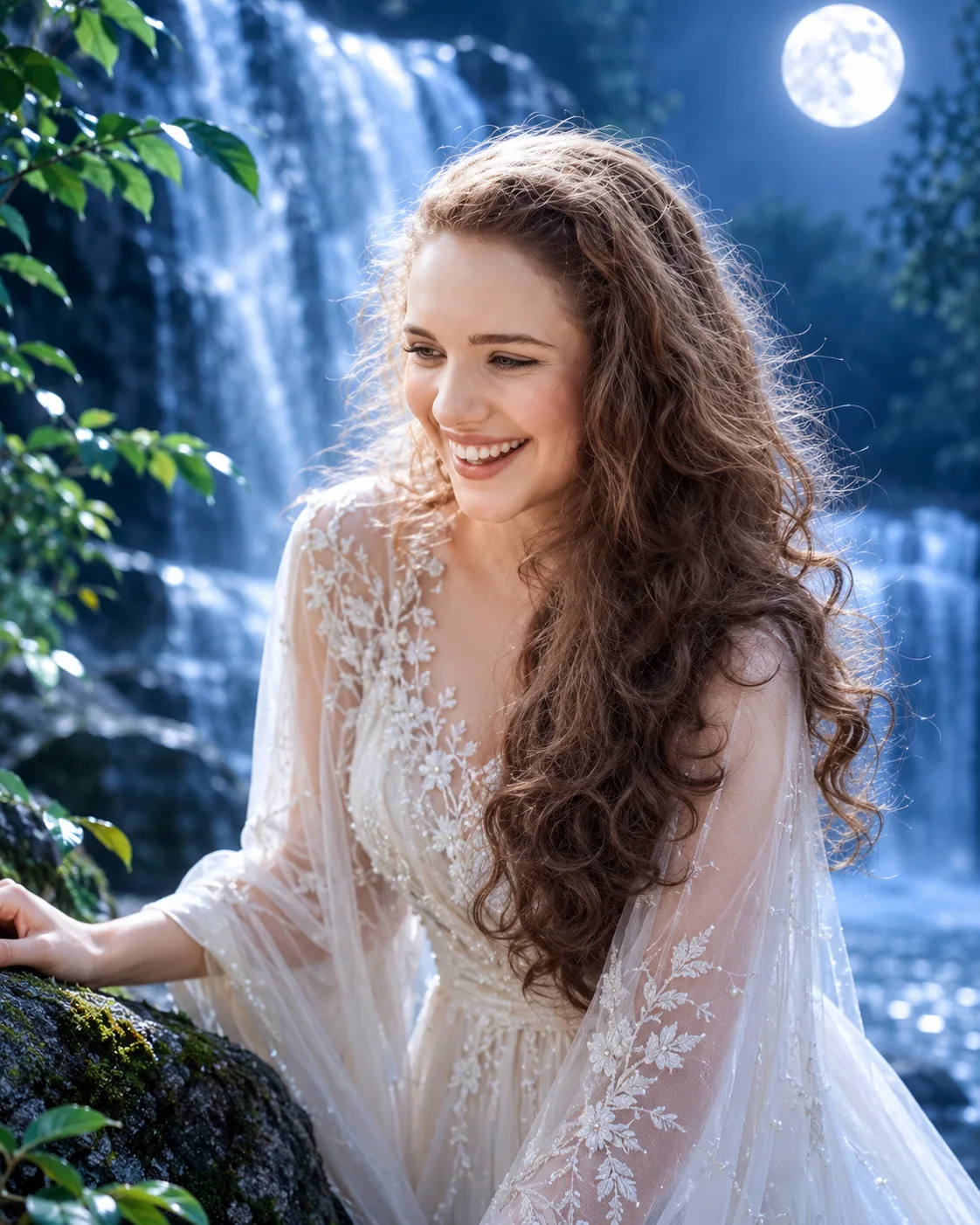
Moonfall Goddess – Silver Waterfall Fantasy Portrait
Create a moonlit fantasy portrait beside a silver waterfall, featuring an ivory chiffon gown, luminous mist and natural facial identity.
Using the uploaded photo, create an ultra-realistic cinematic fantasy portrait of the same recognizable woman standing beside a majestic silver waterfall in an enchanted forest at night. Use a vertical 4:5 composition with her face clearly visible and naturally integrated into the moonlit environment. KEEP — Preserve the woman's exact facial identity and original facial geometry from the uploaded photograph. Retain her natural forehead proportions, facial width, eyebrow shape and placement, original eye shape and natural eye colour, nose bridge and tip, lip contours, cheek volume, cheekbones, jawline, chin, ears and natural facial asymmetry. Maintain her original skin tone, undertones, pores, fine texture, natural marks and age. Preserve her exact hairline, hairstyle, hair density, texture and natural hair colour. Keep facial hair unchanged if present. Maintain original neck, shoulder width, body proportions and recognizable silhouette. Do not reconstruct, replace, beautify or reinterpret her face. CHANGE — Dress her in an elegant flowing ivory-white chiffon gown with translucent layered sleeves, delicate floral lace at the neckline, subtle pearl-thread embroidery and a softly draped waist. Add realistic fabric movement from the cool waterfall breeze. Position her body at a gentle three-quarter angle, with one hand resting lightly against a moss-covered stone beside the water. SCENE — Place her beside a tall cascading waterfall in a secluded forest at midnight. Silver water streams descend over dark textured rocks, while distant trees, wet foliage and scattered moonlit leaves create depth. Keep the waterfall softly blurred behind her, with delicate mist and subtle foreground water droplets. LIGHT — Place a large natural moonlight source behind and slightly to one side of her, creating silver-blue highlights along her hair and shoulders. Add soft frontal illumination matching the direction of her face, preserving natural skin colour and realistic facial shadows. Avoid an artificial glowing outline. CAMERA — Photograph at 85mm, f/1.8, camera at eye level, with precise focus on both eyes and shallow depth of field. GRADE — Use midnight navy, icy silver, muted teal and luminous ivory. Apply cinematic cool-blue colour grading, controlled highlights, deep forest shadows and realistic contrast. OUTPUT — Vertical 4:5 portrait, 8K resolution, photorealistic facial detail and natural fabric texture. DO NOT — Slim the face, whiten the skin, change eye colour, smooth skin into plastic, alter body proportions, invent jewellery or tattoos, obscure facial features or introduce cartoon-like rendering.
Photo Guide
- Upload a sharp, high-resolution face photo with both eyes visible.
- Choose a front-facing or slight three-quarter camera angle.
- Use soft, even lighting to retain natural facial details.
- Keep the complete hairline, forehead and facial outline visible.
- A cool daylight portrait blends better with the silver-blue waterfall lighting.
- Avoid heavy beauty filters; they distort facial geometry and skin texture.
How to Build
- 1Open Gemini and select the image generation feature.
- 2Upload your original photograph as the identity reference.
- 3Paste the complete Moonfall Goddess prompt without removing KEEP.
- 4Choose portrait orientation with a 4:5 aspect ratio.
- 5Select the highest available image quality or resolution.
- 6Generate the image and inspect facial identity and waterfall lighting.
- 7If the first result is wrong, refine only the incorrect details and regenerate.
Pro Tips
- Choose a photo with visible hair texture so moonlight renders naturally.
- Keep the original expression unchanged to reduce facial identity drift.
- Use a visible forehead and jawline so mist does not hide facial structure.
- Avoid bright white source lighting so the ivory gown retains fabric detail.
- Keep the waterfall behind the subject so her face remains the focal point.
- Request softer background blur if the falling water competes with facial detail.
Share This Prompt
About the Author
Naziya
Creative AI writer at MFDA, sharing trendy photo-editing prompts and fresh ideas for beautiful, stylish AI images.