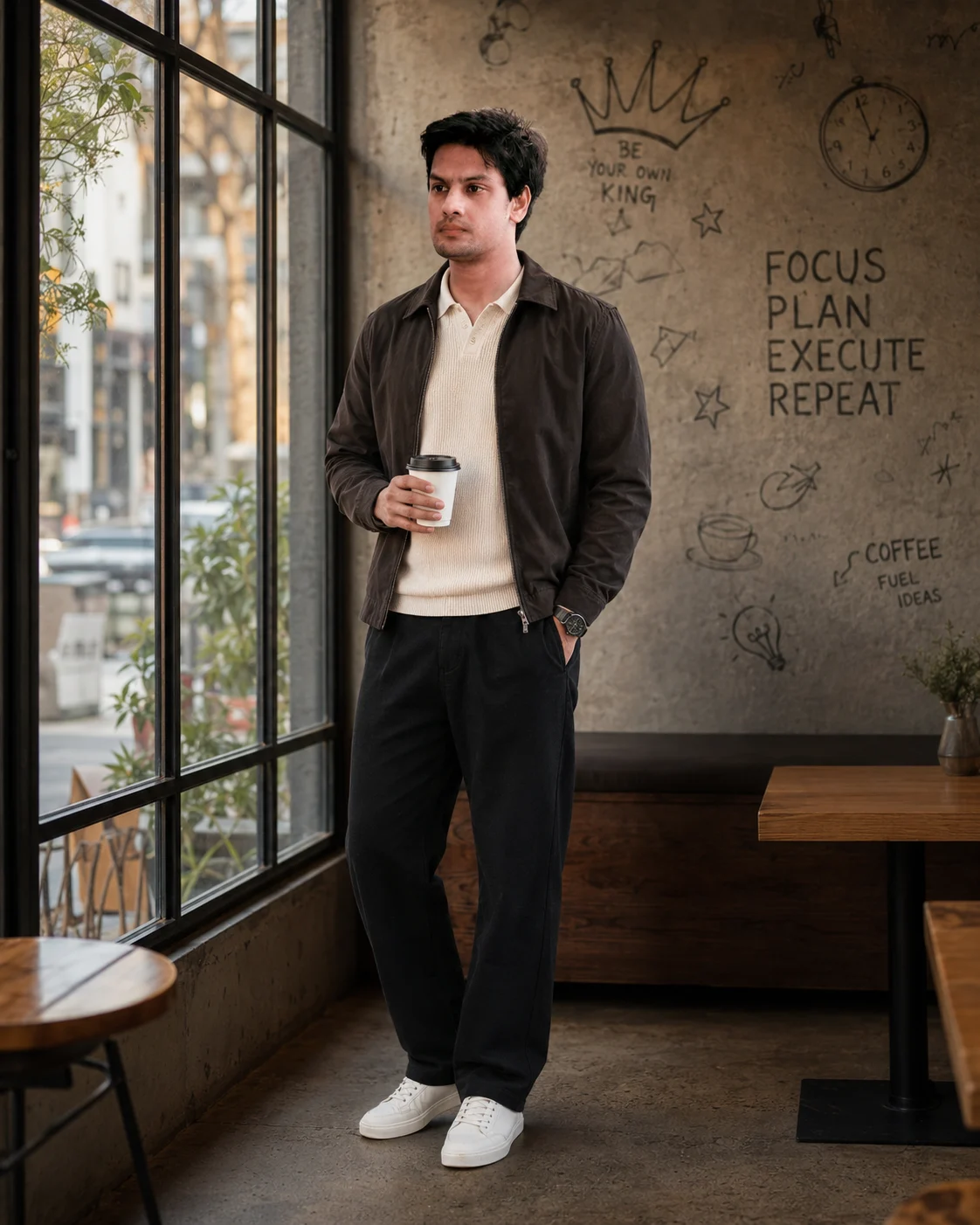
Minimalist Cafe Fashion Portrait With Warm Window Light
Create a warm café fashion portrait with natural window light, textured walls, relaxed styling, and accurate facial identity from your uploaded photo.
Using the uploaded photo, create a photorealistic full-body minimalist café fashion portrait of the same person. KEEP — Keep the uploaded face structure exactly, including jawline, cheek shape, nose shape, lip shape, eye shape, and eye colour. Keep the original skin tone and natural skin texture, including visible pores and small realistic details. Keep the original hairline and recognizable hairstyle characteristics, including natural hair density and texture. Keep facial hair exactly as shown in the uploaded photo if present. Keep the person's natural body proportions, shoulder width, torso shape, arm length, leg length, hand size, and overall height relationship. Do not reshape the face or body to match a model. CHANGE — Dress the subject in a cream-colored knitted polo shirt beneath a lightweight dark brown jacket, relaxed-fit black trousers, a simple black wristwatch, and clean white sneakers. Make the knit fabric visibly soft and textured, the jacket matte and lightweight, and the trousers naturally draped rather than tightly fitted. Add a plain takeaway coffee cup in one hand. Change the pose to a relaxed standing position beside a large industrial café window, with one hand in a trouser pocket and the body angled slightly toward the camera. The gaze should look naturally off-camera to the left. SCENE — Place the subject inside a minimalist urban café beside a large industrial-style window. Behind them, show a textured concrete wall with subtle hand-drawn doodles of a crown, clock, stars, coffee sketches, arrows, and motivational typography. Keep the wall details tasteful and secondary, with moderate blur so the subject remains dominant. Set the scene in the morning. LIGHT — Use soft morning daylight entering from the window on the subject's left side, producing gentle illumination across the face, soft shadow falloff on the opposite cheek, and warm highlights on the jacket and concrete wall. Use approximately 4300–4800K light so the skin remains natural while the café feels warm. CAMERA — Shoot from chest-height camera position using an 85mm lens at f/1.8. Keep the full body inside the vertical frame with realistic perspective, sharp facial detail, natural hands, and shallow depth of field separating the subject from the café background. GRADE — Use warm cinematic colour grading, restrained saturation, medium contrast, soft filmic highlights, natural skin tones, and slightly deeper brown and charcoal shadows. OUTPUT — Create a vertical 4:5 composition at 8K resolution with the entire body visible and enough surrounding café space for the window and concrete wall to remain readable. DO NOT — Do not slim or reshape the face, whiten the skin, change eye colour, smooth the skin plastically, alter body proportions, invent jewellery, add tattoos, change facial hair, distort hands, or replace recognizable identity.
Photo Guide
- Use a sharp photo with enough resolution to see the full face clearly.
- A front or slight three-quarter angle works best for the 85mm portrait.
- Use even daylight so the original skin tone and eye colour are clear.
- Keep the hairline, jawline, shoulders, hands, and facial hair visible.
- A dark indoor selfie with heavy shadows can cause facial features to drift.
How to Build
- 1Open Gemini and choose image generation with your uploaded photo.
- 2Upload one clear reference photo, then paste the full prompt exactly.
- 3Choose a vertical 4:5 output if the tool offers aspect-ratio controls.
- 4Generate at the highest available resolution without adding beauty filters.
- 5Check the face, hairline, hands, clothing, and full-body proportions first.
- 6If the result is wrong, regenerate using the same photo and prompt unchanged.
Pro Tips
- Use a daylight reference photo so warm café lighting does not shift skin tone.
- Keep both eyes unobstructed so their original shape and colour stay consistent.
- Choose a photo showing the shoulders so the 85mm framing preserves proportions.
- Avoid sunglasses in the reference so facial identity remains easier to match.
- Use a clear full-body reference when possible so the pose does not alter anatomy.
Share This Prompt
About the Author
Naziya
Creative AI writer at MFDA, sharing trendy photo-editing prompts and fresh ideas for beautiful, stylish AI images.