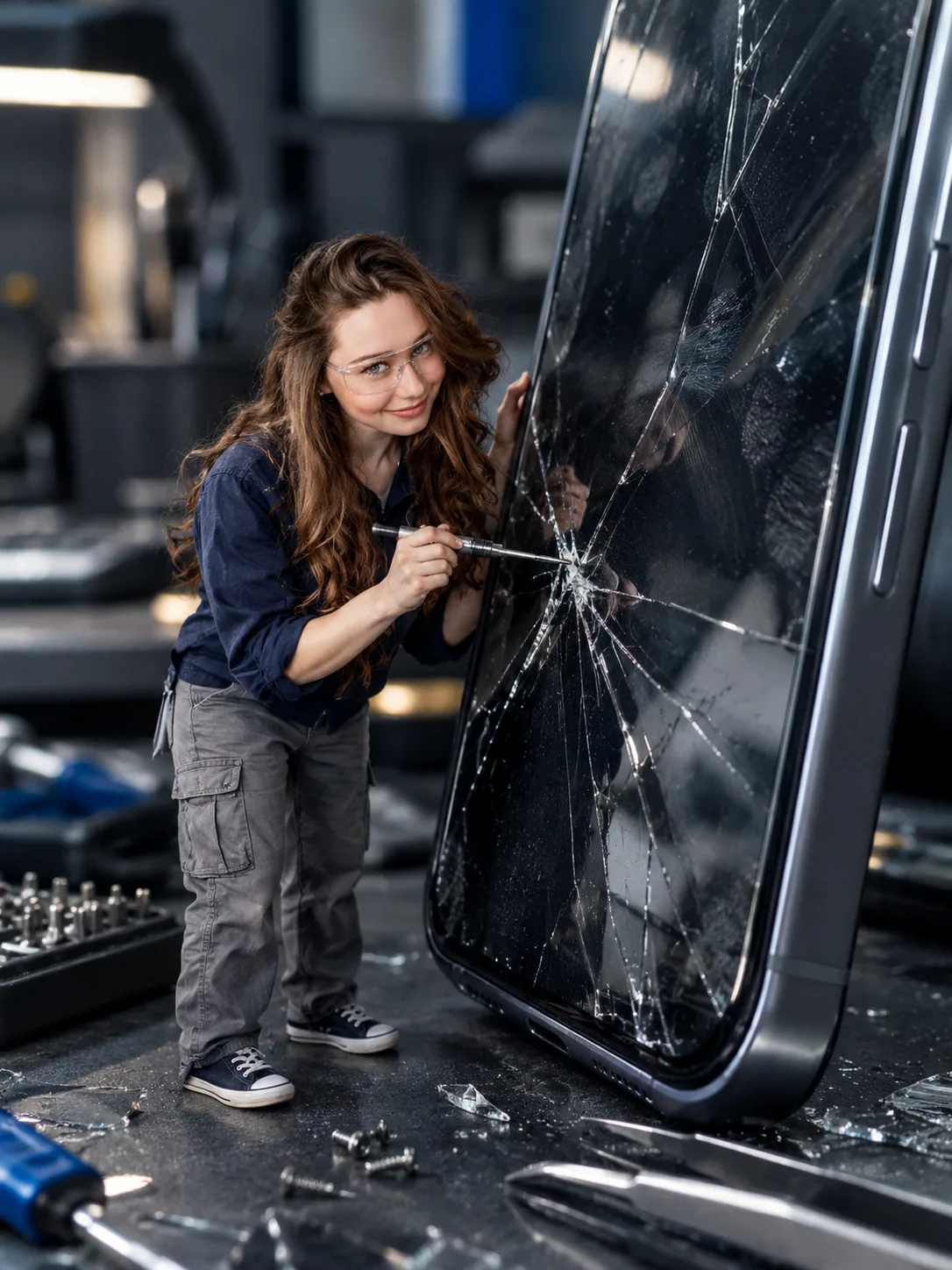
Miniature Smartphone Repair Technician Macro Portrait
Turn your uploaded photo into a tiny smartphone repair technician inspecting a giant cracked screen on a detailed electronics workbench.
Using the uploaded photo, create a photorealistic vertical 3:4 macro portrait of the same person as a miniature smartphone repair technician, approximately 6 cm tall, inspecting a gigantic modern smartphone with a branching crack across its glass screen. KEEP — Preserve the exact recognizable facial identity from the uploaded photo, including forehead shape, eyebrow placement, eye shape and natural eye colour, nose bridge and tip, lips, cheeks, cheekbones, jawline, chin, ears, facial width and natural asymmetry. Keep the original skin tone, visible pores, fine lines, marks and realistic skin texture. Preserve the existing hairline, hair density, texture and hairstyle, along with any visible facial hair and its natural growth pattern. Maintain the person's original body proportions, shoulder width, neck, arms and hand structure. Keep the person's identity unmistakable; do not replace the face with a generic technician. CHANGE — Dress the person in a dark navy cotton work shirt with visible stitching, grey utility trousers with practical side pockets, miniature dark sneakers and transparent safety glasses. The glasses must fit naturally without obscuring the eyes. Pose the technician beside the oversized phone, holding a precision screwdriver while examining a large branching crack. Keep the hands anatomically correct and the screwdriver realistically gripped. SCENE — Place the miniature technician on a dark electronics workbench. Surround him with tiny repair tools, loose screws, delicate tweezers and scattered glass fragments. The smartphone should tower over his entire body, with brushed aluminium edges, fingerprint smudges and sharp, branching fractures. Include subtle reflections on the screen and believable contact shadows beneath every object. LIGHT — Use cool-neutral workshop lighting from the upper left, softened by a large diffused source. Add restrained blue reflections along the phone's metal edges and gentle frontal fill so the face remains naturally exposed and integrated into the scene. CAMERA — Photograph from a low, workbench-level angle using a 100mm macro lens at f/4. Focus sharply on the technician's face, screwdriver and nearest section of cracked glass. Let the distant tools and workshop background fall into soft cinematic bokeh. GRADE — Use cool graphite, steel-grey and navy tones, controlled contrast, realistic skin colour and restrained highlights. Preserve fine detail without artificial sharpening or excessive blue tint. OUTPUT — Vertical 3:4 aspect ratio, 1536 × 2048 pixels or the closest supported resolution. Keep the full miniature figure and enough of the oversized phone visible to communicate the scale difference. DO NOT slim the face, whiten the skin, change eye colour, smooth skin into plastic, invent jewellery or tattoos, alter facial hair, distort hands, add extra fingers, generate illegible interface text, or include watermarks. No cartoon styling, illustration or artificial-looking CGI.
Photo Guide
- Use a sharp, high-resolution photo with the face clearly visible.
- Choose a front-facing or slight three-quarter angle for accurate facial structure.
- Use soft, even lighting so the face fits the cool workshop scene.
- Keep the hairline, eyes, jawline and any facial hair unobstructed.
- A photo with strong blue lighting may distort natural skin colour.
- Avoid blurry faces or extreme filters that hide skin texture.
How to Build
- 1Open Gemini and select image generation with your uploaded photo.
- 2Upload one clear reference photo of the person you want to preserve.
- 3Paste the complete prompt, including both KEEP and CHANGE sections.
- 4Choose a 3:4 vertical aspect ratio if the tool offers it.
- 5Select the highest available image resolution.
- 6Generate the image and inspect the face, hands and miniature scale.
- 7If the result is wrong, regenerate with a specific correction for the drifting feature.
Pro Tips
- Choose a photo with visible eyes so safety glasses do not obscure identity.
- Use a neutral expression to reduce unwanted changes to the mouth and jaw.
- Keep the technician beside the phone, not in front of its cracked screen.
- Retain the 100mm macro look so the oversized phone feels physically imposing.
- If the face looks pasted on, request matching cool-neutral light and contact shadows.
- If the screen crack looks artificial, request irregular branching fractures and glass reflections.
Share This Prompt
About the Author
Naziya
Creative AI writer at MFDA, sharing trendy photo-editing prompts and fresh ideas for beautiful, stylish AI images.