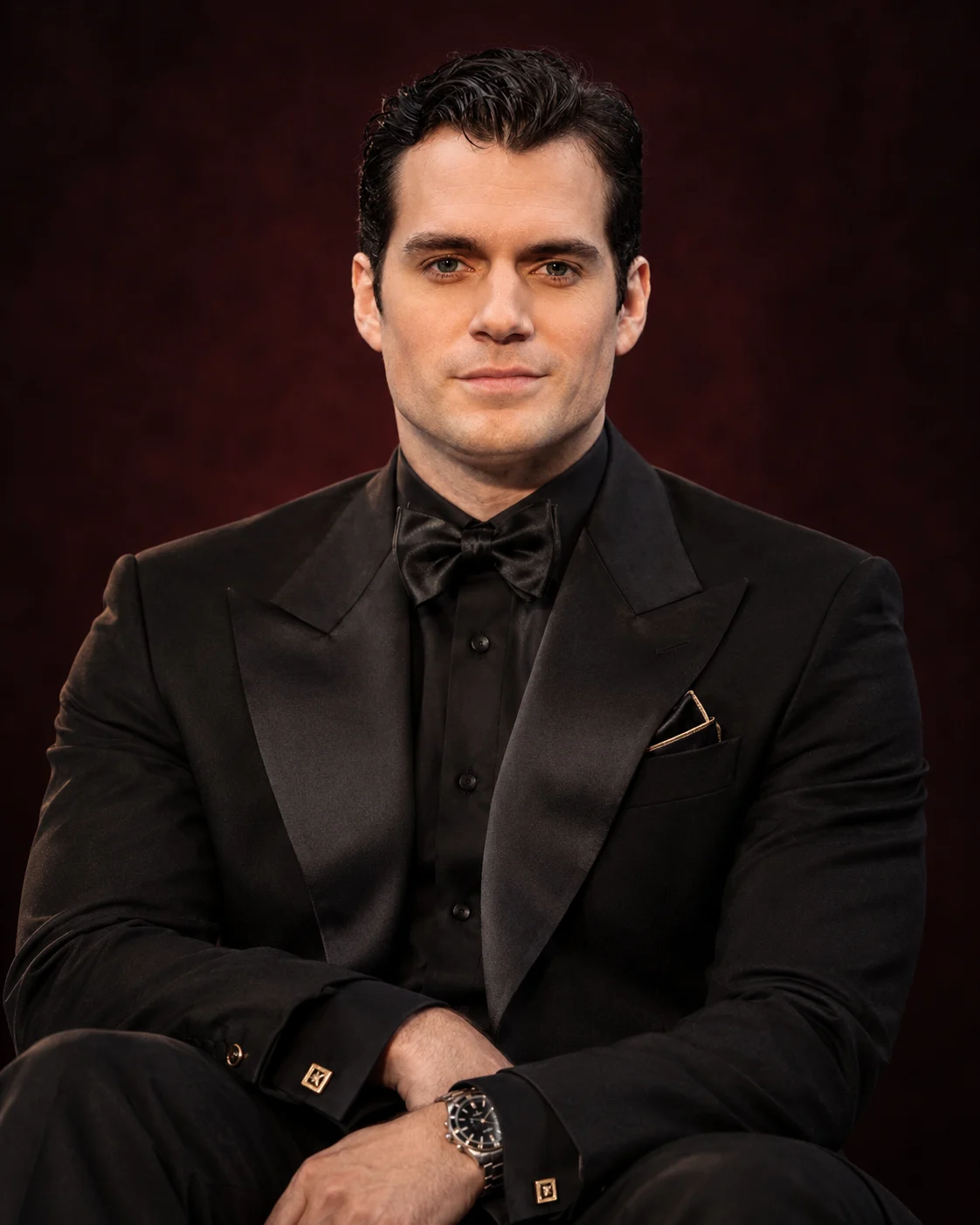
Midnight Monarch Black Tuxedo Cinematic Portrait
Create a cinematic seated portrait in a tailored black tuxedo, silk shirt and gold cufflinks against a burgundy-black studio backdrop while preserving your real facial identity.
Using the uploaded photo, create a photorealistic vertical portrait of the same person seated confidently in a black-tie editorial studio, dressed as the Midnight Monarch in formal eveningwear. KEEP — Preserve the person's exact recognizable identity, original face shape, forehead proportions, facial width, eyebrow placement, eye shape and natural eye colour, nose bridge and tip, lip shape, cheek volume, cheekbones, jawline, chin, ears and natural facial asymmetry. Retain the original skin tone, visible pores, fine skin texture, age characteristics, hairline, hair density, natural hair colour and hairstyle. Keep existing facial hair, including its original outline, density and length, if present. Preserve natural neck length, shoulder width, body proportions and hand anatomy. Do not replace the face with a generic fashion model or merge the person's features into a different identity. CHANGE — Dress the person in a precisely tailored black wool tuxedo with broad satin peak lapels, a black silk dress shirt and a neatly tied black bow tie. Add restrained gold cufflinks and a folded black pocket square with a narrow gold edge. Seat the person on a low, concealed stool, with the torso facing slightly towards the camera, forearms resting naturally across the lap and hands relaxed. Keep the expression composed, serious and self-assured, with the eyes directed towards the camera. SCENE — Place the seated subject against a deep burgundy-black studio backdrop with a subtle cloudy texture. Keep the background darkest at the corners, with a muted wine-red gradient behind the shoulders. No furniture, text or decorative props should compete with the subject. LIGHT — Use a large soft key light from the front-left at approximately 45 degrees, with gentle fill from the opposite side. Add a narrow, low-intensity rim light behind the shoulders to separate the black tuxedo from the dark background. Keep facial shadows natural and preserve detail in the black fabric. CAMERA — Shoot at eye level using an 85mm portrait lens at f/2.0. Frame from the upper thighs to the top of the head, keeping the face and hands sharply focused while the backdrop falls softly out of focus. GRADE — Apply a restrained cinematic colour grade with deep neutral blacks, subtle burgundy shadows, warm natural skin tones and controlled gold highlights. Maintain realistic contrast without crushing suit details or over-sharpening skin. OUTPUT — Vertical 4:5 composition, 8K target resolution, photorealistic editorial finish and fine fabric detail. DO NOT slim the face, whiten the skin, change eye colour, smooth the skin into plastic, alter natural facial hair, invent jewellery or tattoos, or change the person's identity.
Photo Guide
- Upload a sharp, high-resolution photo with the full face unobstructed.
- Choose a front-facing or slight three-quarter angle with both eyes visible.
- Use even light so the original skin tone and facial details remain clear.
- Include the hairline, jawline and shoulders for accurate identity preservation.
- A dark outfit is fine, but avoid pure-black clothing that hides the shoulder outline.
- Avoid sunglasses, heavy filters and strong shadows across the eyes.
How to Build
- 1Open Gemini and select image generation with your uploaded reference photo.
- 2Upload one clear identity photo before pasting the complete prompt.
- 3Keep the output aspect ratio at 4:5 if the tool offers that setting.
- 4Choose the highest available image resolution for detailed fabric and skin.
- 5Generate the image with the full prompt and inspect the face and hands.
- 6If the first result is wrong, regenerate with a specific correction to the affected detail.
Pro Tips
- Choose a photo with visible hairline and jaw edges so the dark lighting preserves them.
- Use a neutral expression in the reference so the serious pose remains believable.
- Keep gold accessories minimal so they do not overpower the black tuxedo.
- If the suit loses detail, request brighter lapel highlights without lifting the backdrop.
- If the face looks pasted on, soften the key light and match the original skin tone.
- Keep the camera framing from upper thighs upward so the seated pose reads clearly
Share This Prompt
About the Author
Naziya
Creative AI writer at MFDA, sharing trendy photo-editing prompts and fresh ideas for beautiful, stylish AI images.