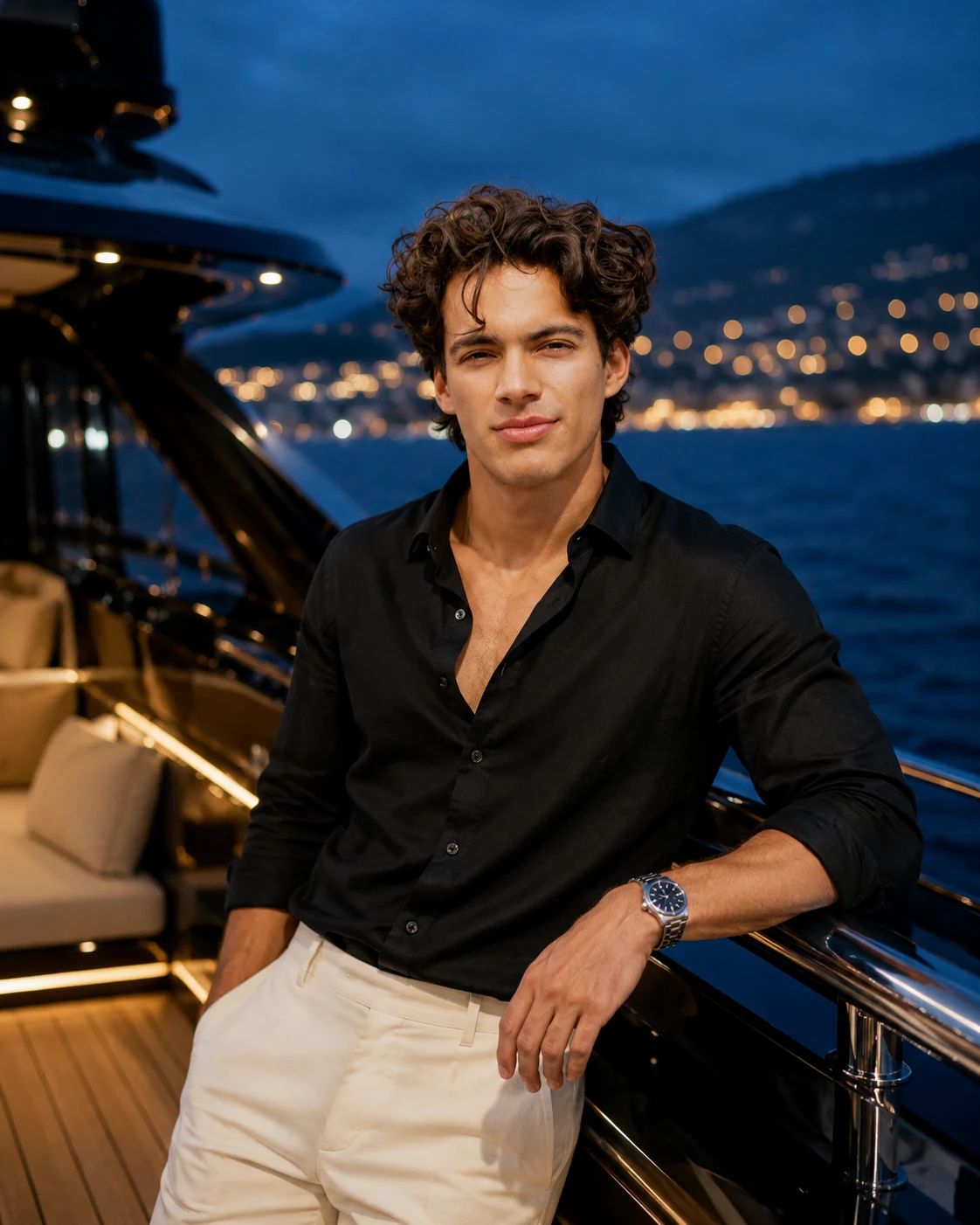
Midnight Luxury Yacht Portrait at Blue Hour
Create a cinematic yacht portrait with a black silk-blend shirt, ivory trousers, glowing deck lights, and a deep-blue ocean while preserving your face.
Using the uploaded photo, create a photorealistic luxury lifestyle portrait of the same person relaxing on the rear deck of a black luxury yacht during blue hour, with a deep navy ocean and an illuminated coastline behind them. Use a vertical 4:5 composition. KEEP — Preserve the person's exact facial identity and recognizable face structure, including forehead proportions, eyebrow shape and placement, original eye shape and colour, nose bridge and tip, lip shape, cheek volume, cheekbones, jawline, chin, ears, facial width, and natural asymmetry. Retain the original skin tone, visible pores, fine skin texture, natural marks, and authentic age. Preserve the original hairline, hair texture, hairstyle characteristics, and facial hair wherever visible. Maintain the person's existing body proportions, shoulder width, neck, and natural posture. Do not substitute a generic model's face. CHANGE — Dress the person in a black open-collar silk-blend shirt with subtle sheen, realistic draping, and natural creases around the elbows. Add tailored ivory trousers with a fine woven texture and a brushed-steel wristwatch. Position the person beside a polished yacht railing, with one hand resting naturally on the metal and the torso turned slightly toward the ocean. Keep the expression relaxed and the pose physically comfortable. Add no chain unless one is visible in the uploaded photo or explicitly requested. SCENE — Place the person on the yacht's aft deck shortly after sunset. Include brushed-metal railings, dark teak decking, cream outdoor cushions, and a distant coastline dotted with warm lights. Keep the coastline softly blurred while retaining recognizable yacht details. Show small ocean ripples reflecting scattered blue and amber highlights. LIGHT — Use cool blue ambient light from the open sky and a soft, warm practical light from the yacht's deck fixtures. Illuminate the face from the front at a slight three-quarter angle so facial features remain readable. Keep skin highlights neutral and consistent with the surrounding environment. CAMERA — Shoot with an 85mm portrait lens at f/2.0, camera positioned at chest height. Use natural perspective, controlled background compression, and sharp focus on the eyes. GRADE — Apply deep navy shadows, restrained amber highlights, natural skin tones, moderate contrast, and a subtle cinematic film finish. Avoid crushed blacks and excessive blue tint on the face. OUTPUT — Generate a vertical 4:5 portrait at 8K resolution, with realistic skin detail, fabric texture, reflections, and natural anatomy. DO NOT slim the face, whiten the skin, change eye colour, smooth skin into plastic, alter body proportions, invent tattoos or jewellery, distort hands, or replace the person's identity.
Photo Guide
- Upload a sharp photo where both eyes, nose, and jawline are clearly visible.
- Choose a front-facing or slight three-quarter angle for accurate facial structure.
- Use even lighting so the original skin tone and natural texture remain visible.
- Keep the hairline and facial hair unobstructed if they are part of your look.
- A blue-hour yacht scene blends best when the reference has neutral skin tones.
- Avoid heavy beauty filters because they can cause facial identity drift.
How to Build
- 1Open Gemini and select image generation with your uploaded reference photo.
- 2Upload one clear photo showing your face and natural proportions.
- 3Paste the complete prompt without removing the KEEP or CHANGE sections.
- 4Choose a vertical 4:5 aspect ratio if the image tool supports it.
- 5Select the highest available image resolution for detailed fabric and skin.
- 6Generate the image and inspect the face, hands, shirt, and water reflections.
- 7If the result is wrong, strengthen the KEEP instructions and regenerate.
Pro Tips
- Choose a photo with visible facial texture so the generated face stays recognizable.
- Use a black shirt reference only if you want more accurate fabric behaviour.
- Keep the face unobstructed so blue-hour lighting does not hide key features.
- Use a slight three-quarter pose to complement the yacht railing and ocean horizon.
- Keep warm deck lights behind or beside the subject so facial lighting stays natural.
- Check the wristwatch and resting hand carefully because railings can distort fingers.
Share This Prompt
About the Author
Naziya
Creative AI writer at MFDA, sharing trendy photo-editing prompts and fresh ideas for beautiful, stylish AI images.