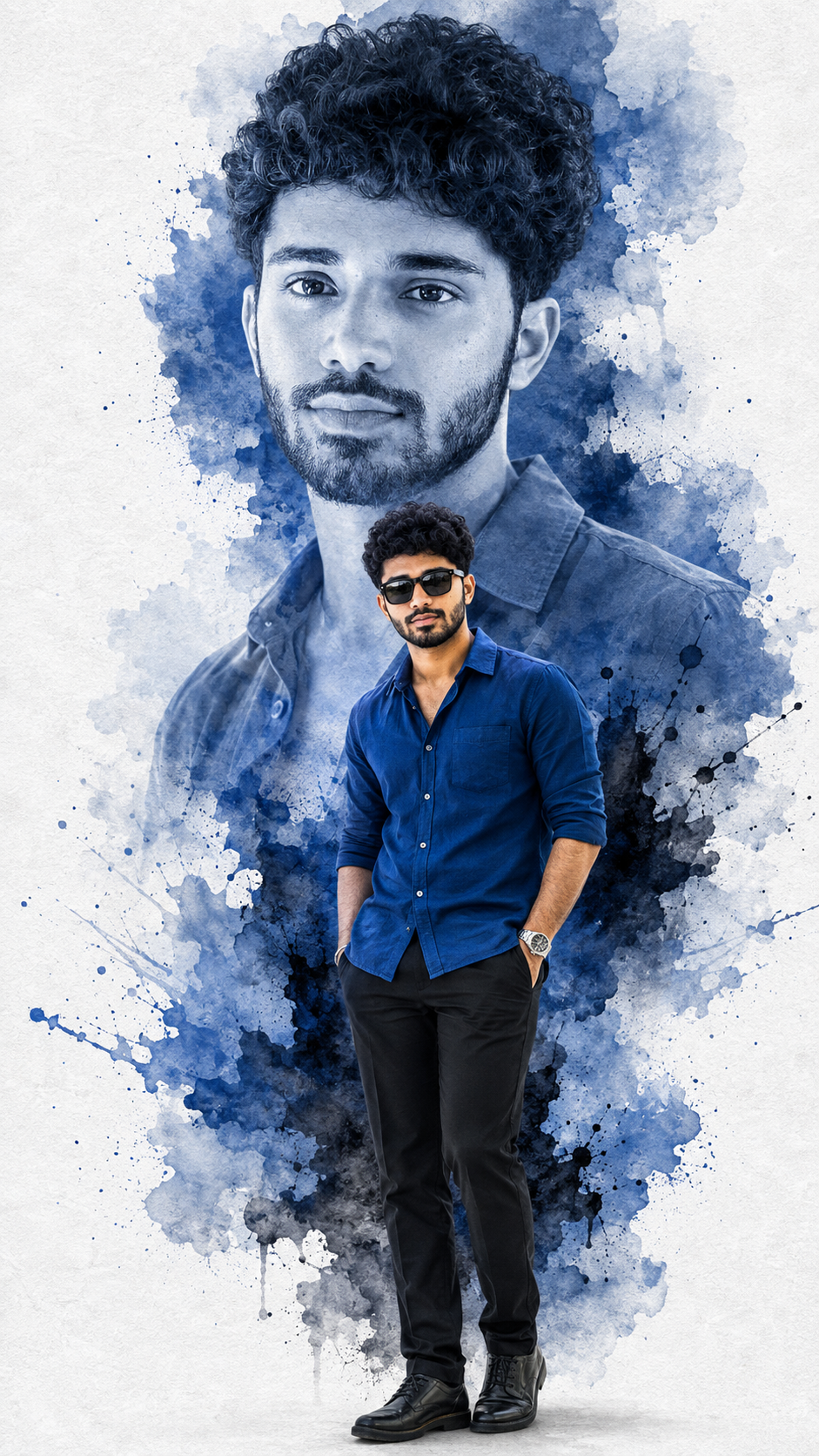
Luxury Blue Ink Splash Double Portrait Img Prompts
Create a luxury double portrait with your real face and body, royal blue styling, ink splashes, and a clean editorial poster composition.
Using the uploaded photo, create a polished luxury ink-splash fashion poster featuring the same person in a double-portrait composition. Preserve the original facial landmarks and bone structure exactly. KEEP - Preserve the original facial landmarks and bone structure exactly, including jawline, nose shape, lip shape, eye shape and colour, eyebrow shape, hairline, hair texture, and facial hair. Keep the natural skin tone and visible texture across the face, neck, arms, and hands, including pores, freckles, moles, scars, fine lines, and natural left-right asymmetry. Keep the person's real height, build, weight, shoulder width, waist and hip proportions, arm and leg length, hand size, and finger shape. Keep any glasses, piercings, tattoos, birthmarks, and apparent age that are actually visible. Do not let the poster styling rebuild the person. CHANGE - Replace the outfit with a [royal blue cotton shirt with rolled sleeves], paired with [black sunglasses] and [a simple metal wristwatch]. Add [subtle bracelets only if present in the uploaded photo]. Create one large faded monochrome-blue portrait of the same person behind the subject and one [full-body standing pose] in front. Add flowing [blue watercolor and black ink splashes] around the silhouette. Replace the original background with [white textured art paper]. Leave clean negative space around the upper composition for optional typography. SCENE - Build the image as a premium studio fashion poster with the large faded face occupying the upper background and the standing figure centered below it. Keep the paper texture visible but softly restrained, with ink spreading naturally around the figure. LIGHT - Use [soft directional studio light from camera-left] with neutral-white colour temperature. Match highlights and shadows across both portrait layers. Add a realistic contact shadow directly beneath the standing shoes and subtle shadow where ink overlaps the body. CAMERA - Use an [85mm lens] at [f/4], camera at [chest height], framing the foreground person from head to shoes. Keep the background portrait larger and softly faded without distorting facial proportions. GRADE - Use restrained [blue, black, white, and neutral-grey grading], medium-high contrast, realistic skin values, fine paper grain, and subtle photographic grain applied across the entire frame. OUTPUT - Create a [9:16] vertical poster at [high resolution], keeping the complete body, shoes, background portrait, and ink composition inside the frame. DO-NOT - Do not slim the face or body, add muscle, change height, whiten or tan skin, smooth skin into plastic, change eye colour, erase moles, scars or freckles, add jewellery, makeup or tattoos not present in the photo, or change the number or shape of fingers.
Photo Guide
- Use a sharp full-body or waist-up photo with clear body proportions.
- Choose an eye-level photo with the face and shoulders facing the camera.
- Even studio or daylight helps preserve the real skin texture.
- Keep the hairline, hands, fingers, jawline, and full outfit area visible.
- A plain light background works especially well with the white paper poster.
- Avoid cropped headshots because the front figure is full-body.
How to Build
- 1Open ChatGPT and choose the GPT Image image-generation mode.
- 2Upload your clearest full-body or waist-up photo as the identity source.
- 3Set the canvas to a 9:16 vertical composition.
- 4Paste the full prompt and generate the edited poster.
- 5Compare the face, height, shoulders, hands, and body proportions with your photo.
- 6If it drifts, ask ChatGPT to preserve the original facial landmarks and body exactly.
Pro Tips
- Use a full-body source so the standing figure keeps your real height and build.
- Keep your hands visible so the ink composition does not alter finger shape.
- Choose even lighting so the blue treatment does not hide facial texture.
- If the face drifts, repeat the exact landmark and bone-structure lock.
- Keep the hairline visible so the faded portrait still resembles the source.
Share This Prompt
About the Author
Mina
**AI Prompt Engineer at MFDA.** I design precise, creative prompts for AI image generation, photo editing, portraits, fashion, and visual storytelling.