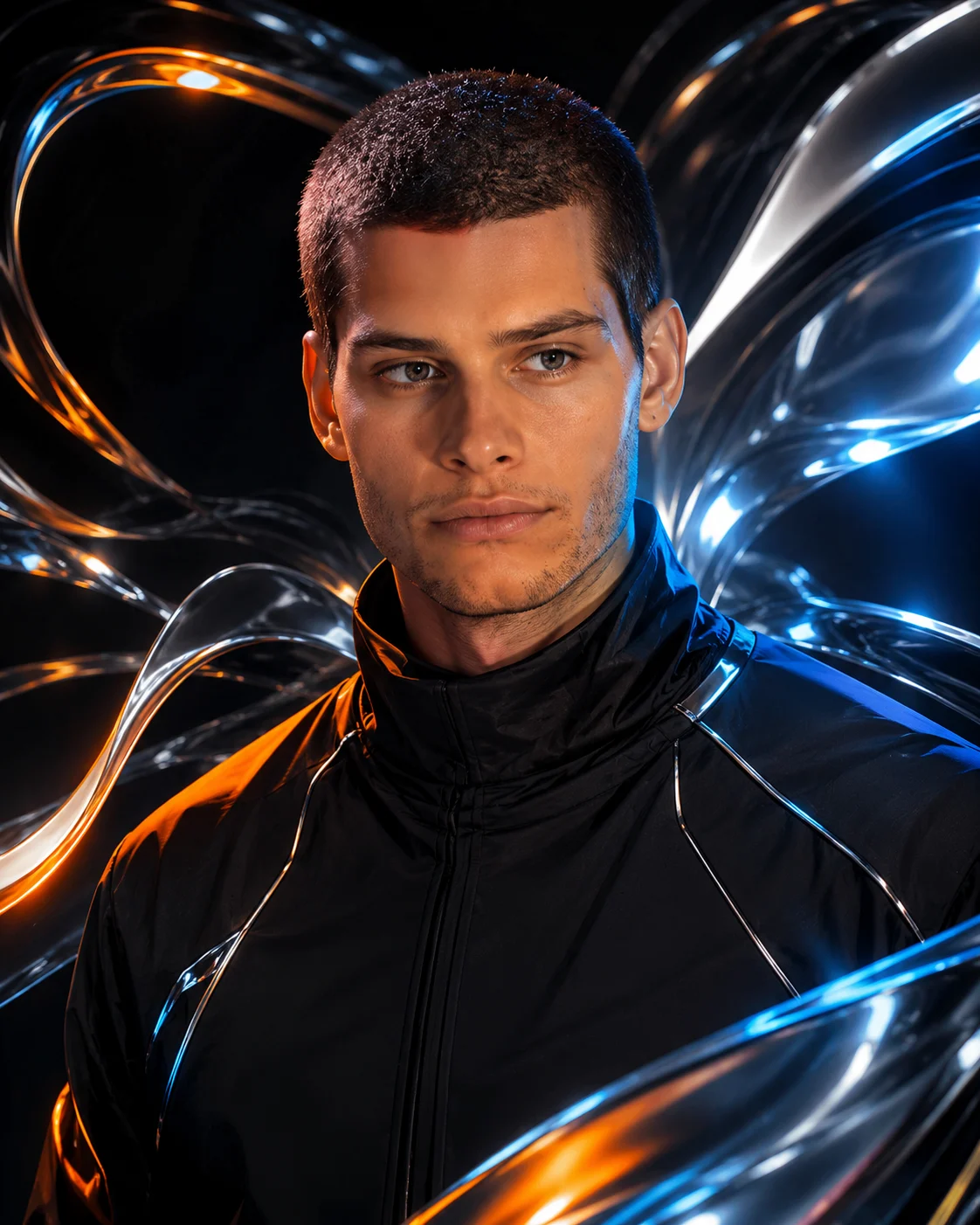
Liquid Chrome 3D Comic Portrait with Metallic Reflections
Create a 3D comic-book portrait with flowing liquid chrome, black fashion, and blue-orange reflections while preserving your facial identity.
Using the uploaded photo, create a vertical 4:5 3D-meets-comic-book portrait of the same person, combining recognizable facial features with a futuristic liquid-chrome environment. KEEP — Preserve the subject's exact facial identity, natural face shape, forehead proportions, eyebrow placement, eye shape and original eye colour, nose bridge and tip, lip shape, cheeks, cheekbones, jawline, chin, ears, and natural facial asymmetry. Keep the original skin tone, visible pores, fine skin texture, authentic age, hairline, hair density, hairstyle, individual hair characteristics, and facial hair pattern. Preserve the subject's original body proportions, neck width, shoulder width, and natural anatomy. Do not replace the face with a generic character or allow metallic reflections to alter facial features. CHANGE — Replace the clothing with a minimalist black high-neck fashion jacket made from matte technical fabric, featuring narrow reflective piping and subtle structured seams. Position the subject in a chest-up, three-quarter left-facing pose, with the head turned slightly left and the gaze directed off-camera. Add flowing liquid-chrome ribbons, polished silver arcs, and curved metallic sheets around the shoulders and outer background. Introduce restrained electric-blue and burnt-orange reflections across the metal, keeping the face unobstructed. Render the image as dimensional 3D character art blended with bold graphic-novel outlines and semi-realistic digital painting. SCENE — Place the subject inside a dark futuristic studio at night, with an almost-black charcoal backdrop. Arrange reflective chrome curves behind the head and around both shoulders, leaving clear negative space around the face. Keep the metallic forms softly separated by depth, with the nearest surfaces sharply defined and distant elements slightly blurred. The chrome should appear solid, sculptural, and physically reflective rather than liquid covering the body. LIGHT — Use a large, soft neutral key light from the front-left at approximately 45 degrees to reveal the original facial structure. Add cool silver-blue rim lighting from the right and a controlled burnt-orange accent from the left rear. Match highlights and shadows to the face's orientation. Keep skin naturally coloured and restrict coloured reflections to the jacket edges and metallic objects. CAMERA — Simulate an 85mm portrait lens at f/2.8, with the camera at chest height and focused precisely on the eyes. Maintain natural facial perspective and a gently blurred background. GRADE — Use deep charcoal blacks, cool silver highlights, restrained electric blue, and burnt orange. Apply high contrast, smooth tonal transitions, crisp ink outlines, and subtle illustrated texture without excessive sharpening. OUTPUT — Render at a vertical 4:5 aspect ratio, preferably 2048 × 2560 pixels or higher. Keep the entire head, hairline, and both shoulders inside the frame with clean edges and detailed chrome reflections. DO NOT slim the face, whiten the skin, change eye colour, smooth skin into plastic, invent jewellery or tattoos, add chrome to the skin, distort facial anatomy, cover the face with reflections, or add text, logos, or watermarks.
Photo Guide
- Upload a sharp, high-resolution photo with the full face clearly visible.
- Choose a three-quarter or front-facing photo with both eyes visible.
- Use even frontal lighting so the original facial structure stays readable.
- Keep your hairline, ears, and visible facial hair unobstructed.
- A dark outfit helps the black jacket blend naturally with the chrome scene.
- Avoid coloured lighting that hides natural skin tone or changes eye colour.
How to Build
- 1Open ChatGPT or Gemini and select an image-generation feature.
- 2Upload your clearest face photo as the identity reference.
- 3Paste the complete prompt into the image-generation input.
- 4Choose a vertical 4:5 aspect ratio and the highest available resolution.
- 5Generate the image with facial identity preservation enabled if available.
- 6If the face drifts, retry with a clearer photo and reduce chrome near the face.
Pro Tips
- Use a photo with visible hair strands so the illustrated hairstyle stays accurate.
- Keep the face larger than the chrome elements so identity remains the focal point.
- Choose a neutral-lit reference to prevent blue-orange colour contamination on skin.
- Keep the chrome behind the shoulders so reflections do not obscure facial features.
- Use moderate background blur so the metallic curves remain distinct and dimensional.
Share This Prompt
About the Author
Naziya
Creative AI writer at MFDA, sharing trendy photo-editing prompts and fresh ideas for beautiful, stylish AI images.