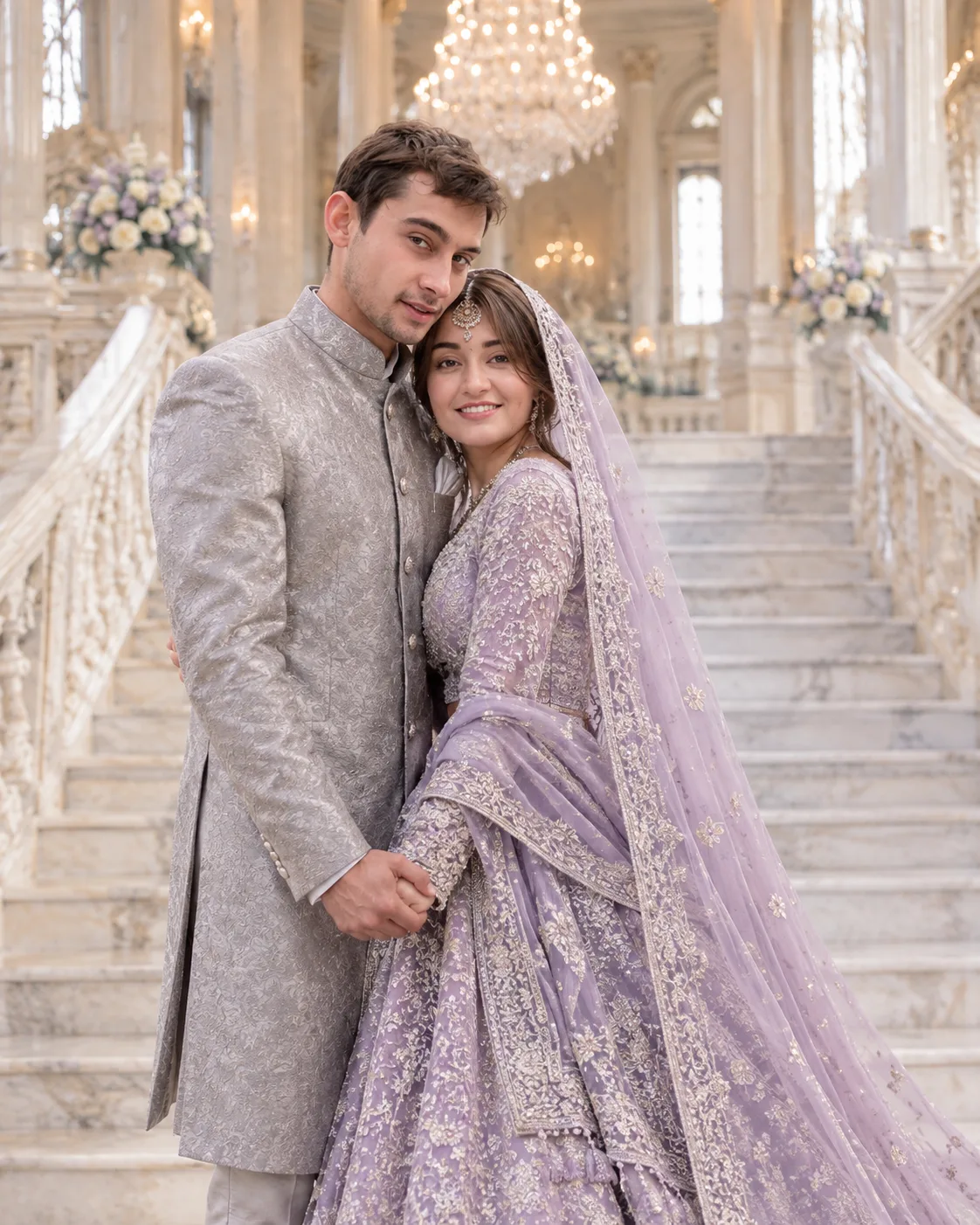
Lavender Silver Bridal Portrait in a Royal Palace
Create a royal Indian couple portrait with lavender and silver bridal embroidery, a pearl-grey sherwani, marble stairs, and soft chandelier lighting.
Using the uploaded photo, create a photorealistic Indian couple wedding portrait on a grand white marble staircase inside a royal palace, styled in lavender, silver, pearl grey, and ivory. KEEP — Preserve the uploaded person's original identity. Retain the exact face structure, jawline, cheekbones, nose, lips, eye shape and natural eye colour, eyebrows, skin tone and texture, hairline, hairstyle, facial hair, and distinctive features. Preserve natural body proportions, shoulder width, height relationships, and age appearance. Keep the original identity recognizable without reshaping, replacing, or beautifying the face. If two people are supplied, preserve each person's identity independently. If only one person is supplied, do not invent a second person's identity; use a separate reference for the other person. CHANGE — Dress the woman in a lavender silk bridal lehenga with intricate silver zardozi embroidery, floral metallic threadwork, fine sequins, and a heavily embroidered hem. Add a sheer lavender dupatta with a narrow silver border, draped naturally over her head and shoulder. Dress the man in a tailored pearl-grey jacquard sherwani with subtle silver floral embroidery, a structured band collar, covered buttons, and matching trousers. Position the woman slightly ahead of the man on the staircase, holding his hand gently while turning toward him. Have him face her with a relaxed, affectionate expression. Keep both faces unobstructed and hands anatomically natural. SCENE — Set the portrait inside an ivory marble palace with a broad symmetrical staircase, carved balustrades, tall arched openings, polished flooring, and a multi-tier crystal chandelier. The setting is an elegant indoor wedding location with soft daylight entering through tall windows. Keep the staircase recognizable but gently blurred behind the couple; retain enough chandelier detail to establish the royal setting. LIGHT — Use diffused window light from the front-left, with gentle fill light and subtle warm chandelier illumination. Match the direction and softness of the light across both faces, clothing, and marble. Preserve natural skin tones, soft facial shadows, realistic silver reflections, and detailed highlights without glare. CAMERA — Photograph at chest height using a full-frame camera, an 85mm lens at f/2.8, and a natural perspective. Keep both faces sharply focused, with realistic depth of field and visible embroidery. Frame the couple vertically from mid-thigh to full length, allowing the staircase to remain part of the composition. GRADE — Apply a refined editorial grade with muted lavender, pearl grey, ivory, and restrained silver highlights. Use balanced contrast, natural skin colour, soft warm highlights, and clean whites without excessive saturation or artificial glow. OUTPUT — Vertical 4:5 aspect ratio, high-resolution 4K-quality finish, realistic skin texture, detailed fabric, natural anatomy, and professional Indian wedding photography. DO NOT slim faces, whiten skin, change eye colour, smooth skin into a plastic texture, alter body proportions, invent jewellery or tattoos, replace identities, distort hands, or create artificial facial features.
Photo Guide
- Use a sharp, high-resolution photo where facial features are clearly visible.
- Choose a front-facing or three-quarter angle with both eyes visible.
- Use soft, even lighting so the face blends with the palace illumination.
- Keep the hairline, facial hair, jawline, and natural skin texture unobstructed.
- Lavender and silver clothing references help guide embroidery without changing identity.
- Avoid heavily filtered selfies because they can encourage facial identity drift.
How to Build
- 1Open Gemini and select image generation with reference image upload.
- 2Upload clear identity photos for both people, if available.
- 3Paste the complete prompt, including KEEP and CHANGE sections.
- 4Choose a vertical 4:5 aspect ratio and the highest available resolution.
- 5Generate the portrait and check faces, hands, clothing, and staircase perspective.
- 6If the result is wrong, regenerate with a specific correction while keeping KEEP unchanged.
Pro Tips
- Use separate, clear face references for both people so identities stay distinct.
- Choose a reference with visible hairlines and natural skin texture to reduce face drift.
- Keep the lavender and silver palette consistent so the embroidery looks coordinated.
- Use soft-lit reference photos to match the palace's diffused window illumination.
- Request sharper faces if the chandelier or staircase draws too much visual attention.
- If jewellery becomes excessive, remove extra accessories rather than altering facial details.
Share This Prompt
About the Author
Naziya
Creative AI writer at MFDA, sharing trendy photo-editing prompts and fresh ideas for beautiful, stylish AI images.