Krishna Janmashtami Devotional Portrait
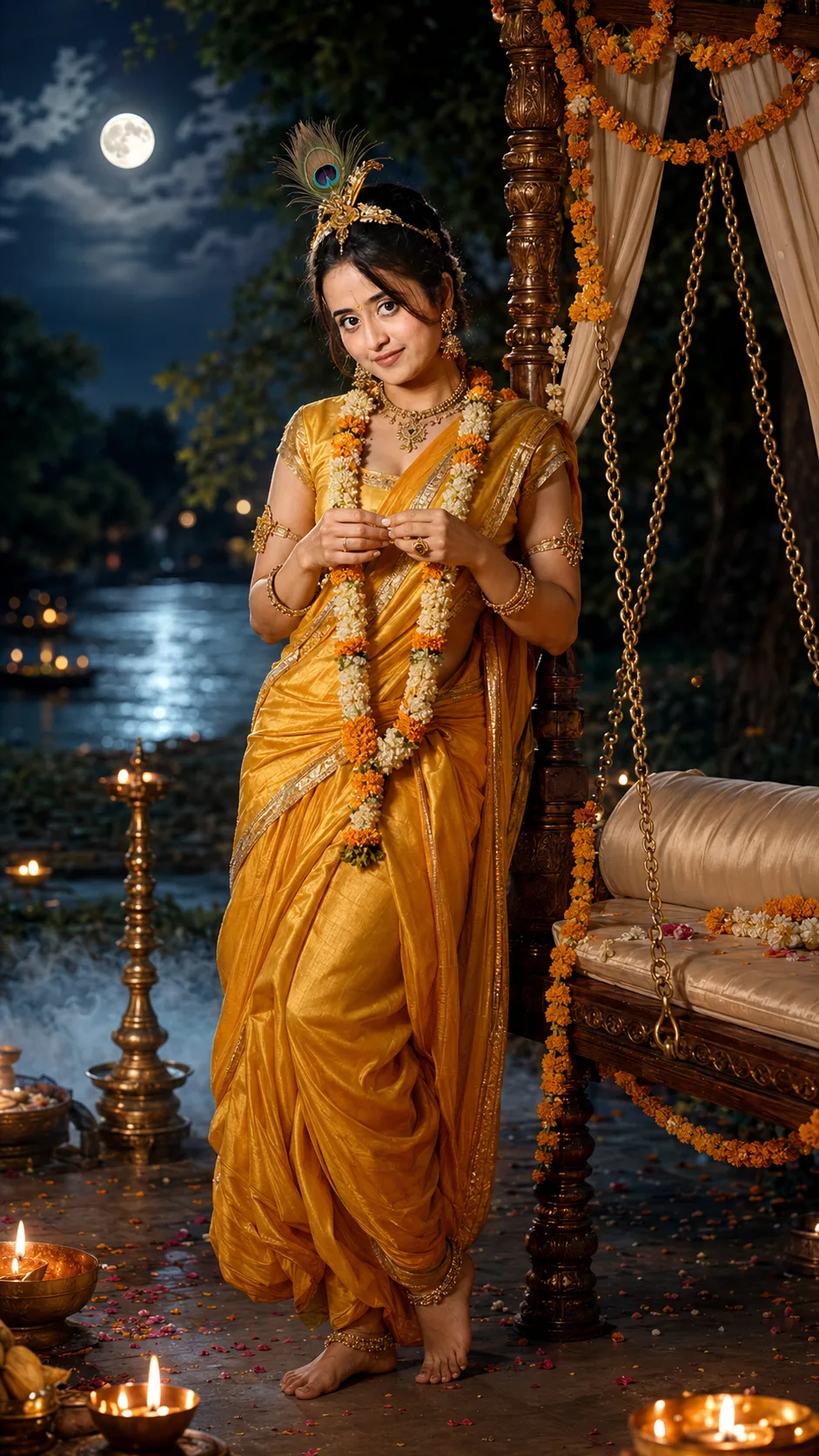
Create a photorealistic Krishna Janmashtami portrait with a yellow dhoti, peacock feather crown, glowing diyas and moonlit Vrindavan scenery.
@Create image Using the uploaded photo, create a highly detailed cinematic devotional portrait of the same person transformed into a Krishna Janmashtami-inspired character while keeping their recognizable identity. KEEP - Keep the exact face structure, jawline, nose, lips, cheek shape, eye shape and natural eye colour from the uploaded photo. Keep the original skin tone and visible skin texture, including natural pores, fine lines and small marks. Keep the original hairline and hair texture wherever visible, along with facial hair if present. Keep the person's natural body proportions, shoulder width, height impression and overall build unchanged. CHANGE - Change the wardrobe into a traditional saffron-yellow silk dhoti with fine woven texture and subtle gold edging. Add a delicate antique-gold necklace, slim armlets and small traditional ornaments. Add a realistic peacock feather crown with natural feather detail without covering the forehead or changing the face. Add fresh marigold and white flower garlands. Place the subject beside a carved wooden swing decorated with marigold flowers and cream fabric. Keep the styling devotional and refined rather than theatrical. SCENE - Set the portrait in a dreamy Vrindavan-inspired garden at night, with kadamba trees, a calm Yamuna river and a large glowing full moon in the distance. Place small brass diyas around the swing and foreground. Use soft blue atmospheric mist near the ground and gentle background bokeh. LIGHT - Use cool moonlight from the upper left to shape the face, balanced by warm golden diya light from the lower right. Keep both light sources soft and physically consistent on the skin, jewellery and fabric. CAMERA - Shoot at 85mm, f/1.8, camera at chest height, with shallow depth of field and natural portrait compression. Keep the face sharply focused while the river, trees and moon fall into soft blur. GRADE - Use a rich cinematic Indian festival grade with deep blue shadows, warm gold highlights, controlled contrast and natural skin colour. Keep realistic fabric, feather, flower and jewellery textures. OUTPUT - Create a vertical 9:16 composition at 2160 x 3840 resolution, with the subject fully visible and enough surrounding space for the devotional setting. DO-NOT - No face slimming, no skin whitening, no changed eye colour, no plastic smoothing, no invented jewellery or tattoos, no altered body proportions, no cartoon face, no exaggerated makeup, and no facial replacement.
Photo Guide
- Use a sharp photo where the full face and natural hairline are clearly visible.
- A front or three-quarter angle works best for the devotional portrait.
- Use soft daylight so skin texture and facial structure are easy to preserve.
- Choose a photo showing the shoulders and body proportions clearly.
- Keep the forehead visible so the peacock crown does not hide facial identity.
- Avoid heavily filtered selfies; they can cause plastic-looking skin and face drift.
How to Build
- 1Open Gemini and upload your clearest original portrait photo.
- 2Paste this prompt without changing the KEEP section.
- 3Choose a vertical 9:16 image setting if Gemini offers one.
- 4Generate the first image and check the face before judging the scenery.
- 5If the face drifts, re-upload the clearest photo and regenerate with the same prompt.
- 6If the outfit or lighting is wrong, regenerate rather than changing facial details.
Pro Tips
- Use a photo with visible skin texture so the moonlight does not flatten the face.
- Keep the forehead unobstructed so the feather crown stays naturally positioned.
- Choose a three-quarter pose if you want stronger depth around the swing.
- Use a clean background photo so Vrindavan elements separate naturally.
- Avoid beauty filters so the model does not copy softened facial proportions.
Share This Prompt
About the Author
Naziya
Creative AI writer at MFDA, sharing trendy photo-editing prompts and fresh ideas for beautiful, stylish AI images.