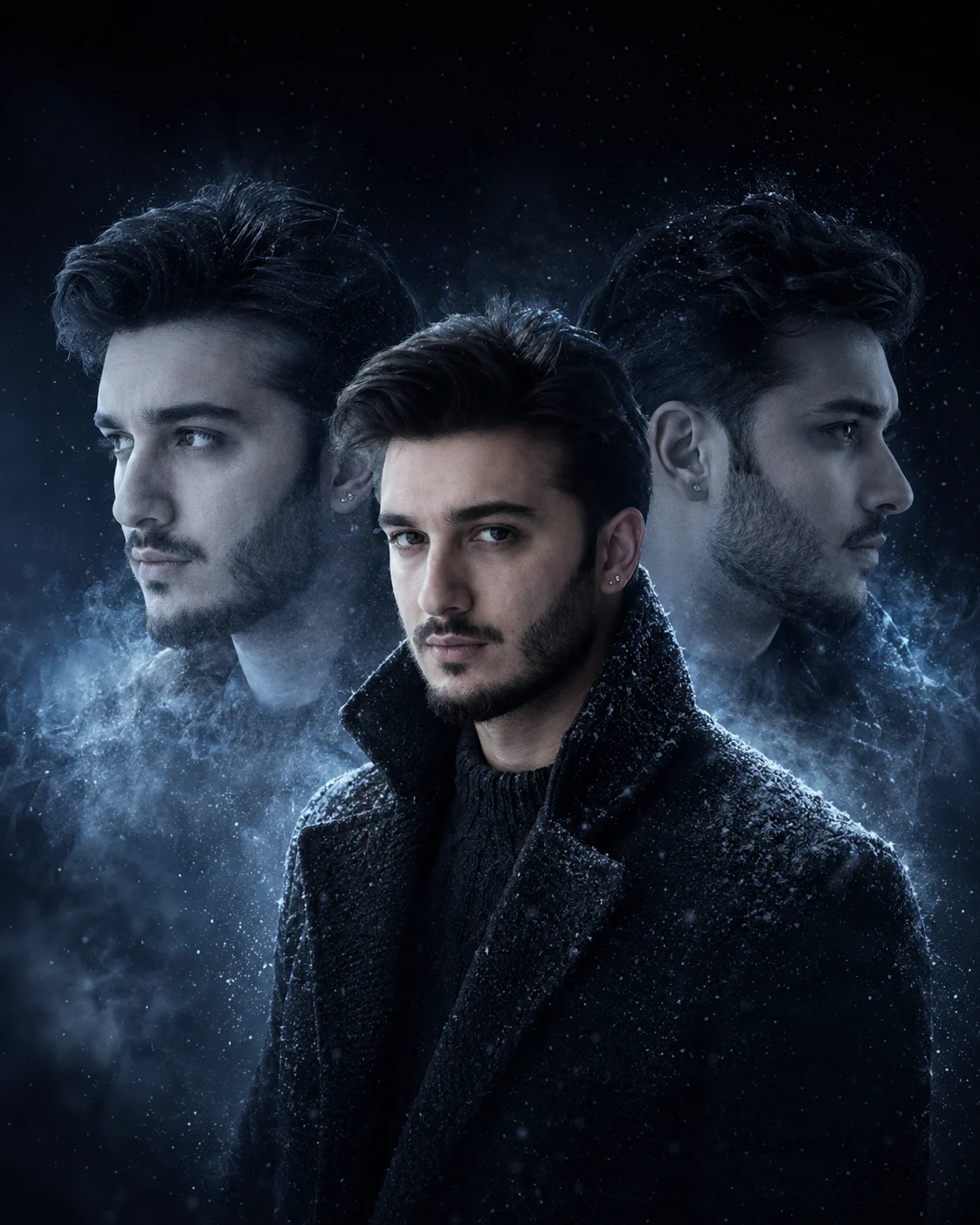
Icy Blue Triple Exposure Portrait of a Man
Create a cinematic icy-blue portrait with three views of the same man, frosted atmospheric details, black winterwear, and realistic facial identity.
Using the uploaded photo, create a photorealistic icy-blue triple-exposure portrait of the same man, with three distinct views integrated into one symmetrical vertical composition. KEEP — Preserve the man's exact facial identity and natural facial structure, including forehead shape, eyebrow placement, eye shape and original eye colour, nose bridge and tip, lip shape, cheek contours, cheekbones, jawline, chin, ears, facial width, and natural asymmetry. Retain his original skin tone, visible pores, fine skin texture, natural marks, age, hairline, hair density, hairstyle, beard pattern, moustache, and facial hair length. Keep his original neck, shoulders, and body proportions. All three representations must depict the same individual without blending facial features or inventing different versions of his face. CHANGE — Create a forward-facing central portrait with a calm, intense expression. Position two larger, semi-transparent side profiles behind him: the left profile faces left, and the right profile faces right. Dress him in a textured black wool winter coat with a raised collar and charcoal knitted innerwear. Add subtle frost-like particles around the shoulders, never covering facial features. SCENE — Place him in a dark navy and icy-charcoal studio environment at night. Fine frozen mist drifts horizontally behind the portraits, with faint crystalline particles and delicate silver-blue atmospheric layers. Keep the upper background nearly black. The central portrait stays sharp, while both background profiles blend softly into the mist without losing their recognizable facial structure. LIGHT — Use soft, neutral-cool frontal light directed toward the central face, with natural skin colour and visible pores. Add icy-blue rim lighting from behind on both sides to separate the black coat from the background. Keep the side profiles darker, with gentle silver highlights following their facial contours. Match the lighting across all three views. CAMERA — Shoot at eye level using an 85mm portrait lens at f/1.8, with chest-up framing and a symmetrical composition. Keep the central eyes, nose, lips, and beard sharply focused. Use realistic depth of field, detailed wool fibres, and natural hair strands. GRADE — Apply a restrained navy, charcoal, and silver-blue colour grade with deep blacks, controlled highlights, natural skin tones, and cinematic contrast. Avoid excessive cyan saturation or artificial glowing edges. OUTPUT — Vertical 4:5 aspect ratio, 8K-quality detail, photorealistic editorial finish, and clear separation between all three portraits. DO NOT alter facial identity, slim the face, whiten the skin, change eye colour, smooth away pores, modify the beard, blend the three faces together, invent jewellery or tattoos, add extra heads, cover the face with ice, or introduce text, logos, or watermarks.
Photo Guide
- Use a sharp, high-resolution photo with the entire face clearly visible.
- Choose a straight-on photo so the central portrait matches the reference.
- Use even lighting so the original skin tone and eye colour remain accurate.
- Keep the hairline, ears, beard, and jawline visible in the reference.
- Avoid blue-lit source photos because they can distort natural skin colour.
- A clearly visible beard helps retain consistent facial hair in all three views.
How to Build
- 1Open Gemini and select its image-generation feature.
- 2Upload a clear photo of the person whose identity must remain unchanged.
- 3Paste the complete prompt into the image-generation input.
- 4Choose a vertical 4:5 aspect ratio if the tool offers that setting.
- 5Select the highest available image quality or resolution.
- 6Check that the central face and both opposite-facing profiles match.
- 7If the result is wrong, regenerate using the same photo and correct the failed detail.
Pro Tips
- Use a front-facing reference so the central face stays close to the original.
- Keep both ears visible when possible so the side profiles retain facial structure.
- Choose a dark or neutral outfit in the reference to reduce colour distractions.
- Keep the original beard edges visible so facial hair does not change between views.
- Request softer background profiles if they compete with the central face.
- If the skin turns blue, reduce the icy lighting and preserve neutral facial illumination.
Share This Prompt
About the Author
Naziya
Creative AI writer at MFDA, sharing trendy photo-editing prompts and fresh ideas for beautiful, stylish AI images.