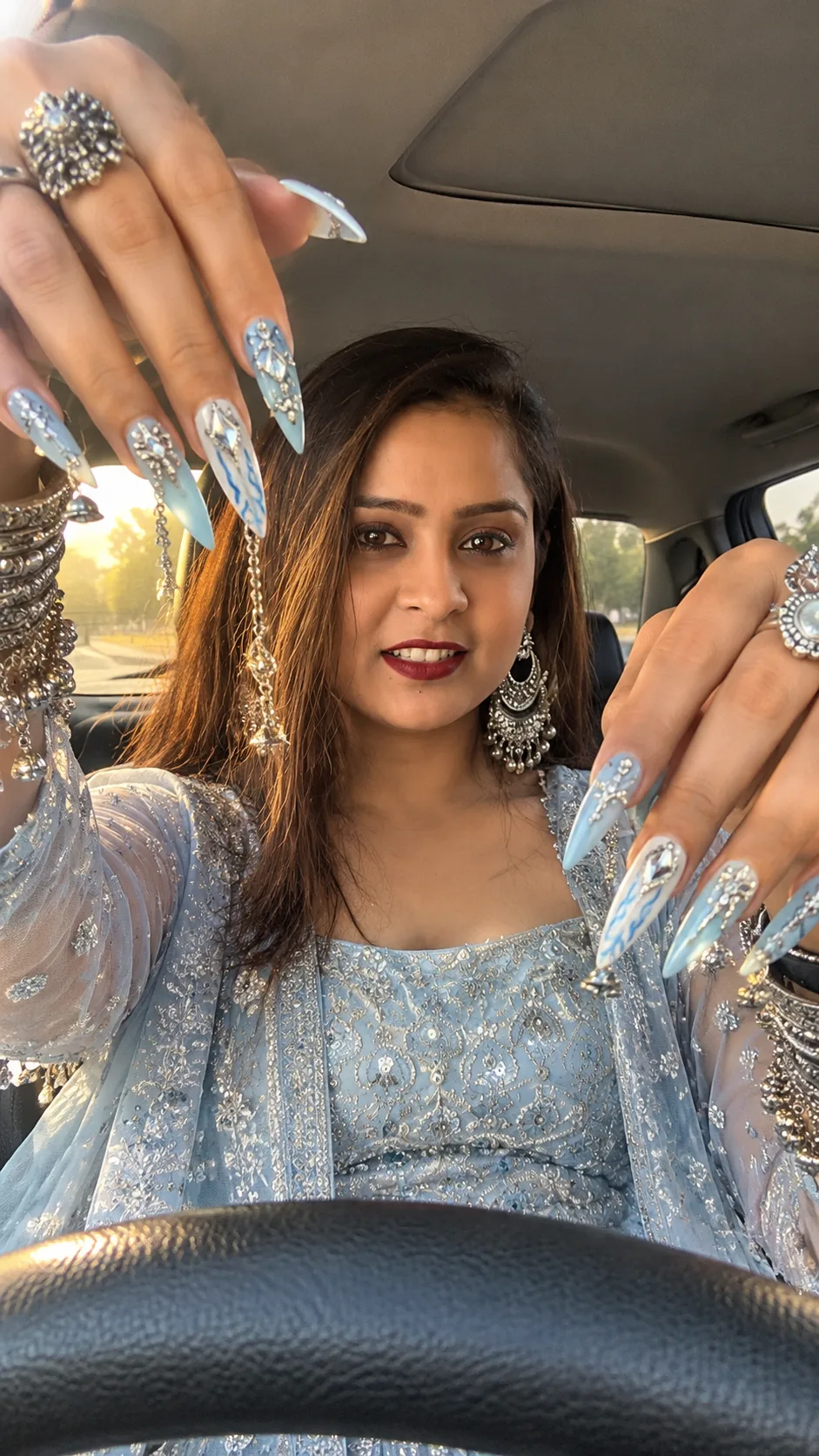
Icy Blue and Silver Bridal Nail Art AI Portrait Prompt
Create a realistic bridal portrait with icy-blue stiletto nails, silver charms, layered bangles, and soft golden-hour light inside a car.
Using the uploaded photo, create a photorealistic vertical bridal fashion portrait featuring elaborate icy-blue and silver nail art, photographed inside a car from a low dashboard-level angle. KEEP — Preserve the person's exact recognizable facial identity, including forehead shape, eyebrow placement, eye shape and natural eye colour, nose bridge and tip, lips, cheeks, cheekbones, jawline, chin, ears, facial width, and natural facial asymmetry. Keep the original skin tone, visible pores, fine lines, pigmentation, and realistic skin texture. Preserve the natural hairline, hair density, texture, and visible facial hair if present. Maintain the person's original body proportions, shoulder width, neck, arms, and natural hand structure. Do not replace the person with a generic bridal model. CHANGE — Style the person in an elegant icy-blue traditional Indian outfit with translucent net sleeves, intricate silver zari embroidery, small sequins, and a sheer baby-blue dupatta edged with embroidered silver floral borders. Add long, pointed almond-to-stiletto acrylic nails in alternating pastel baby blue and milky white. Decorate the nails with fine blue flame patterns, polished chrome accents, raised geometric diamond ornaments, small rhinestone clusters, tiny metallic pearls, short silver chains, teardrop charms, and a few miniature dangling bells. Add layered oxidized silver bangles, engraved cuffs, ornamental rings, and delicate silver earrings. Keep all nail decorations attached to the nail surfaces and all wrist jewellery positioned naturally. SCENE — Place the person in the front seat of a modern car during late afternoon. Position both raised hands close to the camera, entering from the upper-left and upper-right sides to frame the face. Point the fingers downward toward the centre so the nail extensions dominate the foreground. Keep the face clearly visible between the hands, with the upper torso and embroidered outfit below. Include a black textured steering wheel across the lower foreground, the car roof above, and softly blurred outdoor scenery through the side windows. LIGHT — Use warm golden-hour sunlight entering through the front-left windshield, with soft highlights across the face, fingertips, chrome nails, and silver jewellery. Keep shadows gentle and consistent across the hands and face. Use natural skin reflections and controlled metallic highlights without blowing out the pale-blue fabric. CAMERA — Simulate a smartphone photograph with a 24–28mm equivalent wide-angle lens, positioned near steering-wheel height and tilted slightly upward. Use a realistic wide-aperture look around f/1.8–f/2.2, with the foreground nails sharply detailed and the car background gently softened. Maintain believable perspective without stretching the face or fingers unnaturally. GRADE — Apply a warm, restrained cinematic colour grade with cool icy-blue fabric, neutral milky whites, realistic skin tones, and clean silver reflections. Preserve fine skin pores, embroidered thread detail, and individual nail ornaments. Avoid excessive glow, oversaturated blues, or artificial beauty retouching. OUTPUT — Generate a high-resolution vertical 9:16 portrait suitable for Instagram Reels, Stories, and festive fashion content. Keep both hands, all visible fingertips, the face, and the steering-wheel edge inside the frame. DO NOT slim the face, whiten the skin, change eye colour, smooth skin into plastic, alter facial identity, distort fingers, invent jewellery or tattoos, merge nail charms into the skin, or crop important nail tips.
Photo Guide
- Use a sharp, high-resolution selfie with the full face clearly visible.
- Choose a front-facing or slightly elevated angle with natural facial proportions.
- Prefer daylight-balanced photos; they blend better with warm car-window sunlight.
- Keep your hairline, eyes, nose, lips, and jaw unobstructed.
- Avoid heavily filtered selfies because they hide natural skin texture.
How to Build
- 1Open ChatGPT and choose image generation with photo upload support.
- 2Upload your selfie as the reference image.
- 3Copy this prompt and submit it with your uploaded photo.
- 4Request a vertical 9:16 composition for a full-screen portrait.
- 5Check the face, finger count, nail tips, charms, and wrist jewellery.
- 6If the first result fails, edit the faulty hand or simplify the nail decorations.
Pro Tips
- Keep both hands separated slightly so the generator can distinguish each finger.
- Use alternating blue and white nails to make individual designs easier to read.
- Limit dangling bells and chains so they do not merge with the fingers.
- Keep the face between the hands to maintain a clear identity reference.
- Retain warm window light so silver charms reflect the same light as the skin.
Share This Prompt
About the Author
Naziya
Creative AI writer at MFDA, sharing trendy photo-editing prompts and fresh ideas for beautiful, stylish AI images.