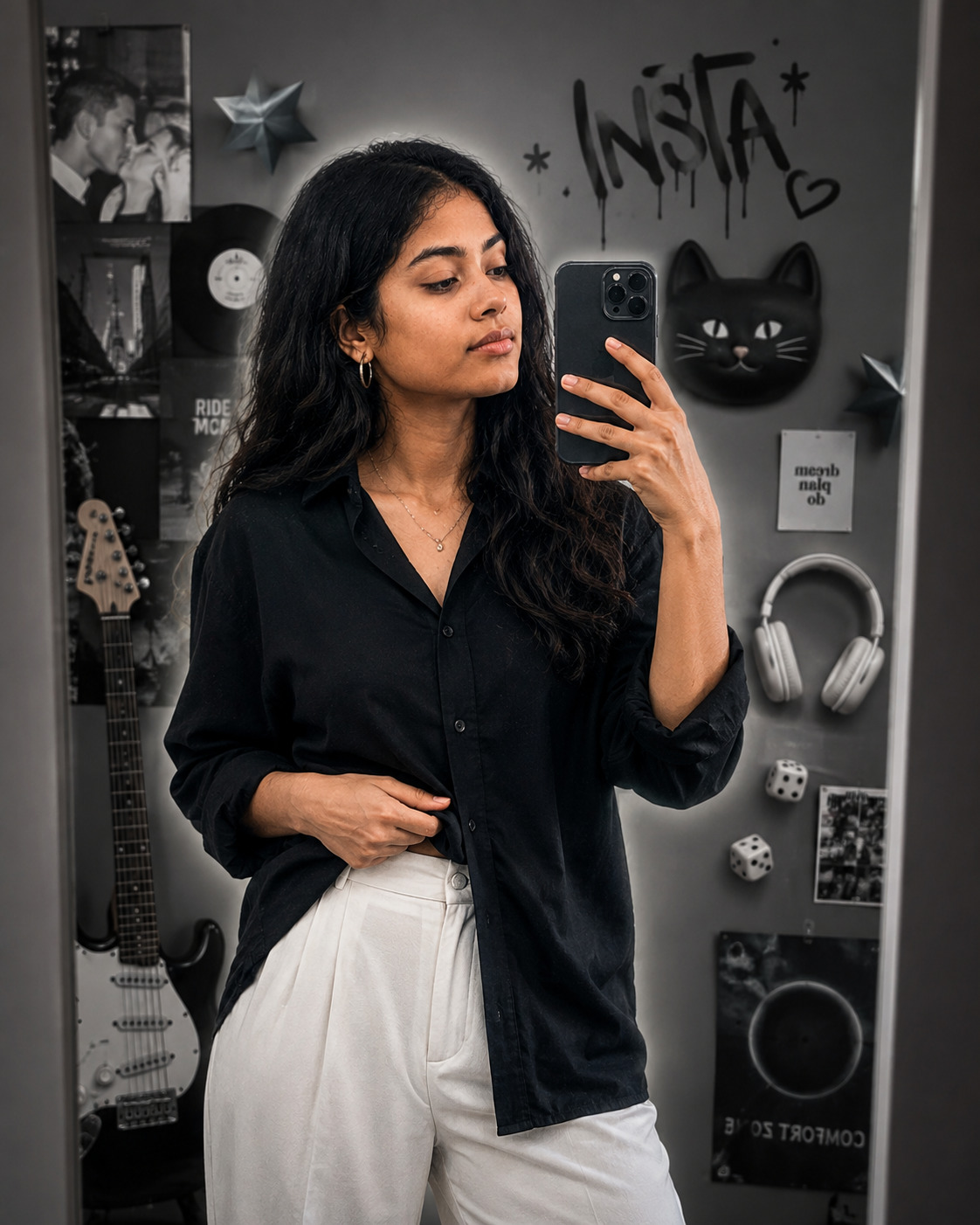
Grayscale Instagram Mirror Selfie Glow Edit
Create a realistic mirror selfie with a soft white silhouette glow, monochrome collage background, casual fashion, and preserved facial identity.
Using the uploaded photo, create a photorealistic vertical mirror selfie of the same woman, preserving her recognizable identity throughout the edit. KEEP: Keep the exact face structure, natural facial proportions, eye shape and eye colour, skin tone and visible skin texture, hairline, natural hair density, facial features, and body proportions from the uploaded photo. Keep any existing facial asymmetry and natural details that make her recognizable. Preserve the real structure of the nose, lips, cheeks, jawline, ears, and chin rather than rebuilding the face from a generic model. Keep the original identity clearly recognizable in the mirror reflection. CHANGE: Change the wardrobe to a loose black shirt made from soft matte cotton and relaxed white trousers with a clean fabric texture. Change the pose so she stands naturally in front of a mirror, holding part of the black shirt casually with one hand while taking the selfie with the other. Add only minimal, understated jewellery. Add a thin soft white glow around her outer silhouette without covering facial details or becoming a thick sticker border. Replace the original setting with a modern grayscale editorial collage. SCENE: Place her in a contemporary monochrome studio-like setting with grayscale collage elements behind the mirror, including an electric guitar, over-ear headphones, small dice, cat-face decor, dimensional star shapes, and hand-drawn graffiti-style “INSTA” lettering. Keep these elements visually secondary and slightly softened so the reflection remains dominant. LIGHT: Use realistic soft frontal light from the mirror direction, with gentle side fill and neutral-white colour temperature. Keep natural facial shadowing while allowing the white silhouette glow to remain subtly visible. CAMERA: Use a 50mm lens at f/2.8, camera held around chest height, with realistic mirror-selfie perspective and mild background separation. GRADE: Use a neutral grayscale editorial grade with controlled contrast, clean whites, deep blacks, and subtle photographic grain while preserving natural skin colour in the face. OUTPUT: Create a vertical 4:5 composition at 8K resolution with crisp facial detail, realistic hands, accurate mirror geometry, and clean collage integration. DO-NOT: no face slimming, no skin whitening, no changed eye colour, no plastic smoothing, no invented jewellery or tattoos, no distorted hands, no warped mirror, no duplicate limbs, no artificial facial reconstruction. PHOTO GUIDE Use a sharp photo where the full face and hairline are clearly visible. A front-facing or slight-angle photo gives the mirror reflection better identity detail. Even indoor lighting works best; avoid harsh shadows across the eyes and nose. Keep shoulders and upper body visible so the relaxed shirt pose can match. Avoid blurry selfies, heavy filters, or covered facial features; they cause face drift.
Photo Guide
- Use a sharp photo where the full face and hairline are clearly visible.
- A front-facing or slight-angle photo gives the mirror reflection better identity detail.
- Even indoor lighting works best; avoid harsh shadows across the eyes and nose.
- Keep shoulders and upper body visible so the relaxed shirt pose can match.
- Avoid blurry selfies, heavy filters, or covered facial features; they cause face drift.
How to Build
- 1Gemini: upload the photo and paste the prompt into image generation.
- 2Choose image generation with the highest available quality setting.
- 3Set the canvas to vertical 4:5 before generating the final image.
- 4Check the mirror reflection first for face, eyes, hairline, and jaw accuracy.
- 5Generate again if hands, mirror geometry, or collage elements become distorted.
- 6If the first result is wrong, re-upload the same photo and repeat the prompt.
Pro Tips
- Use a clear face photo so the grayscale edit does not weaken identity.
- Keep the hairline visible so the silhouette glow follows the real head shape.
- Use simple clothing in the source so the black shirt is rendered cleanly.
- Keep the original eye colour in the prompt so the reflection stays recognizable.
- Ask for subtle glow, not a thick outline, so the result stays photographic.
Share This Prompt
About the Author
Jitesh Mali
Author