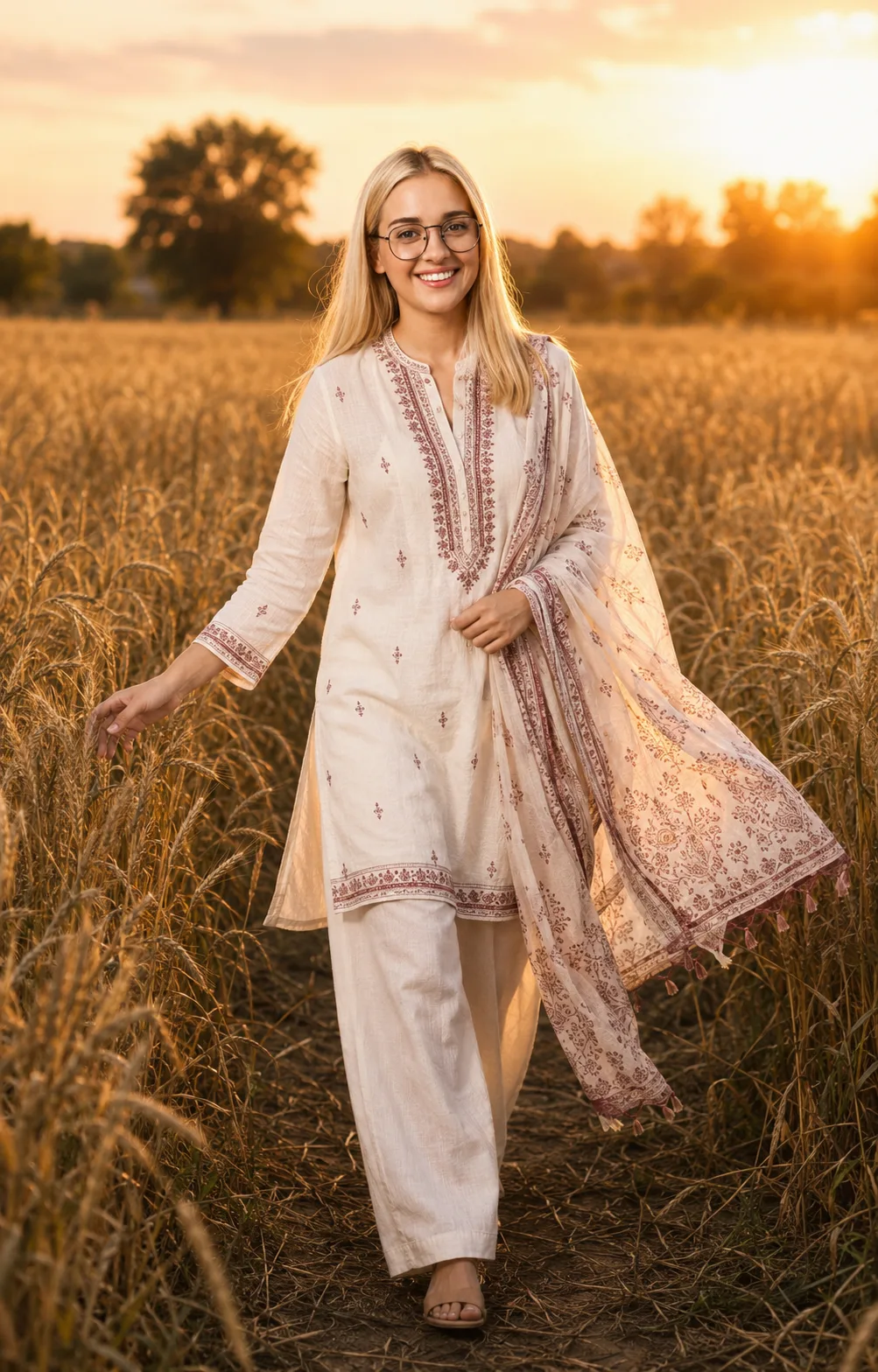
Golden Wheat Field Sunset Portrait
Create a warm sunset wheat-field portrait with your identity preserved, ivory ethnic styling, flowing fabric, and natural cinematic depth.
Using the uploaded photo, create a cinematic full-body sunset portrait while keeping the person clearly recognizable as the same individual. KEEP — Keep the exact face structure, eye shape and natural eye colour, nose shape, lips, jawline, forehead proportions, skin tone and visible skin texture from the uploaded photo. Keep the original hairline, natural hairstyle, hair texture, facial hair if present, and natural body proportions. Preserve distinctive facial details rather than reconstructing or beautifying the face. Keep the person's apparent age, identity, and natural physical build unchanged. CHANGE — Change the wardrobe to an ivory-white cotton kurti with fine maroon embroidery, matching wide-leg cotton trousers, and a lightweight printed dupatta. Change the background to a tall golden wheat field at sunset. Change the pose to a natural walking step, with the face gently turned toward the camera, one hand brushing the wheat and the other lightly holding the dupatta. Add warm directional sunlight and a restrained cinematic colour grade. SCENE — Place the person in a mature wheat field during late golden hour. Tall wheat stalks should surround the lower body, with a distant tree line behind them rendered softly out of focus. Keep the field realistic rather than perfectly symmetrical. Let the moving dupatta and hair suggest a light evening breeze. LIGHT — Use low warm sunlight coming from behind and slightly to one side of the person, creating a soft golden rim along the hair and shoulders. Keep enough bounced daylight on the face so facial features remain naturally exposed rather than silhouetted. Use warm highlights around 4500K-5000K. CAMERA — Shoot at 50mm, f/2.0, camera positioned around waist height, with natural perspective and moderate background compression. Keep the entire body inside the frame while maintaining realistic proportions. GRADE — Use warm golden highlights, gently muted greens, natural skin tones, moderate contrast, soft highlight roll-off, and subtle film grain. Avoid heavy orange skin tones or artificial lens effects. OUTPUT — Create a vertical 4:5 image at 2048 × 2560 pixels, with the subject sharply detailed and the distant field softly blurred. DO-NOT — No face slimming, no skin whitening, no changed eye colour, no plastic smoothing, no invented jewellery or tattoos, no altered body proportions, no facial reconstruction, and no replacement of distinctive identity features.
Photo Guide
- Use a sharp 2000px+ photo where the face and full body are visible.
- Choose a front or three-quarter angle so the jawline and hairline remain clear.
- Use even daylight; avoid strong coloured indoor lighting on the face.
- Keep natural hair texture visible, especially around the forehead and sides.
- A sunset-coloured indoor photo can fight the outdoor golden-hour lighting.
How to Build
- 1Open Gemini and choose image generation with the highest quality setting.
- 2Upload one clear identity photo with the face unobstructed.
- 3Paste the full PROMPT CONTENT without changing the KEEP section.
- 4Set the output ratio to 4:5 and resolution to 2048 × 2560.
- 5Generate once, then compare the face, hairline, hands, and body proportions.
- 6If wrong, regenerate using the same photo and explicitly reinforce KEEP details.
Pro Tips
- Use a daylight source photo so warm sunset light blends naturally with skin.
- Choose a photo showing the full body so proportions stay consistent.
- Keep the forehead visible so the generated hairline does not drift.
- Avoid sunglasses because they remove the eye reference needed for identity.
- Use a relaxed expression so the walking pose does not distort facial features.
Share This Prompt
About the Author
Naziya
Creative AI writer at MFDA, sharing trendy photo-editing prompts and fresh ideas for beautiful, stylish AI images.