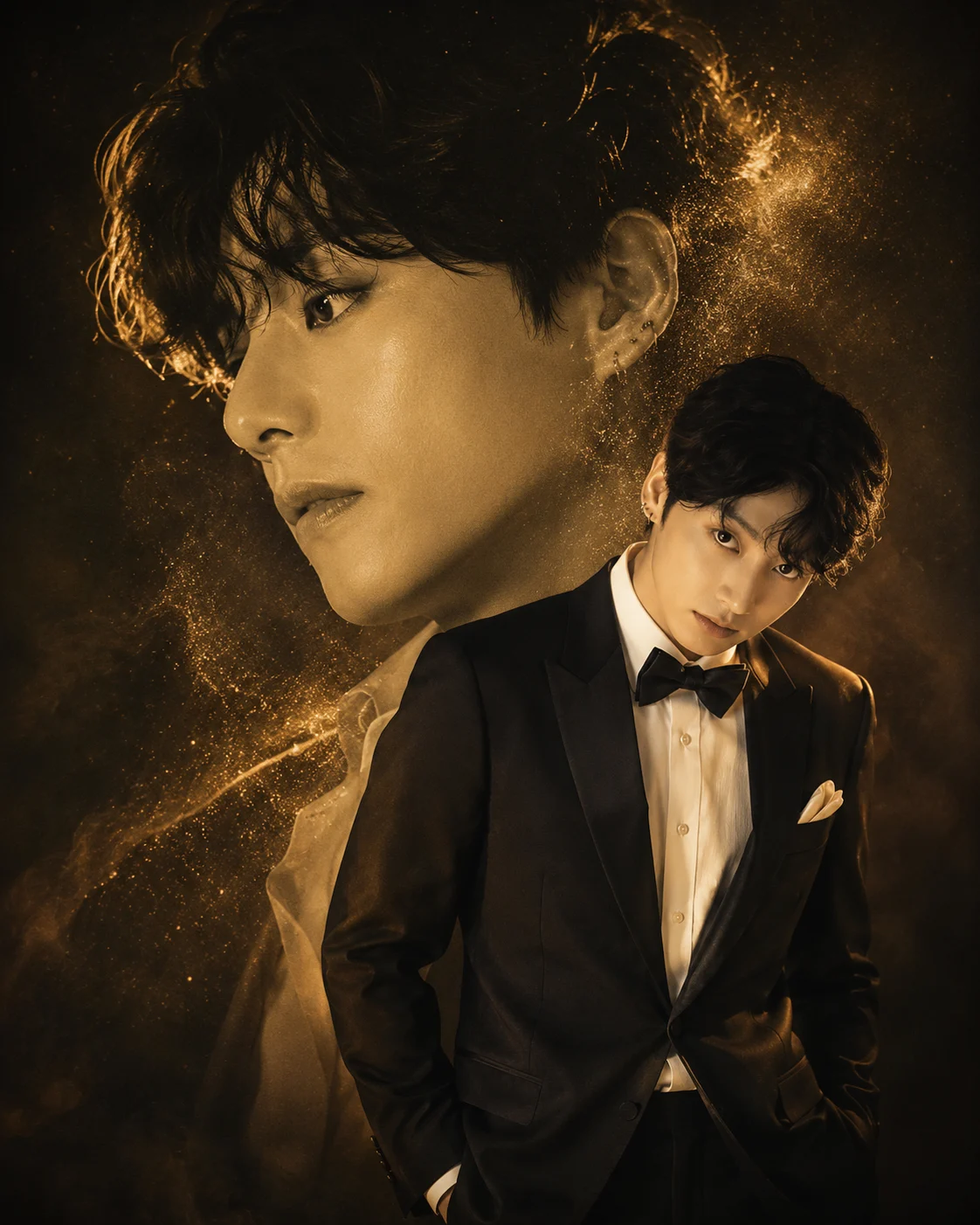
Golden Legacy Double Exposure Royal Suit Portrait
Create a cinematic royal fashion portrait with your own face, an oversized golden side-profile, a black tailored suit and glowing amber atmosphere.
Using the uploaded photo, create a premium cinematic double-exposure fashion portrait of the same recognizable man, combining an oversized golden monochrome side-profile with a smaller full-colour royal fashion portrait in a vertical 4:5 composition. KEEP — Preserve the exact facial identity and natural anatomy visible in the uploaded photograph. Retain the original forehead proportions, eyebrow thickness and placement, eye shape and natural eye colour, nose bridge and tip, lip shape, cheek volume, cheekbones, jawline, chin, ears and natural facial asymmetry. Keep the original skin tone, pores, fine lines, authentic texture and natural age. Preserve the original hairline, hair density, texture, colour and hairstyle. Maintain the original facial hair pattern, beard outline and moustache if present. Keep the person's natural neck width, shoulder structure, body build and proportions. Both portraits must depict exactly the same individual without identity variation. CHANGE — Transform the wardrobe into a perfectly tailored black royal tuxedo featuring satin peak lapels, a crisp ivory-white dress shirt, a black silk bow tie and a neatly folded champagne-white pocket square. Add black tailored trousers and polished black formal shoes where visible. Position the foreground subject in a confident three-quarter stance with both hands inside the trouser pockets, shoulders relaxed and chin slightly raised. SCENE — Create an enormous golden monochrome side-profile of the same man across the upper-left background, facing left. Place the smaller full-colour portrait in the lower-right foreground, visible from mid-thigh upward. Blend the portraits using fine floating gold particles, subtle metallic dust and translucent amber shadows. Set the scene inside a dark charcoal luxury studio with a warm golden atmospheric haze. LIGHT — Illuminate the foreground face from the upper front-left using a soft amber key light. Add a restrained golden rim light around the hair and tuxedo shoulders. Keep facial shadows naturally attached to the face. Give the background profile soft diffused champagne-gold illumination. CAMERA — Simulate professional 85mm portrait photography at f/2.0, camera positioned at chest height. Maintain realistic facial proportions, controlled depth of field and crisp foreground details. GRADE — Apply rich black tones, antique gold highlights, warm amber midtones and deep charcoal shadows. Use refined cinematic contrast with subtle film grain and realistic skin colour. OUTPUT — Vertical 4:5 aspect ratio, 8K-quality detail, sharp facial features, realistic fabric texture and clean double-exposure blending. DO NOT slim or reshape the face, whiten the skin, change eye colour, smooth skin into plastic, alter facial hair, invent jewellery or tattoos, add extra people, introduce text, logos or watermarks.
Photo Guide
- Upload a sharp, high-resolution photo with the full face visible.
- Choose a front-facing or slight three-quarter facial angle.
- Use soft, even lighting so facial details remain clear.
- Keep your original hairline, ears and facial hair unobstructed.
- A naturally dark outfit helps the black tuxedo blend convincingly.
- Avoid heavily filtered photos that obscure natural skin texture.
How to Build
- 1Open Gemini or ChatGPT and select its image generation feature.
- 2Upload your personal photograph as the identity reference.
- 3Copy the complete prompt and paste it into the image generator.
- 4Choose a vertical 4:5 portrait aspect ratio.
- 5Select the highest available image quality or resolution.
- 6Generate the image and inspect both portraits for identity consistency.
- 7If the first result drifts, regenerate with stronger KEEP instructions.
Pro Tips
- Use a photo with visible facial contours so both profiles match.
- Keep sunglasses out of the reference for clearer eye preservation.
- Choose a naturally dark background to strengthen the gold contrast.
- Request fine gold particles rather than dense glitter to retain facial detail.
- Keep the foreground portrait larger enough to show tuxedo construction.
- Check the background profile's nose and jawline against the original face.
Share This Prompt
About the Author
Naziya
Creative AI writer at MFDA, sharing trendy photo-editing prompts and fresh ideas for beautiful, stylish AI images.