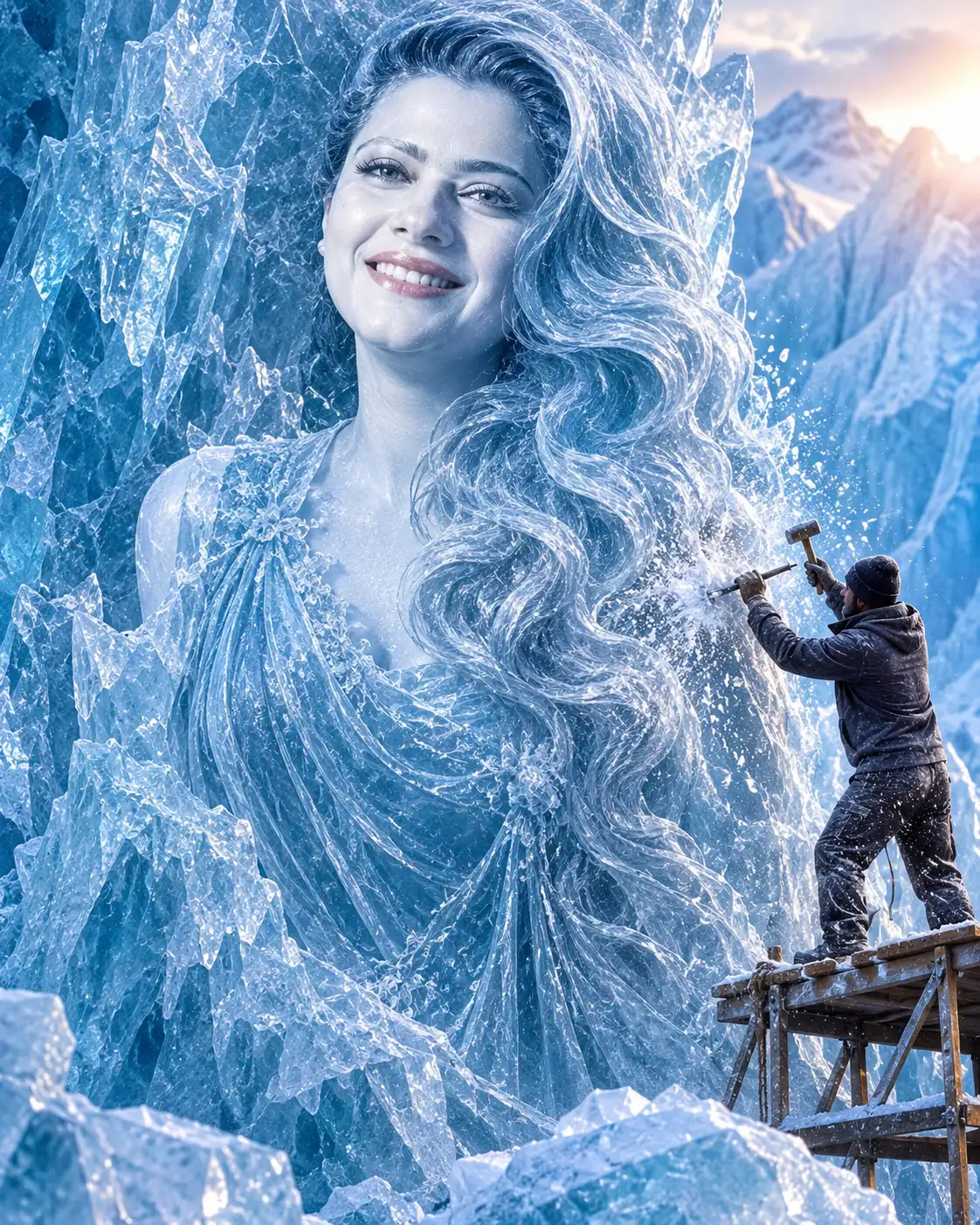
Glacier Ice Princess Monument Portrait
Transform your uploaded portrait into a monumental ice princess sculpture carved from a translucent glacier, while preserving your recognizable facial identity.
Using the uploaded photo, create a photorealistic cinematic portrait of the same woman emerging as a giant ice princess sculpture from a towering translucent glacier monolith. KEEP — Preserve the exact identity of the woman in the uploaded photograph. Retain her original face shape, forehead width, cheekbone placement, jawline, chin, nose bridge and tip, lip shape, eyebrow position, and natural facial proportions. Keep the original eye shape, eye colour, eyelid structure, and distance between the eyes. Preserve her natural skin tone, visible skin texture, hairline, and recognizable facial characteristics. Maintain the original body proportions wherever visible. Her face must remain unmistakably recognizable as the person in the reference photo. Do not substitute a generic fantasy princess face. CHANGE — Transform the portrait into a monumental ice sculpture. Recreate her hair as thick, flowing frozen waves made from translucent blue-white ice. Give the sculpture a smooth, finely polished facial surface with realistic crystalline reflections, while the surrounding glacier remains rough, fractured, and naturally layered. Dress the visible figure in an elegant ice-blue gown with delicate frozen fabric folds and subtle crystalline detailing. Position her face emerging directly from the glacier, with a slight three-quarter orientation. Include a tiny male sculptor in rugged charcoal winter clothing on the right, striking a metal chisel with a wooden mallet. SCENE — Place the sculpture inside an enormous Arctic glacier workshop during late afternoon. Show towering frozen walls, scattered ice blocks, carving tools, and transparent ice fragments behind the sculptor. Keep distant glacier formations softly blurred while the princess's face and chisel impact remain sharply detailed. Fine ice dust and frozen mist should float around the sculpture. LIGHT — Use natural Arctic daylight entering from the upper right. Create cool blue reflections across the ice, balanced with soft neutral illumination on the sculpted face. Add directional rim lighting to separate the rough glacier edges from the background. Match facial highlights and shadows to the original face structure. CAMERA — Shoot a medium-wide, slightly low-angle composition using a 50mm lens at f/5.6, camera positioned around chest height. Keep the entire sculptural scale visible without distorting facial proportions. GRADE — Apply a restrained icy blue, silver, and cool white colour grade. Preserve natural facial tones, detailed ice transparency, realistic refraction, and deep cinematic shadows. OUTPUT — Vertical 4:5 aspect ratio, ultra-detailed 8K-style rendering, sharp facial identity, realistic materials, and professional cinematic composition. DO NOT slim the face, whiten the skin, change eye colour, alter facial proportions, apply plastic smoothing, invent jewellery or tattoos, or replace the original identity.
Photo Guide
- Use a clear, high-resolution portrait with visible facial details.
- Choose a straight-on or slight three-quarter face angle.
- Use soft, even lighting so facial features remain identifiable.
- Keep the complete forehead, eyes, nose, lips, and chin visible.
- A cool daylight portrait blends naturally into the blue glacier environment.
- Avoid heavy beauty filters; they cause facial identity drift.
How to Build
- 1Open Gemini and select its image generation or image editing feature.
- 2Upload one clear photograph of the person whose identity must be preserved.
- 3Copy the complete Prompt Content into the instruction box.
- 4Keep the aspect ratio at 4:5 if the tool offers this setting.
- 5Generate the image and inspect the face against the uploaded photograph.
- 6If the face changes, regenerate using the same photo and stronger KEEP instructions.
Pro Tips
- Choose a photo with visible hairline so the icy hair transition looks natural.
- Use a slightly angled portrait to create depth in the glacier carving.
- Keep natural skin texture so the polished ice face does not look artificial.
- Avoid dark source photos because facial details disappear in blue lighting.
- Use a high-resolution reference so the sculpted eyes and lips stay recognizable.
Share This Prompt
About the Author
Naziya
Creative AI writer at MFDA, sharing trendy photo-editing prompts and fresh ideas for beautiful, stylish AI images.