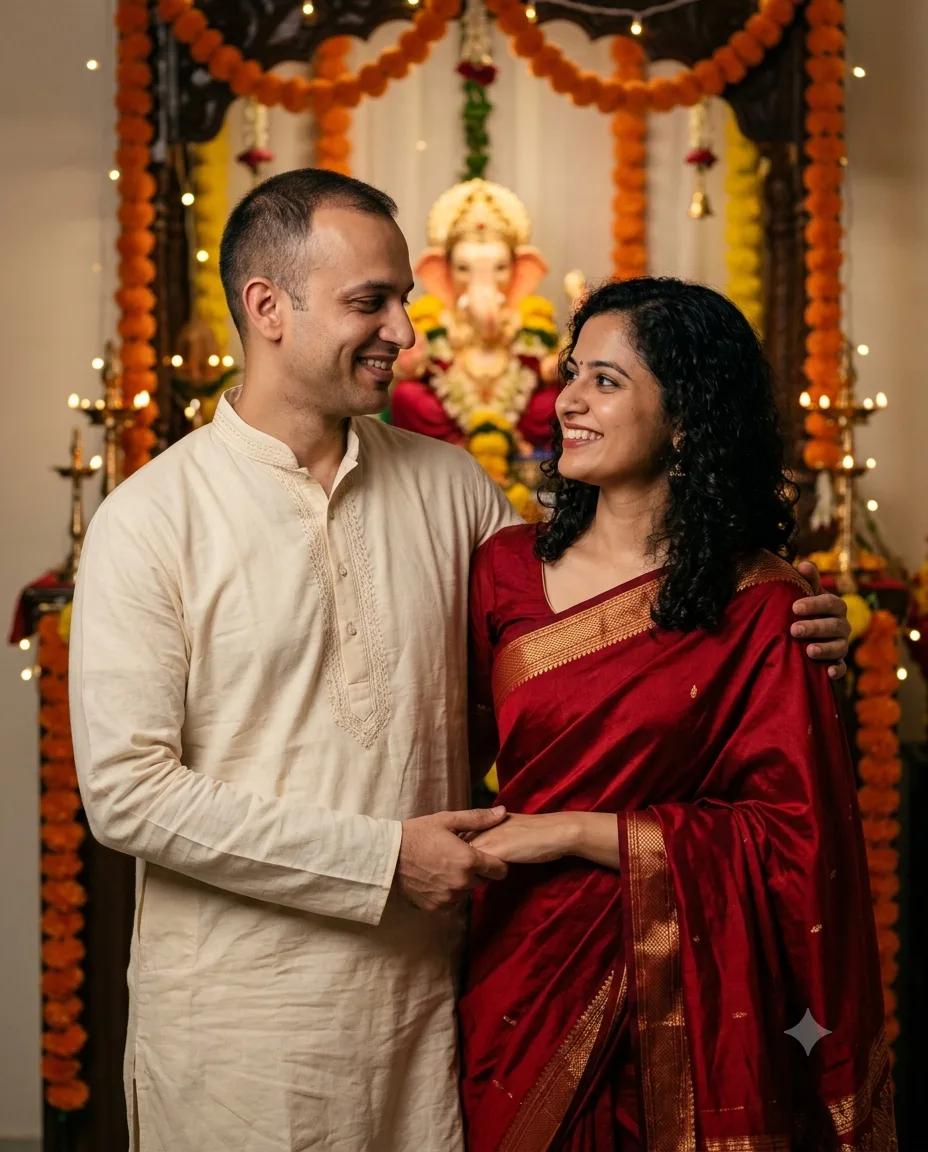
Ganesh Chaturthi Couple Portrait AI Prompt 2026
Create a realistic Ganesh Chaturthi couple portrait with traditional outfits, a decorated idol, warm diyas, and both faces kept recognizable.
Using the uploaded photo, create a romantic Ganesh Chaturthi couple portrait that looks like a real evening celebration photograph while preserving both people as the same recognizable individuals. KEEP - Keep each person’s exact face structure, forehead shape, jawline, cheek structure, nose, lips, eye shape, and eye colour from their uploaded photo. Keep each person’s original skin tone, natural pores and texture, facial marks, hairline, hairstyle, and facial hair where visible. Keep both people’s real body proportions, shoulder width, neck length, height difference, and natural build. Preserve each person’s recognizable expression and keep their facial features completely separate. CHANGE - Dress the man in [cream cotton kurta with subtle embroidery] and the woman in [deep red silk saree with matching blouse]. Show realistic cotton weave, silk sheen, natural pleats, and believable fabric folds. Change the pose to the couple standing close together with relaxed shoulders, natural arm placement, and comfortable spacing. Change the setting to a decorated Ganesh Chaturthi celebration containing a traditional Ganesh idol, orange marigold garlands, brass diyas, and warm decorative lights. Change the lighting to a soft evening setup and apply a restrained golden colour grade. SCENE - Place the couple indoors during early evening, standing several feet in front of the Ganesh idol. Keep marigold garlands and small brass diyas around the idol. Use moderate background blur so the idol remains identifiable while the couple receives visual priority. LIGHT - Use a broad soft key light from the front-left at approximately 4300K, with weaker warm fill from the right. Keep both faces evenly illuminated and make shadows fall consistently across faces, clothing, and the background. CAMERA - Use an 85mm lens at f/2.0, positioned at chest height. Keep both faces within the sharp focus area and use natural telephoto compression without altering facial proportions. GRADE - Use warm golden highlights, medium contrast, controlled saturation, natural skin tones, and fine cinematic grain. Keep reds rich but prevent the saree from becoming unnaturally bright. OUTPUT - Create a vertical 4:5 portrait at 2048 × 2560 pixels with realistic photographic detail and clean facial definition. DO-NOT - No face slimming, no skin whitening, no changed eye colour, no plastic smoothing, no invented jewellery or tattoos.
Photo Guide
- Use two sharp photos, ideally 2000px or larger, with each face unobstructed.
- Front-facing or slight 15-degree angles work best for matching both faces.
- Soft daylight photos blend better than harsh indoor selfies for this warm scene.
- Keep both hairlines, eyes, jawlines, and shoulders visible in the photos.
- Avoid sunglasses or beauty filters because they hide identity details.
- Do not use blurry couple photos; mixed faces can make identity drift worse.
How to Build
- 1Open Gemini and select image generation with photo upload enabled.
- 2Upload both clear reference photos before adding the prompt.
- 3Set the canvas to vertical 4:5 if Gemini shows an aspect ratio option.
- 4Choose the highest available image quality or resolution setting.
- 5Paste the full prompt and generate one version first.
- 6If the first result is wrong, replace weak source photos and regenerate.
Pro Tips
- Keep the idol behind both shoulders so it adds context without covering either face.
- Choose deep red silk so saree folds catch the warm 4300K light naturally.
- Keep the cream kurta lightly embroidered so texture does not distract from faces.
- Use separate source photos to prevent facial features from blending between people.
- Keep both faces at similar camera distance so one person does not look distorted.
Share This Prompt
About the Author
Naziya
Creative AI writer at MFDA, sharing trendy photo-editing prompts and fresh ideas for beautiful, stylish AI images.