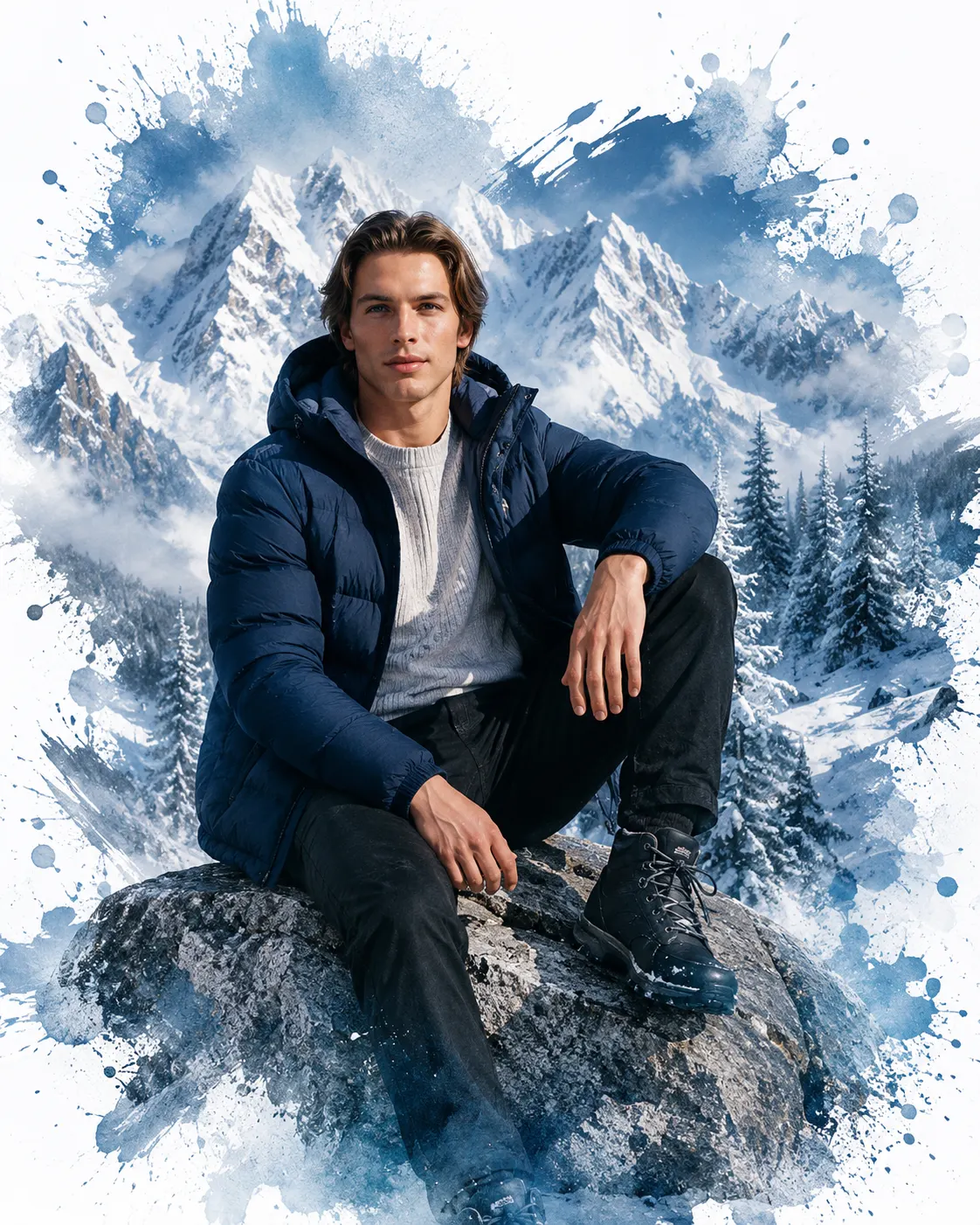
Frozen Alps Winter Portrait with Arctic Blue Ink Splash
Create a realistic winter fashion portrait with snowy Alpine peaks, midnight-blue outerwear and icy watercolor splashes while preserving your facial identity.
Using the uploaded photo, create a photorealistic vertical 4:5 winter fashion portrait of the same man seated on a rugged alpine rock, surrounded by snow-covered mountain peaks and an Arctic blue ink-splash composition. KEEP — Preserve the man's exact recognizable identity from the uploaded photo, including forehead shape, eyebrow placement, eye shape and natural eye colour, nose bridge and tip, lip shape, cheeks, cheekbones, jawline, chin, ears, facial width and natural asymmetry. Keep his original skin tone, visible pores, fine skin texture, natural marks and authentic age. Retain his original hairline, hairstyle, hair density, texture and colour, along with any visible facial hair. Preserve his natural body proportions, shoulder width, neck length, limb anatomy and realistic hand structure. Do not replace his face with a generic fashion model. CHANGE — Dress him in a premium midnight-blue puffer jacket with realistic horizontal quilting, a light-grey ribbed knit sweater, black winter trousers and rugged dark leather hiking boots. Add understated black rectangular sunglasses only if compatible with the reference styling. Seat him on a large, rough-textured grey alpine boulder, with one knee raised toward the camera, the opposite leg extending naturally downward and one forearm resting across the raised knee. Turn his torso slightly sideways and direct his gaze toward the distant mountains. SCENE — Place him in a high-altitude Himalayan landscape during a clear winter morning. Behind him, show layered snow-covered peaks, frosted pine trees, icy ridgelines and pale-blue mountain mist. Keep distant peaks softly atmospheric while retaining visible snow formations. Transform the outer landscape into cobalt-blue watercolor washes, silver-grey brushstrokes, irregular ink edges and fine snow-like pigment droplets. Let these textures spread organically into a clean white background without covering his face or clothing. LIGHT — Use cool natural daylight from the front-left, softened by mountain haze, with subtle warm reflections on the face. Maintain believable shadows beneath the chin, jacket folds and seated body. Snow highlights should remain bright without losing surface detail. CAMERA — Use an 85mm portrait lens at f/4, positioned around chest height with a slightly low viewing angle. Frame the subject in a medium-full-body composition, keeping the face, hands, footwear and rock contact sharp. GRADE — Apply cool Arctic blues, restrained silver-grey highlights, neutral skin tones and moderate contrast. Combine realistic editorial photography with textured watercolor artwork, fine grain and natural atmospheric depth. OUTPUT — Generate a vertical 4:5 image at 2048 × 2560 pixels or the nearest supported resolution. Keep the man sharply defined against the fading white edges. DO NOT slim the face, whiten the skin, change eye colour, smooth skin into plastic, alter body proportions, invent jewellery or tattoos, distort hands, or allow ink splashes to modify facial features.
Photo Guide
- Use a sharp, high-resolution photo where facial details are clearly visible.
- Choose a front-facing or slight three-quarter angle for accurate facial structure.
- Use even daylight so the original skin tone remains easy to match.
- Keep the hairline, ears and any facial hair visible in the reference.
- A snowy outdoor reference helps match the cool mountain light and blue palette.
- Avoid heavy beauty filters; they can erase the skin texture needed for identity.
How to Build
- 1Open ChatGPT Images or Gemini and upload your clearest reference photo.
- 2Choose image editing or image generation with the uploaded photo as reference.
- 3Paste the complete prompt and retain the KEEP section unchanged.
- 4Set the aspect ratio to 4:5 and select the highest available resolution.
- 5Generate the portrait with the white background and blue ink-splash effect.
- 6If the face drifts, regenerate using the original photo and reinforce KEEP first.
Pro Tips
- Use a reference with visible eyes and brows so sunglasses do not hide identity cues.
- Keep the jacket midnight blue so it contrasts with the white snow and canvas.
- Choose a photo with natural skin texture to prevent artificial facial smoothing.
- Keep the raised knee visible so the seated pose reads clearly at 4:5.
- Request sparse splashes near the head so blue pigment does not obscure facial edges.
- If the result looks pasted on, refine the front-left light and rock contact shadows.
Share This Prompt
About the Author
Naziya
Creative AI writer at MFDA, sharing trendy photo-editing prompts and fresh ideas for beautiful, stylish AI images.