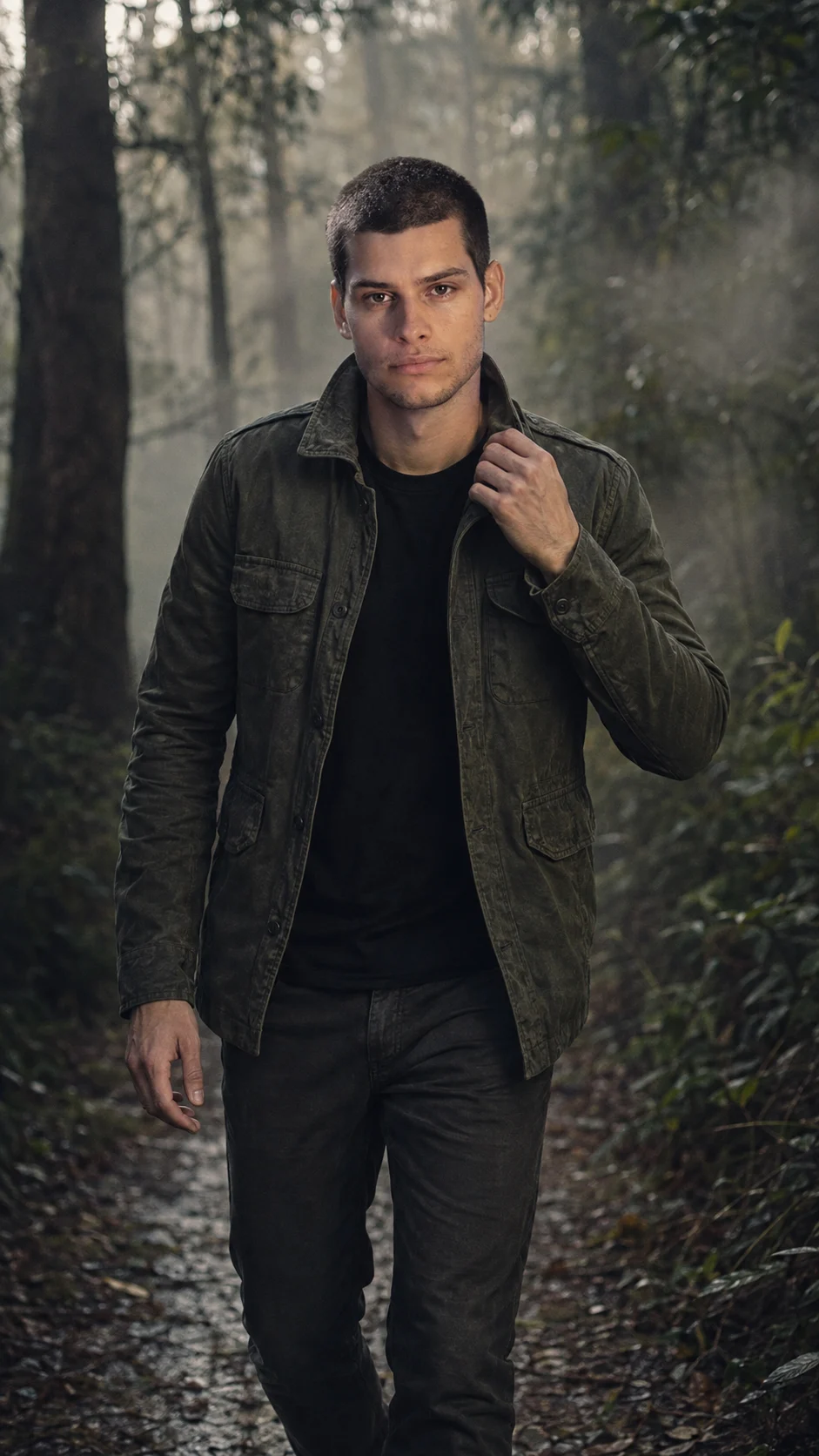
Foggy Forest Cinematic Male Portrait
Create a cinematic dawn forest portrait with mist, rugged styling, natural skin detail, and strong identity preservation in a vertical frame.
Using the uploaded photo, create a photorealistic cinematic outdoor portrait of the same man walking through a mist-covered forest at dawn, keeping his identity clearly recognizable. KEEP - Preserve the exact facial structure from the uploaded photo, including forehead shape, eyebrow placement and shape, eye shape and natural eye colour, nose structure and proportions, lips, cheeks, cheekbones, jawline, chin, ears, and natural facial asymmetry. Keep his real skin tone, visible pores, fine skin texture, natural marks, under-eye details, hairline, hair density, natural hair texture, hairstyle characteristics, and facial-hair pattern, including beard density, length, colour, and shape. Keep his natural head size, neck proportions, shoulder width, torso proportions, limb proportions, and overall body build unchanged. Do not replace him with a generic male model. CHANGE - Replace the original clothing with a dark olive cotton field jacket featuring a slightly weathered matte texture, worn over a plain black crew-neck shirt and rugged dark charcoal trousers. Change the pose to a slow natural walk toward the camera, with one hand gently holding the raised jacket collar and the other arm relaxed. Change the environment to a dense misty forest at early dawn, with tall tree trunks and wet foliage receding behind him. Use soft directional morning light, muted forest greens, deep charcoal shadows, shallow focus, and restrained cinematic contrast. SCENE - Set the portrait on a narrow damp forest path just after sunrise. Place tall dark tree trunks, wet leaves, thin branches, and drifting ground mist behind him. Keep the nearest background elements softly recognizable while distant trees dissolve into atmospheric blur. LIGHT - Light the face primarily from the front-left at a low angle, using broad diffused dawn light filtered through trees. Keep the opposite cheek and jaw slightly darker so the subject remains naturally grounded in the environment. CAMERA - Shoot at 85mm, f/1.8, camera positioned at chest height and approximately eye-level with the subject. Use shallow depth of field with natural lens compression and realistic separation between the man and the forest. GRADE - Apply a muted cool-green cinematic grade with restrained saturation, natural skin rendering, deep but detailed shadows, soft highlight roll-off, subtle film grain, and realistic moisture in the air. OUTPUT - Create a vertical 9:16 portrait at 2160 x 3840 resolution with the man occupying most of the central frame while retaining enough forest background to establish depth. DO NOT - No face slimming, no skin whitening, no changed eye colour, no plastic smoothing, no altered facial proportions, no generic face, no artificial beard, no invented jewellery or tattoos, no distorted hands, and no exaggerated muscles.
Photo Guide
- Use a sharp photo of the face with enough detail to preserve beard texture.
- A front or slight three-quarter angle gives the forest lighting room to wrap naturally.
- Even daylight is better than harsh indoor light for matching the dawn scene.
- Keep the forehead, hairline, beard, jawline, shoulders, and neck clearly visible.
- Avoid heavy beauty filters because they can erase texture needed for identity.
- A heavily shadowed or blurry source photo can cause facial detail to drift.
How to Build
- 1Open Gemini and upload the clearest original portrait you have.
- 2Paste the full prompt and choose image generation mode.
- 3Set the canvas to 9:16 vertical before generating if available.
- 4Use 2160 x 3840 output when the tool provides resolution controls.
- 5Generate several variations without changing the KEEP section.
- 6If the first result is wrong, strengthen the KEEP details and regenerate.
Pro Tips
- Use a source with visible beard texture so facial hair stays consistent.
- Choose a photo with natural skin texture so mist does not create plastic skin.
- Keep the original hairstyle visible so the hairline remains stable.
- Use a relaxed expression so the walking pose does not distort the jaw.
- A slight three-quarter source angle can improve natural depth in the forest.
- Keep the jacket collar hand visible so the gesture does not become distorted.
Share This Prompt
About the Author
Naziya
Creative AI writer at MFDA, sharing trendy photo-editing prompts and fresh ideas for beautiful, stylish AI images.