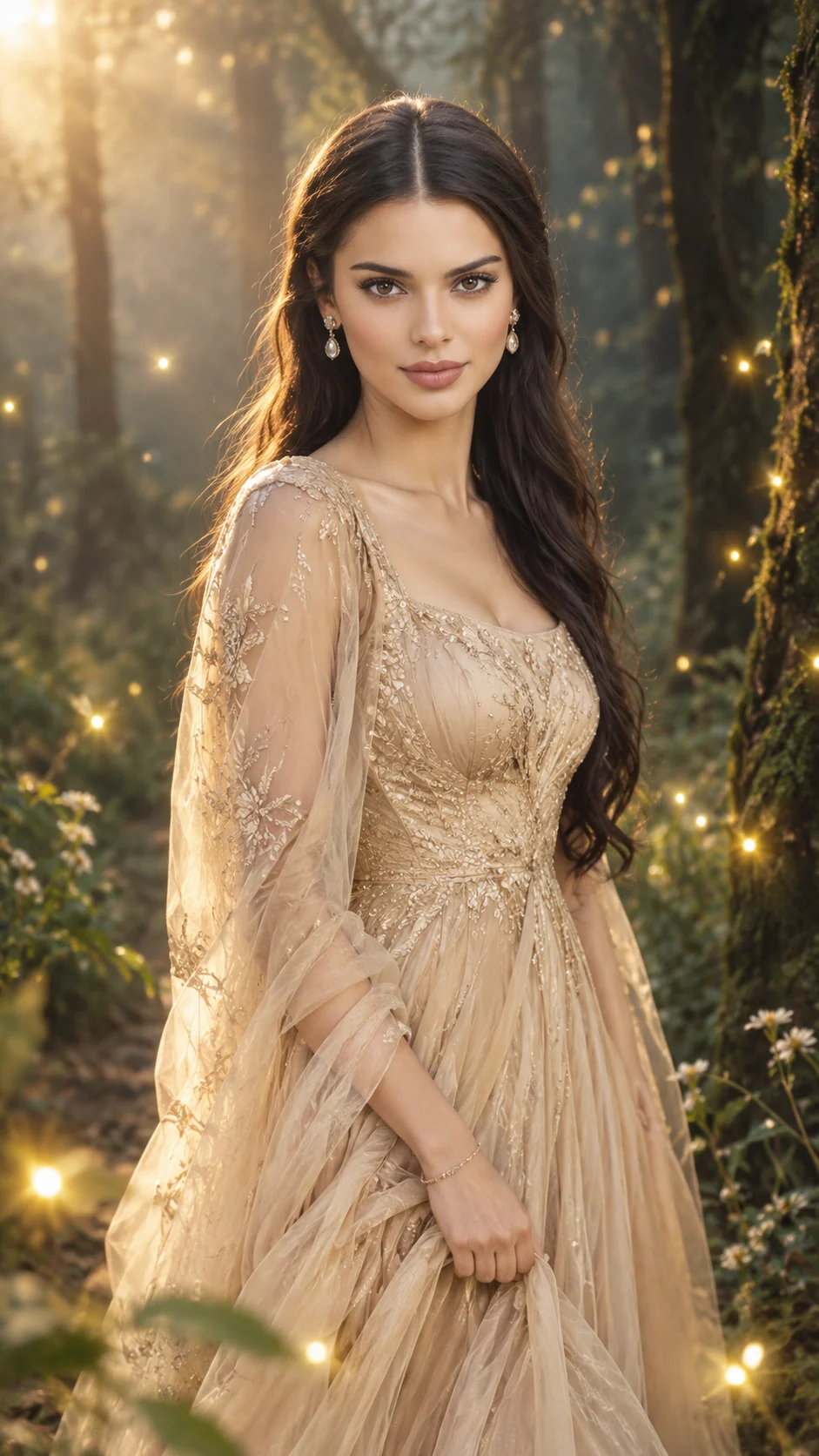
Enchanted Golden Forest Champagne Gown Portrait
Create a cinematic woodland portrait in a flowing champagne-gold gown, with glowing fireflies, twilight mist, and natural facial identity preserved.
Using the uploaded photo, create a photorealistic cinematic fashion portrait of the same adult woman in a misty woodland at twilight, wearing a flowing champagne-gold gown surrounded by tiny golden fireflies. KEEP — Preserve the exact identity of the uploaded person. Keep the original face shape, forehead, cheekbones, jawline, chin, nose structure, lip shape, eyebrow placement, eye shape and natural eye colour unchanged. Retain the original skin tone, visible pores, natural texture, facial asymmetry, hairline, and natural age. Preserve the original body proportions and recognizable features. Keep existing facial hair if present. Do not average features from multiple references or apply a beauty filter. CHANGE — Replace the clothing with a floor-length champagne-gold silk chiffon gown featuring a fitted bodice, softly draped waist, layered flowing skirt, and fine embroidered details. Add understated gold drop earrings and a delicate bracelet. Style the hair in loose, natural waves while preserving the original hairline and natural hair colour. Position the subject standing gracefully, body turned slightly sideways, face tilted toward the fireflies, with one hand gently gathering the skirt. Use a peaceful expression and relaxed shoulders. SCENE — Place the subject on a narrow path in an old woodland with moss-covered tree trunks, delicate ferns, scattered wildflowers, and fine atmospheric mist. Tiny golden fireflies appear at different distances, with a few softly blurred in the foreground. Keep the woman's face unobstructed and slightly right of centre. The trees recede into a softly blurred background with natural depth. LIGHT — Use soft, warm golden light filtering from behind and to one side, with gentle frontal fill illuminating the face. Combine warm amber highlights with cool blue-green woodland shadows. Add a subtle rim light along the hair and gown. Keep facial shadows consistent with the woodland light direction and avoid making the fireflies appear like oversized artificial light sources. CAMERA — Simulate a full-frame DSLR with an 85mm portrait lens at f/2.0, camera at chest height, and a three-quarter composition framed from mid-thigh upward. Keep both eyes and facial features sharply focused, with realistic optical compression, shallow depth of field, and soft foreground bokeh. GRADE — Use muted forest greens, champagne gold, warm ivory, amber highlights, and cool twilight shadows. Apply natural skin tones, restrained contrast, subtle film grain, and a cinematic editorial colour grade without excessive saturation or artificial HDR halos. OUTPUT — Vertical 9:16 composition, high-resolution 4K or higher where supported, realistic skin and fabric detail, natural anatomy, and professional fashion photography quality. DO NOT slim the face, whiten the skin, change eye colour, smooth the skin into plastic, alter body proportions, or invent jewellery or tattoos. Avoid face morphing, distorted hands, extra fingers, metallic-looking fabric, oversized fireflies, artificial glow, inconsistent shadows, excessive fog, CGI, illustration, text, logos, and watermarks.
Photo Guide
- Use a sharp, high-resolution photo where both eyes and facial features are visible.
- Choose a front-facing or slight three-quarter angle with a relaxed expression.
- Even daylight on your face blends better with the forest's soft frontal fill.
- Keep your hairline, natural skin texture, and jawline unobstructed.
- A heavily filtered selfie makes accurate identity preservation harder.
- Avoid photos with harsh flash because the face may look pasted into twilight.
How to Build
- 1Open Gemini and select image generation with photo upload enabled.
- 2Upload one clear face photo with minimal filters and unobstructed facial features.
- 3Copy the full prompt into the image-generation instruction field.
- 4Choose 9:16 portrait orientation and the highest available image resolution.
- 5If available, enable reference-image or character consistency controls.
- 6Generate the image and inspect the face, gown folds, and woodland lighting.
- 7If the result looks wrong, reuse the same photo and specify only the failed detail.
Pro Tips
- Choose a photo with soft daylight so the face blends with the woodland fill.
- Use a clear view of both eyes so the gaze stays natural in the final portrait.
- Keep the reference hairline visible so the loose waves do not change facial identity.
- Request subtle firefly glow so the woodland stays photographic rather than fantasy art.
- Keep the champagne fabric softly reflective so it retains silk texture instead of looking metallic.
Share This Prompt
About the Author
Naziya
Creative AI writer at MFDA, sharing trendy photo-editing prompts and fresh ideas for beautiful, stylish AI images.